Epson EB-530 Distance Calculator
Mastering projection geometry ensures sharp, perfectly aligned images across your presentation space. Here is your complete technical setup guide for optimal throw distance.
The Epson EB-530 features an ultra-short-throw ratio of 0.48:1, allowing large displays from minimal distances. Always measure your precise lens-to-screen offset before drilling structural mounts.
Ready to compare verified models? Start with our Best Epson Best Projector: Top Picks (2026).
Practical Quick-Reference Table
| Scenario / Metric | Recommended Target | Why It Matters |
|---|---|---|
| Throw Ratio | 0.48:1 fixed | Defines the exact lens-to-screen distance requirement. |
| Native Resolution | XGA 1024x768 | Optimizes legacy PC compatibility and spreadsheet viewing. |
| Brightness Output | 3,200 ANSI lumens | Ensures clear visibility in moderately lit environments. |
| Contrast Ratio | 16,000:1 native | Differentiates text legibility against dark slide backgrounds. |
| Aspect Ratio | 4:3 standard format | Accommodates traditional educational software and document feeds. |
| Mounting Offset | Fixed positive offset | Positions projected images correctly above the lens axis. |
Understanding Epson EB-530 Ultra-Short-Throw Optics
The Epson EB-530 utilizes advanced 3LCD projection technology to deliver vibrant color brightness without rainbow artifacts. As noted in our Epson Home Cinema 2350 review, understanding this optical engine helps optimize your room layout.
Unlike standard long-throw models, this ultra-short-throw design eliminates presenter shadows. You can mount the chassis mere inches away from your interactive whiteboard or flat wall surface.
- Utilizing a robust native 3LCD optical engine architecture delivers exceptionally vibrant colors without noticeable rainbow artifacts across your active presentation room.
- Deploying a specialized fixed ultra-short-throw glass element completely eliminates annoying presenter shadows during active interactive whiteboard teaching sessions.
- Maintaining a strict zero shadow classroom configuration ensures maximum student engagement during complex digital whiteboard instructional multimedia lessons.
- Prioritizing high color light output design specifications guarantees crystal-clear visibility under moderate ambient fluorescent office lighting environments.
Optical Engine Characteristics
Epson relies on three separate LCD chips to process red, green, and blue light channels simultaneously. This eliminates color breakup and ensures stable color light output across all video sources.
The fixed focal length glass lens requires exact physical placement because there is no optical zoom ring. Fine-tuning image size demands referencing our best laser projector guide before moving the physical chassis.
Calculating Projection Distance and Offset Metrics
Precise distance calculation prevents costly installation errors when deploying ultra-short-throw hardware. The EB-530 requires a specific throw distance relative to your desired diagonal screen dimensions.
Vertical offset determines how high or low the image sits relative to the lens center. Utilizing a fixed positive offset projects the image properly, which you can verify with our screen size and viewing distance calculator.
- Measuring the exact lens-to-screen distance prevents severe geometric distortion and ensures crisp pixel alignment across every corner.
- Accounting for the fixed vertical offset guarantees that your projected image aligns perfectly with your chosen whiteboard boundary.
- Verifying mounting plate structural clearances ensures safe and secure installation before final hardware attachment takes place.
- Calculating diagonal image width accurately helps determine the correct seating distance for optimal audience viewing experiences.
Throw Ratio Mathematics
The 0.48:1 throw ratio means that for every foot of image width, you need just under half a foot of throw distance. This compact geometry suits small conference rooms.
Always consult official manufacturer projection calculators to confirm precise millimetric measurements. Wall mounting brackets require exact positioning to align with the pre-set optical offset values.
Video Walkthrough: Epson Throw Distance Calculator for Standard Projectors
Practical Setup Steps for Wall and Ceiling Mounts
Installing an ultra-short-throw projector demands rigid mounting hardware to prevent unwanted image vibrations. Reviewing principles from our Epson distance calculator guide ensures you secure the heavy bracket safely.
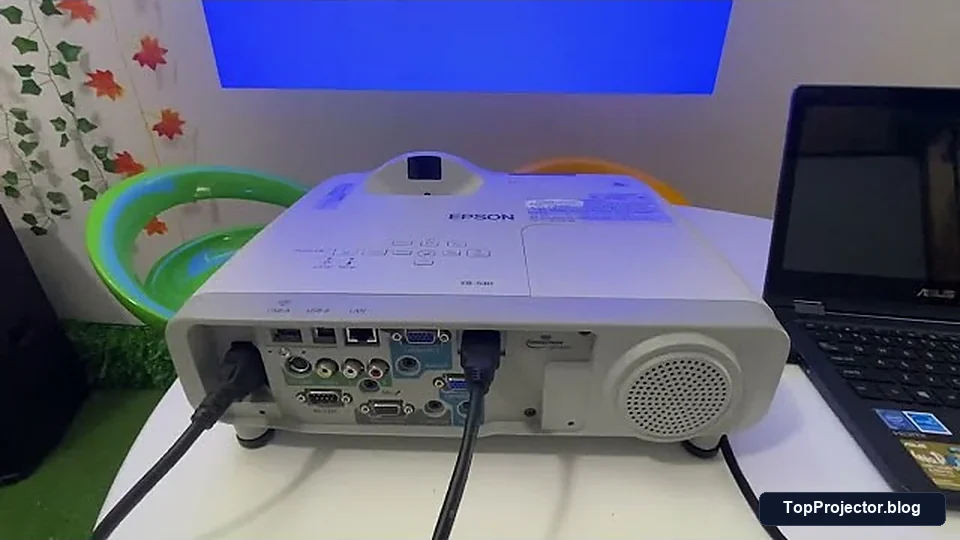
Leveling the mounting plate is critical before attaching the projector chassis. Even a minor angular tilt will result in severe keystone distortion and uneven electronic focus across corners.
- Securing mounting brackets securely to wooden wall studs guarantees long-term stability and prevents drooping over extended operational periods.
- Using a calibrated digital spirit level during installation ensures that the projector chassis remains perfectly horizontal and plumb.
- Adjusting fine-tuning roll screws allows installers to eliminate minor angular rotation errors before locking mechanical joints.
- Locking all mechanical joints firmly prevents accidental shifting caused by daily room vibrations or interactive whiteboard touches.
Alignment and Geometry Calibration
Once mounted, power on the unit and display a standard test grid pattern. Check all four corners to ensure the projected image fills your designated whiteboard boundary completely.
Utilize physical adjustment knobs on the mount rather than relying solely on digital keystone correction. Digital adjustments reduce native resolution and introduce visible scaling artifacts into text.
Native Resolution and Aspect Ratio Specifications
The projector natively supports XGA 1024x768 resolution optimized for legacy computer inputs and presentations. It accepts higher 1080p source signals through HDMI, downscaling them to fit its native pixel grid.
The native 4:3 aspect ratio accommodates traditional spreadsheet applications and document viewing. Modern 16:9 widescreen content will display with horizontal letterbox bars unless rescaled in software.
- Leveraging the native XGA 1024x768 pixel grid ensures maximum sharpness for standard office documents and educational software applications.
- Utilizing the standard 4:3 aspect ratio layout accommodates traditional corporate presentations and legacy enterprise computer workstation displays.
- Connecting modern high-definition sources via HDMI 1080p signal compatibility provides broad flexibility for contemporary multimedia playback devices.
- Relying on the internal hardware scaling downconversion engine ensures seamless processing of higher-resolution computer input signals.
Input Signal Compatibility
Dual VGA ports allow legacy PC connections alongside a modern HDMI digital input for high-definition sources. Ensure your computer graphics output matches the native XGA resolution for sharpest text.
The internal scaler processes incoming digital video feeds efficiently, minimizing input lag during interactive whiteboard sessions. Always test cable lengths to prevent signal degradation over long analog runs.
Video Walkthrough: Projector Throw Ratio Layman's Terms Begining
Optimizing Environmental Light and Contrast Ratios
Delivering 3,200 ANSI lumens ensures clear visibility in moderately lit classrooms and meeting spaces. However, direct sunlight hitting the projection surface will wash out dark contrast levels.
The 16,000:1 contrast ratio helps differentiate text from dark backgrounds during slide presentations. Pairing this projector with an ambient light rejecting screen significantly enhances perceived black levels.
- Operating at a rated output of 3,200 ANSI lumens provides sufficient brightness for illuminated classrooms and collaborative meeting spaces.
- Leveraging a robust 16,000:1 native contrast ratio ensures crisp text legibility against dark background presentation slides.
- Mitigating direct window glare prevents washed-out image quality and preserves deep black levels during daytime viewing sessions.
- Using specialized whiteboard surfaces enhances optical reflection diffusion, reducing hot-spots and maintaining uniform screen illumination.
Managing Ambient Light
Ultra-short-throw projectors are particularly sensitive to overhead lighting and floor-mounted glare reflections. Position room lights away from the immediate projection cone to maintain high visual contrast.
Matte white dry-erase boards diffuse reflections much better than glossy projection screens. Selecting the right surface material prevents hot-spotting and maintains uniform brightness across the display area.
Troubleshooting Image Distortion and Geometry Errors
Trapezoidal distortion occurs when the projector chassis is misaligned relative to the projection wall. Physical adjustments to the mounting bracket eliminate geometric errors without degrading pixel sharpness.
Focus drift can happen as the optical engine warms up during extended operating hours. Allow the unit to run for fifteen minutes before performing final manual focus ring adjustments.
- Checking mechanical bracket alignment resolves basic trapezoidal distortion without introducing unwanted digital scaling artifacts.
- Allowing the unit to warm up for fifteen minutes prevents thermal focus drift during critical presentation sessions.
- Cleaning optical glass lenses regularly removes dust accumulation that degrades overall image contrast and sharpness.
- Verifying source aspect ratios prevents unwanted letterboxing and ensures proper geometric fill across your projection wall.
Lens Maintenance and Dust Control
Dust accumulation on the short-throw mirror or lens element degrades overall image sharpness and contrast. Clean optical surfaces gently using microfiber cloths and specialized lens cleaning solutions.
Regularly inspect and replace the intake air filter to prevent overheating and premature lamp failure. A clogged filter restricts airflow, triggering automatic thermal shutdown protection sequences inside the unit.
Frequently Asked Questions
What is the throw ratio of the Epson EB-530?
The Epson EB-530 features a 0.48:1 throw ratio. This allows you to project large images from a very short distance without casting shadow obstructions.
Does the Epson EB-530 support native widescreen 16:9 content?
No, it features a native 4:3 aspect ratio and XGA resolution. Widescreen content will display with letterboxing unless scaled accordingly in software settings.
How do I calculate the exact distance for a specific screen size?
Multiply your desired screen width by the 0.48 throw ratio factor. Always consult official manufacturer calculators for exact millimeter measurements before drilling mounts.
What is the brightness rating of this projector?
The projector delivers 3,200 ANSI lumens of color and white brightness. This output suits rooms with controlled ambient lighting and standard fluorescent fixtures.
Can I use digital keystone correction without losing quality?
Heavy digital keystone correction reduces native resolution and introduces scaling artifacts. Always prioritize physical mounting adjustments to preserve maximum image sharpness.