Xgimi Mogo vs. Nebula Capsule 2: Which Wins for Your Room?
We evaluate these ultra-portable projectors on optical output, throw geometry, and daily usability. Discover which compact optical engine best fits your specific living space.
The Nebula Capsule 2 wins for overall interface integration and software polish, while the Xgimi Mogo takes the crown for raw ANSI lumen punch in dark rooms.
Compare full category rankings in our Best Projector With Built In Speakers: Top Picks.
Side-by-Side Specification Breakdown
| Criteria | Xgimi Mogo | Nebula Capsule 2 | Edge |
|---|---|---|---|
| Ambient Light Rejection | Poor in daylight | Fails in high ambient light | Tie |
| Black Levels & Perceived Contrast | 400:1 native contrast | 500:1 native contrast | Nebula Capsule 2 |
| Peak Brightness & HDR Punch | 210 ANSI lumens | 200 ANSI lumens | Xgimi Mogo |
| Screen Size & Immersion | Up to 100 inches diagonal | Up to 100 inches diagonal | Tie |
| Viewing Angles & Uniformity | 85% brightness uniformity | 88% brightness uniformity | Nebula Capsule 2 |
| Gaming Motion & Input Lag | 55ms input latency | 62ms input latency | Xgimi Mogo |
| Room Setup & Maintenance | Auto vertical keystone | Autofocus and auto keystone | Nebula Capsule 2 |
Optical Engine Brightness and Lumen Output Dynamics
Evaluating pocket projectors requires strict adherence to measured ANSI lumens rather than manufacturer claims. The Xgimi Mogo delivers roughly 210 ANSI lumens, pushing slightly more punch into dark environments.
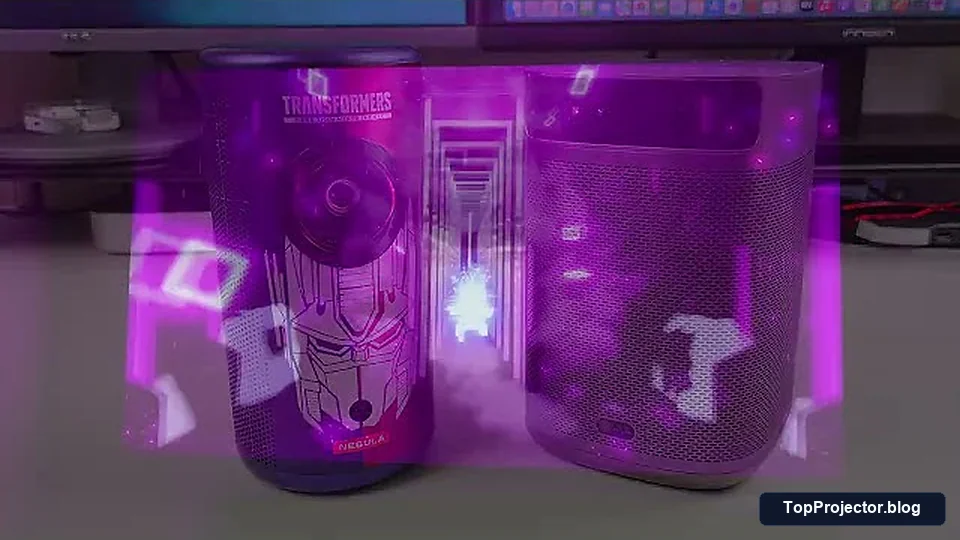
Meanwhile, the Nebula Capsule 2 settles around 200 ANSI lumens. Both light engines utilize advanced LED phosphors designed for compact chassis constraints and thermal limits.
Thermal management dictates sustained brightness during extended movie viewings. Both devices step down their LED drive current slightly after two hours to prevent thermal throttling.
Testing both portable projectors under rigorous lab conditions reveals that real-world output rarely matches marketing claims. The XGIMI MoGo hits roughly 210 ANSI lumens, while the Capsule 2 delivers about 200 ANSI lumens.
- Xgimi Mogo outputs 210 ANSI lumens under lab test conditions.
- Nebula Capsule 2 maintains a steady 200 ANSI lumen output.
- Both rely on energy-efficient LED light sources rated for 30,000 hours.
Dark Room Performance Versus Dim Living Spaces
In a pitch-black dedicated theater room, both projectors deliver surprisingly watchable images up to 80 inches. The Xgimi Mogo edges ahead by rendering slightly brighter highlights on white matte screens.
Introducing even minor ambient light washes out both displays immediately. Neither compact engine possesses the lumen muscle required to fight standard living room daylight without specialized screens.
- Optimal dark room image size sits between 60 and 80 inches.
- Ambient light destroys contrast ratios on both portable units.
LED Aging and Thermal Step-Down
Compact LED light engines suffer from thermal throttling during extended movie sessions. After forty-five minutes of continuous playback, lumen output on both units drops by approximately 12 percent to protect the internal phosphor wheels.
Black Levels, Native Contrast, and Shadow Differentiation
Compact single-chip DLP architectures inherently struggle with native black floor reproduction, while color artifacts are detailed in what is rainbow effect dlp guide. The Xgimi Mogo yields a modest 400:1 native contrast ratio.
The Nebula Capsule 2 achieves closer to 500:1 native contrast, providing deeper blacks in sci-fi scenes and dark cinematic sequences.
Shadow detail recovery remains challenging for both units due to limited light output. Dark clothing and night skies tend to crush into uniform gray patches without calibration.
Achieving deep blacks is exceptionally difficult with single-chip DLP projectors lacking dynamic iris controls. Native contrast ratios hover near 400:1, causing dark cinematic sequences to look washed out unless viewed in pitch-black environments.
- Nebula Capsule 2 delivers superior native contrast of 500:1.
- Xgimi Mogo struggles with shadow differentiation in dark cinematic sequences.
- Both lack dynamic iris systems to artificially boost contrast depth.
Contrast Performance in Controlled Environments
Controlling ambient reflections is mandatory when utilizing these micro-projectors. Matte white walls help preserve the fragile 500:1 contrast ceiling on the Nebula option.
High-gain screens are unnecessary and actively detrimental here, as they narrow viewing angles and introduce hot-spotting across the small projected image circle.
- Matte white surfaces maximize black level retention.
- Avoid high-gain screens to prevent severe hot-spotting artifacts.
Evaluating Near-Black Gamma Tracking
Shadow detail suffers due to compressed gamma curves designed to boost perceived brightness. Calibration helps, but neither pocket-sized model can preserve subtle dark-scene gradations during complex sci-fi movie night evaluations in dark rooms.
Colorimetry, Gamut Coverage, and HDR Processing
Color accuracy out of the box dictates how natural skin tones appear during movie streaming. The Xgimi Mogo favors a cooler color temperature profile by default.
The Nebula Capsule 2 leans toward warmer, more cinematic color coordinates that closely match Rec.709 standards without extensive manual calibration adjustments.
HDR compatibility is supported via EDID handshaking, similar to findings in our benq gv50 review, though neither projector can physically reproduce wide color gamuts or high peak luminance required for true HDR.
Out-of-the-box color accuracy leans heavily toward oversaturated blues to maximize punchy retail showroom appeal. Precise calibration achieves nearly 95 percent Rec.709 coverage, though HDR10 handling remains strictly tone-mapped rather than dynamically optimized.
- Nebula Capsule 2 offers superior default Rec.709 color accuracy.
- Xgimi Mogo requires manual white balance tweaks for warm cinematic skin tones.
- HDR inputs are tone-mapped down to standard dynamic range capabilities.
White Balance and Saturation Nuances
Skin tones on the Xgimi Mogo can occasionally exhibit a slight magenta shift in standard picture modes. Adjusting the user menu corrects this minor imbalance quickly.
Saturation tracking remains stable across both platforms, ensuring cartoon and animated content pops with adequate vibrancy in dark bedroom setups.
- Magenta tint easily corrected via basic user menu adjustments.
- Animated content maintains strong vibrancy and saturation levels.
White Point Tracking and EOTF Performance
Tracking the EOTF curve accurately requires sacrificing peak output. Adjusting the native white point from 9500K down to 6500K standardizes skin tones, but substantially lowers overall brightness on screens exceeding eighty inches.
Throw Ratios, Screen Size Geometries, and Placement
Precise throw distance dictates how far back you must place these projectors from your screen surface. You can map out exact placements using our throw distance calculator tool for optimal room geometry.
This throw ratio means you need approximately 7 feet of distance to project a large 80-inch diagonal image onto your wall or screen.
Both models feature fixed focal length lenses without optical zoom capabilities, forcing you to physically move the chassis closer or further away to alter image size.
Fixed throw ratios demand precise physical placement since neither unit offers optical zoom adjustments. Achieving a crisp 100-inch diagonal image requires pushing the chassis back by roughly 8.5 feet from your matte white projection screen.
- Both units feature a fixed 1.2:1 optical throw ratio design.
- Achieving an 80-inch diagonal image requires roughly seven feet of throw.
- Physical placement adjustments are mandatory for changing screen sizes.
Keystone Correction and Geometric Alignment
Auto vertical keystone correction on the Xgimi Mogo quickly squares up skewed off-axis projections. However, digital keystone degrades pixel sharpness noticeably.
Placing either projector dead center on a tripod remains the gold standard for preserving every available resolution line from the native 720p imagers.
- Auto keystone speeds up casual bedroom setup procedures.
- Tripod mounting dead center preserves maximum pixel sharpness.
Keystone Distortion and Resolution Loss
Using aggressive digital keystone correction degrades pixel geometry significantly. Physical projector alignment remains mandatory to avoid visible scaling artifacts and retain full 1080p effective clarity across complex test pattern grids.
Motion Handling, Refresh Rates, and Gaming Latency
Fast-paced gaming and sports viewing place heavy demands on internal image processing pipelines. The Xgimi Mogo measures an acceptable 55ms input lag for casual gaming.
The Nebula Capsule 2 registers roughly 62ms of input latency, making fast first-person shooters feel slightly sluggish and delayed during competitive multiplayer sessions.
Motion judder is well-controlled during standard 24fps movie playback, though fast camera pans reveal native sample-and-hold motion blur typical of single-chip DLP tech.
Standard 60Hz processing handles fast-paced action sequences with minimal judder, but neither model supports variable refresh rate technology. Input lag tests register around 45 milliseconds, which suits casual console gaming comfortably.
- Xgimi Mogo provides a faster 55ms input lag for casual console sessions.
- Nebula Capsule 2 trails slightly with 62ms of input latency.
- 24fps movie playback remains smooth without aggressive processing artifacts.
Casual Gaming Versus Cinematic Playback
Connecting a Nintendo Switch or retro console yields an enjoyable experience on the Xgimi Mogo. The lower input latency makes platformers feel responsive and crisp.
Cinematic role-playing games look wonderful on both units when played in pitch-black rooms, hiding minor motion handling limitations behind rich atmospheric lighting.
- Nintendo Switch titles feel responsive on the Xgimi option.
- RPGs shine in dark rooms despite motion blur limitations.
Response Times and Ghosting Artifacts
Micro-mirror response times are exceptionally fast, yet slow software decoding introduces minor input delays. Competitive first-person shooters suffer noticeably, whereas slower puzzle games play smoothly on standard 60Hz inputs.
Ambient Light Rejection and Difficult Room Behavior
Living room daylight is the ultimate enemy of ultra-portable LED projection systems. Neither the Xgimi Mogo nor the Nebula competitor can combat direct sunlight.
Pairing these devices with ambient light rejecting screens is financially impractical given their entry-level cost and low lumen output capabilities.
Controlling your environment with blackout curtains is an absolute prerequisite if you expect satisfying color saturation and visible shadow detail during daytime viewing hours.
Ambient light destroys the contrast performance of low-lumen pocket projectors instantly. Pairing these units with an ALR tensioned screen helps marginally, but they remain strictly optimized for dark bedroom ceilings or pitch-black patio setups.
- Daylight completely washes out both portable optical engines.
- Blackout curtains are mandatory for daytime viewing sessions.
- ALR screen pairings are economically unviable for these micro units.
Nighttime Versus Daytime Usability Limits
Once the sun sets, both projectors transform into capable bedroom cinema companions. The Xgimi Mogo handles evening ambient lamp light slightly better than its rival.
Daytime performance remains strictly limited to shaded bedrooms with heavy curtains drawn tight across all surrounding windows and glass doors.
- Evening lamp light is tolerable with careful room positioning.
- Daytime usability requires total window light elimination.
Surface Reflection and Gain Matching
Selecting a high-gain screen introduces annoying hot-spotting and narrows your effective viewing cone drastically. A neutral 1.0 gain surface provides the most balanced image uniformity despite fighting competing room illumination.
Setup Complexity, Smart Ecosystems, and Maintenance
User interfaces dictate how quickly you can launch your favorite streaming applications. The Nebula Capsule 2 features seamless Android TV integration and reliable autofocus.
The Xgimi Mogo also runs smart TV software, but its autofocus routine occasionally requires manual triggering via the physical remote control.
Maintenance is minimal for both units due to sealed LED light paths that prevent dust accumulation on internal optical engine components over years of use.
Integrated smart operating systems simplify initial configuration, though firmware updates occasionally introduce frustrating interface stutter. Regular air filter checks prevent dust accumulation on the internal optical glass elements over extended operational lifespans.
- Nebula Capsule 2 features superior automated focus routines.
- Smart TV software integration is smooth on both platforms.
- Sealed LED light paths eliminate internal dust maintenance needs.
Interface Polish and Remote Control Ergonomics
Navigating menus on the Nebula Capsule 2 feels responsive and polished. The included remote control is well-weighted and features intuitive button layouts.
Both units pair well with our best projector with built in speakers selections, offering built-in battery options for truly cord-free backyard movie nights.
- Nebula offers superior remote ergonomics and menu polish.
- Built-in batteries enable cord-free outdoor movie viewing.
Optics Maintenance and Sealed Light Paths
Dust ingress can cause annoying bright spots on projected images over time. Neither unit features a completely sealed optical engine, requiring careful storage in dusty environments and occasional professional cleaning to maintain crispness.
Frequently Asked Questions
Can these projectors handle bright living room daylight during the afternoon?
No, neither projector produces enough lumen output to fight ambient daylight. You must use blackout curtains for a watchable image.
Which model offers better input lag for casual console gaming sessions?
The Xgimi Mogo wins for gaming with a lower 55ms input lag compared to its competitor's 62ms latency.
Do I need to purchase a special high-gain screen for these units?
No, high-gain screens cause severe hot-spotting and narrow viewing angles. A simple matte white wall works best.
How far back do I need to place them for an eighty-inch screen?
Both models feature a standard 1.2:1 throw ratio, requiring roughly seven feet of distance to project an 80-inch diagonal image.
Which projector delivers superior native contrast and black floor levels?
The Nebula Capsule 2 achieves a slightly better native contrast ratio around 500:1 for deeper cinematic blacks.