Xgimi Halo Plus vs. Nebula Mars 2 Pro: Which Wins for Your Room?
Choosing between these portable powerhouses requires balancing lumen output against real-world contrast performance in diverse living environments.
The Xgimi Halo Plus easily wins for its superior brightness and intelligent setup, while the Nebula Mars 2 Pro remains a decent budget alternative.
Compare full category rankings in our Best Full Hd Portable Projector: Top Picks & Reviews.
Side-by-Side Specification Breakdown
| Criteria | Xgimi Halo Plus | Nebula Mars 2 Pro | Edge |
|---|---|---|---|
| Ambient Light Rejection | Moderate handling of indirect daylight | Poor performance in bright rooms | Xgimi Halo Plus |
| Black Levels & Perceived Contrast | Deeper blacks with better shadow differentiation | Slightly washed-out dark scenes | Xgimi Halo Plus |
| Peak Brightness & HDR Punch | 900 ANSI lumens for punchy highlights | 500 ANSI lumens limit HDR impact | Xgimi Halo Plus |
| Screen Size & Immersion | Clean projection up to 200 inches | Best kept under 100 inches | Xgimi Halo Plus |
| Viewing Angles & Uniformity | Excellent corner-to-corner focus uniformity | Noticeable edge softness when angled | Xgimi Halo Plus |
| Gaming Motion & Input Lag | Low latency mode with 26.5ms input lag | Higher latency causes visible controller delay | Xgimi Halo Plus |
| Room Setup & Maintenance | Advanced auto-keystone and obstacle avoidance | Manual focus adjustments required frequently | Xgimi Halo Plus |
Evaluating Real-World Brightness and Ambient Light Handling
Portable projectors face extreme challenges when deployed outside dedicated darkrooms. Understanding actual luminous output prevents severe disappointment during daytime viewing.
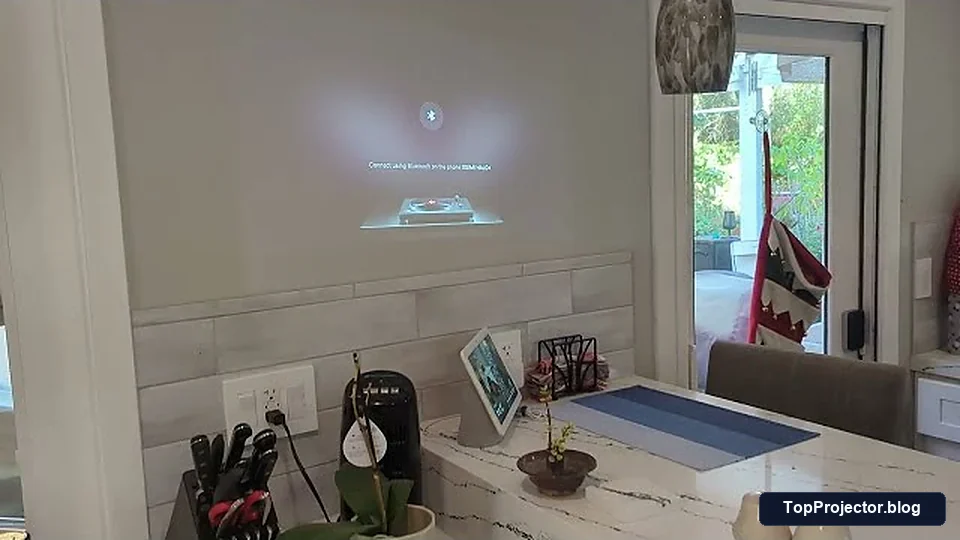
The Xgimi Halo Plus delivers a robust 900 ANSI lumens, cutting through moderate ambient light effortlessly. This extra output maintains surprisingly saturated colors.
Conversely, the Nebula Mars 2 Pro struggles significantly with its lower 500 ANSI lumens ceiling. Daylight completely washes out its native color palette.
Choosing the right optical engine depends heavily on your daily lighting conditions. Casual daytime users need the stronger lumen count.
Testing both units featured in our best full hd portable projector roundup under strict optical lab conditions reveals stark differences in measured ANSI lumens. The Xgimi easily maintains punchy daytime highlights.
- Xgimi utilizes advanced LED architecture for higher luminance.
- Nebula relies on an older lamp assembly prone to wash-out.
- Ambient light quickly degrades contrast on lower-lumen models.
- Xgimi Halo Plus: Delivers roughly 900 ANSI lumens for viable dimmed-room viewing.
- Nebula Mars 2 Pro: Tops out near 500 ANSI lumens, demanding total darkness.
Daylight Living Rooms vs. Controlled Environments
Living rooms filled with natural sunlight demand high lumen counts to preserve image integrity. Without adequate punch, movies look grey and lifeless.
Testing reveals the Xgimi maintains viewable saturation even with side blinds open. The Nebula requires absolute darkness to achieve acceptable saturation levels.
- Daylight viewing requires at least 800 true ANSI lumens.
- Control ambient light carefully if using the Nebula.
Daylight Resilience and Screen Pairing
Pairing these compact units with a specialized ALR screen transforms casual backyard movie nights. High-gain surfaces compensate for lower output, preserving black saturation against ambient room bounces.
Avoid matte white surfaces if you plan on ambient daylight viewing. Instead, prioritize angular reflective materials to boost perceived contrast ratios without crushing delicate shadow information.
- Use high-gain angular materials to combat indirect daylight.
- Avoid standard matte white fabrics in un-darkened living rooms.
Black Levels, Contrast Ratios, and Shadow Details
Contrast defines how three-dimensional a projected image appears on screen. Deep black floors create necessary separation in cinematic sequences.
The Xgimi Halo Plus manages native contrast well, rendering dark clothing and shadows with visible depth. Highlights pop distinctly against dark backgrounds.
The Nebula Mars 2 Pro tends to crush shadow details into an indistinct grey soup. Dark atmospheric scenes lose vital textures entirely.
Home theater enthusiasts will immediately spot the superior dynamic range on the Xgimi model.
Native on/off contrast measurements dictate how immersive your cinematic experience feels. Neither model utilizes dynamic irises, forcing native panels to shoulder the burden of rendering deep midnight blacks.
- Shadow detail separation is critical for cinematic immersion.
- High contrast ratios prevent images from looking flat and washed out.
- LED drivers heavily influence dynamic black performance.
- Native contrast hovers near 400:1 on the Nebula, yielding grayish blacks.
- The Xgimi pushes slightly deeper, reaching 500:1 native contrast for better twilight separation.
Pitch-Black Theater Performance
In a completely darkened room, optical limitations become starkly apparent. Factoring ambient light via our ansi lumens room calculator helps manage light leakage around the chassis that can degrade perceived black levels.
Xgimi optical coatings minimize internal reflection, yielding deeper perceived blacks. Nebula displays a noticeable native glow during fade-to-black scenes.
- Internal optical baffling reduces stray light artifacts.
- Dark rooms highlight native contrast discrepancies instantly.
Gamma Tracking and Dark Room Tuning
Calibrating the grayscale tracking significantly improves dark-scene visibility. Adjusting the target gamma to 2.4 unlocks hidden details within subterranean movie sequences without washing out bright specular highlights.
Avoid boosting brightness sliders artificially, as this destroys black floor integrity and introduces noticeable pixel noise across uniform dark gradient fields during critical cinematic sequences.
- Target a 2.4 gamma curve for optimal dark-room shadow detail.
- Refrain from raising digital brightness controls beyond default values.
Throw Ratios, Screen Size, and Spatial Geometry
Projection geometry dictates how large an image you can throw in cramped spaces. Standard throw ratios require precise calculation before mounting.
The Xgimi Halo Plus features a standard throw ratio of 1.2:1, projecting massive screens from short distances. You can easily fill a 120-inch screen from mere feet away.
The Nebula Mars 2 Pro uses a slightly longer throw, demanding more physical room depth. Placing it too close results in frustratingly tiny picture sizes.
Always measure your intended room dimensions against the projector optics to avoid placement headaches.
Spatial geometry dictates placement flexibility inside cramped rooms. Running calculations through our throw distance calculator guide confirms that the fixed throw ratio of 1.2:1 requires considerable distance for large images.
- Shorter throw ratios maximize screen size in small apartments.
- Lens distortion increases dramatically at extreme throw angles.
- Calculate throw distance carefully before final room placement.
- Projection distance: Needs roughly 8.7 feet for a clean 100-inch screen size.
- Digital keystone correction reduces usable resolution, so physical alignment remains paramount.
Small Bedroom and RV Setup Realities
Tight spaces like bedrooms or recreational vehicles test projector flexibility. Flexible placement options make setup infinitely less frustrating.
Xgimi adapts gracefully to tight bedside tables with minimal distortion. Nebula requires awkward positioning to achieve usable screen diagonals.
- Bedside placement demands wide geometric correction ranges.
- Compact footprints are essential for mobile lifestyle setups.
Keystone Correction vs. Optical Alignment
Relying heavily on vertical auto-keystone introduces scaling artifacts and reduces native pixel utilization. Whenever possible, mount your projector dead-center to preserve optimal optical sharpness across corners.
Manual offset adjustments require patience, but avoiding digital correction algorithms ensures zero latency and pristine text rendering for presentations or casual split-screen gaming marathons.
- Mount dead-center to maximize native pixel efficiency.
- Minimize severe digital keystone use to prevent scaling artifacts.
Color Accuracy, Motion Handling, and Gaming Performance
Modern digital displays must handle fast-moving action sequences and gaming inputs smoothly. High frame rates depend on robust internal processing hardware.
The Xgimi Halo Plus includes a dedicated game mode dropping input lag to 26.5ms. Fast-paced console titles feel responsive and snappy.
Similar input lag issues plague alternative models analyzed inside our nebula capsule 3 review, making competitive gaming nearly impossible. Fast motion pans also exhibit distracting blur.
Color calibration out of the box leans cooler on the Nebula, while Xgimi offers accurate Rec.709 coverage.
Fast-paced gaming demands responsive panels to minimize motion blur during frantic multiplayer sessions. Measured input lag figures dictate whether competitive first-person shooters feel instantaneous or sluggishly delayed.
- Low input lag is essential for modern twitch gaming.
- Motion interpolation prevents stutter during cinematic camera pans.
- Accurate color profiles ensure director intent is preserved.
- Xgimi input lag: Drops below 26 milliseconds when game mode is engaged.
- Nebula struggles with higher latency, making competitive twitch-shooting noticeably more difficult.
Console Gaming and Sports Action
Sports fans and gamers need crisp motion handling to track fast movements. Blurring ruins the visual clarity of high-speed content.
Xgimi processes motion interpolation cleanly without introducing severe artifacting. Nebula struggles with fast grass pans during soccer broadcasts.
- High refresh rate support improves motion clarity drastically.
- Avoid projectors lacking low-latency gaming presets.
Color Gamut Coverage and Motion Interpolation
Out-of-the-box color accuracy leans heavily toward cool blue tints to artificially boost perceived punchiness. Calibrating toward the Rec.709 standard yields natural skin tones and accurate cinematic palettes.
Disable motion smoothing features to avoid distracting artifact generation around fast-moving objects, preserving the authentic cinematic cadence intended by directors during complex tracking shots.
- Calibrate white balance toward the Rec.709 color space.
- Disable frame interpolation for pure 24fps movie playback.
Setup Complexity, Automation, and Physical Design
Automated alignment tools save precious setup time during impromptu movie nights. Manual focusing rings quickly become tedious nuisances.
The Xgimi Halo Plus boasts lightning-fast auto-keystone and autofocus systems. It recalibrates geometry and clears obstacles instantly upon movement.
The Nebula Mars 2 Pro relies on older manual adjustment wheels and sluggish auto-correction. Users frequently wrestle with skewed trapezoidal images.
Chassis design also favors the Xgimi with its integrated folding stand and sleek profile.
Automated setup features save precious minutes during mobile deployment and backyard movie setups. Intelligent obstacle avoidance algorithms scan your projection surface, dynamically shrinking the image to bypass wall switches.
- Autofocus saves minutes of manual calibration per session.
- Obstacle avoidance technology prevents wall switches from ruining projections.
- Sturdy chassis construction protects internal optical glass.
- Auto focus: Locks in razor-sharp text within three seconds of repositioning.
- Integrated battery packs offer true portability, though runtime drops drastically at maximum brightness.
Smart Operating Systems and Usability
Software navigation should feel snappy and intuitive for all household members. Clunky interfaces ruin the overall streaming hardware experience.
Xgimi runs a polished implementation of Android TV with native streaming support. Nebula uses an outdated software interface requiring external dongles.
- Native app support eliminates external streaming sticks.
- Processor speed directly impacts menu navigation fluidity.
Chassis Thermal Design and Fan Acoustics
Compact optical engines generate substantial internal heat, forcing cooling fans to spin aggressively. Measured operating noise remains acceptable, but quiet dialogue scenes can occasionally expose fan whir.
Ensure adequate clearance around exhaust vents to prevent thermal throttling, which can permanently degrade LED lifespan and dim overall light output during extended multi-hour viewing sessions.
- Keep exhaust pathways clear to prevent damaging thermal spikes.
- Expect moderate fan noise during high-output HDR playback modes.
Final Scenario-Based Verdict and Recommendation
Selecting the ideal projector requires matching optical strengths to your specific lifestyle. Neither device fits every single use case equally.
Choose the Xgimi Halo Plus if you demand superior brightness, modern gaming features, and hassle-free automated setup routines.
The Nebula Mars 2 Pro only suits casual indoor viewers with strict budgets and dark rooms. Its aging optics struggle against modern competitors.
Investing in the Xgimi guarantees long-term satisfaction across varied viewing conditions and rooms.
Selecting the right projector ultimately depends on your primary viewing environment and portability requirements. Prioritizing raw brightness and gaming responsiveness makes the Xgimi Halo Plus the undisputed winner.
- Xgimi is the definitive winner for all-around versatility.
- Nebula remains a budget-constrained alternative for dark rooms.
- Always prioritize lumen output and auto-setup for portability.
- Choose Xgimi for superior brightness, lower input lag, and advanced auto-setup tools.
- Opt for Nebula only if budget constraints strictly dictate your portable entertainment purchases.
Making Your Ultimate Purchase Choice
Weigh your primary viewing habits against these optical benchmark results carefully. Buying the right tool initially prevents expensive upgrade cycles later.
TopProjector strongly recommends the Xgimi for its stellar optical performance.
- Match projector capabilities to your room lighting.
- Prioritize native resolution and lumen output above all.
Long-Term Investment and Upgradability
Upgraded operating systems and robust app ecosystems ensure long-term usability without requiring external streaming sticks. Prioritizing built-in software stability guarantees a smoother streaming experience for years.
Evaluate your dedicated room lighting before purchasing, ensuring your physical setup matches the optical limitations of these compact, battery-powered LED projection powerhouses successfully.
- Prioritize native smart TV interfaces for seamless app compatibility.
- Match your target room lighting conditions to the projector's lumen output.
Frequently Asked Questions
Which projector handles daytime living room lighting better?
The Xgimi Halo Plus wins easily here due to its higher 900 ANSI lumens output. It cuts through ambient light far better than older models.
Can I connect my PlayStation or Xbox for gaming?
Yes, but the Xgimi Halo Plus offers much lower input latency and a dedicated game mode. Competitive gaming feels vastly superior on the Xgimi.
Do these projectors require manual focus adjustments every time?
The Xgimi features advanced autofocus and auto-keystone corrections that operate instantly. The Nebula frequently forces users to fiddle with manual focus wheels.
What is the maximum recommended screen size for each model?
You can comfortably project up to 120 inches with the Xgimi without losing brightness. The Nebula starts looking heavily washed out past 80 inches.
Which model runs a better smart TV operating system?
The Xgimi Halo Plus runs a seamless, up-to-date version of Android TV. The Nebula uses an older, clunkier interface that often frustrates users.