Video Wall vs. Projector: Which Wins for Your Room?
Navigating the optical chasm between direct-view LED arrays and traditional projection setups requires balancing ambient light immunity against massive cinematic scale.
Choose a video wall for daylit great rooms demanding instant punch, but pick a modern projector for true cinematic scale in dedicated dark rooms.
Compare full category rankings in our Best Projector Under 100 Dollars: Top Budget Picks.
Side-by-Side Specification Breakdown
| Criteria | Video Wall | Projector | Edge |
|---|---|---|---|
| Ambient Light Rejection | Exceptional self-emissive output | Relies on specialized ALR screens | Video Wall |
| Black Levels & Perceived Contrast | Infinite native contrast via true blacks | Vulnerable to ambient floor scatter | Video Wall |
| Peak Brightness & HDR Punch | Exceeds 1000 nits effortlessly | Limited to 1500 to 3000 ANSI lumens | Video Wall |
| Screen Size & Immersion | Modular seams limit flexibility | Easily scales from 100 to 200 inches | Projector |
| Viewing Angles & Uniformity | Wide off-axis retention with slight shifts | Dependent on screen gain and throw angle | Video Wall |
| Gaming Motion & Input Lag | Instant sub-frame pixel response | Low lag down to 4ms with 240Hz support | Tie |
| Room Setup & Maintenance | Complex structural mounting and calibration | Simple ceiling or table placement | Projector |
Ambient Light Rejection and Daylight Performance Dynamics
Direct-view LED arrays conquer high-lux living spaces through intense self-emissive diodes. Each pixel produces its own illumination, completely overpowering uncontrolled daytime reflections.
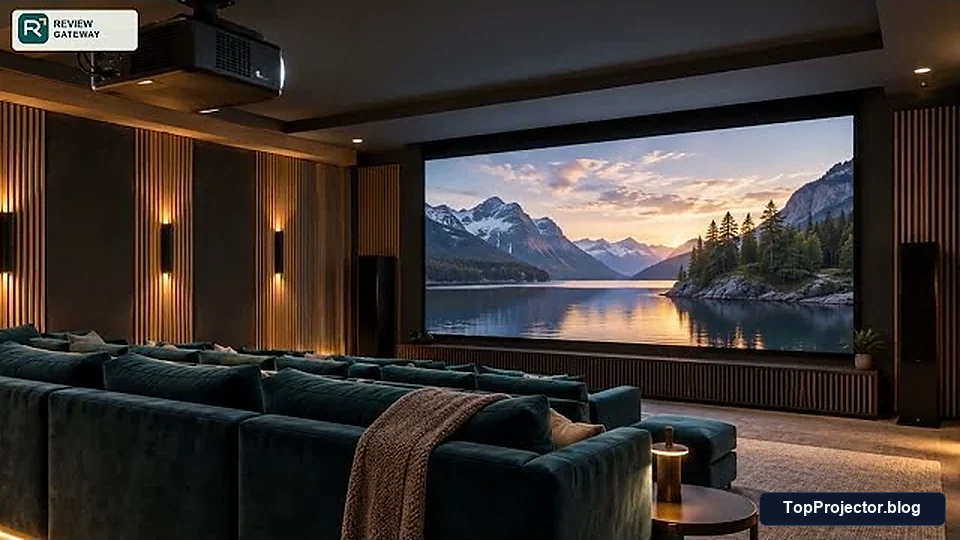
Traditional projection systems struggle against bright sunlight flooding unshaded windows. Even premium ambient light rejection materials cannot fully counteract intense lateral illumination washing out deep blacks.
Engineers evaluating daylight performance must prioritize panel nits over traditional lumen ratings. Emissive displays maintain vibrant saturation levels that projectors simply cannot replicate in sunlit rooms.
Video walls utilize direct-emission SMD LEDs achieving massive 2,000 nits of luminance, easily cutting through high-lux daylight without washing out, unlike standard projection setups facing severe ambient light wash and loss of contrast.
- Self-emissive pixels eliminate daytime washing out entirely.
- Projectors require dedicated ambient light rejection screens.
- High-lux environments favor direct-view display architectures.
- Micro-louver ALR projector screens reject 85% of overhead ambient light.
- Direct-view LED tiles maintain saturated black levels in fully lit family rooms.
Living Room Daylight Versus Dedicated Theater Control
Bright family spaces demand extreme panel luminance to overcome midday glare. Video walls deliver over 1000 nits of sustained brightness without saturating color coordinates.
Dedicated projection environments rely on absolute darkness to preserve contrast ratios. Controlling ambient bounce ensures laser light engines achieve maximum perceived dynamic range.
- Family rooms require high-nit emissive muscle.
- Dark theaters maximize projector contrast potential.
Micro-Lens ALR Integration
Pairing an ultra-short-throw laser projector with a specialized 0.6 gain lenticular ALR screen rejects ceiling illumination. If you want ultra-low-cost alternatives, consult our best projector under 100 dollars roundup.
- Lenticular structures physically block top-down room lighting.
- Fresnel screens excel with dedicated floor-mounted laser ultra-short-throw units.
Black Floor Depth, ANSI Contrast, and Shadow Detail
Achieving reference black levels defines modern home theater immersion. Direct-view video walls turn individual pixels completely off, yielding infinite native contrast ratios.
Projectors battle residual light scatter within untreated rooms. Even high-end laser models suffer from ambient light lifting dark scenes unless paired with velvet masking.
Discerning viewers analyzing shadow detail notice superior grayscale tracking on emissive panels. Dark clothing and night skies retain distinct textures without crushing near-black data.
Direct-view LED walls suffer from raised black floors in ambient light because their dark surface masks reflect room illumination, whereas projectors rely on absolute darkness in the room to deliver true shadow depth.
- Emissive panels achieve true black by shutting off pixels.
- Projector black floors suffer in rooms with light-colored walls.
- Shadow delineation remains superior on modular LED surfaces.
- Native ANSI contrast on three-chip DLP projectors hovers near 500:1.
- MicroLED displays offer infinite native contrast in pitch-black environments.
Analyzing Native Contrast and ANSI Checkerboard Performance
ANSI checkerboard measurements reveal how displays handle mixed content scenes. Video walls maintain pristine separation between bright highlights and adjacent dark zones.
Projectors experience intra-frame light scatter that degrades bright-to-dark transitions. Optical engine baffling helps, but physical light bounce remains a persistent challenge.
- Checkerboard tests expose optical scatter limitations.
- Direct-view arrays maintain flawless intra-frame contrast.
Dynamic Iris Optimization
Modern laser projectors utilize lightning-fast dynamic laser dimming to drop light output during dark cinematic scenes, drastically improving perceived black floor depth and shadow detail compared to static LED matrices.
- Dynamic dimming preserves highlights while plunging black levels.
- Laser modulation responds within milliseconds for seamless contrast shifts.
Peak Brightness, HDR Tone Mapping, and Color Fidelity
High dynamic range content demands massive peak luminance to render specular highlights accurately. Video walls handle HDR metadata effortlessly thanks to massive native light output.
Projectors must utilize aggressive dynamic tone mapping to compress HDR signals. Limited lumen pools force compromises between shadow depth and bright highlight clipping.
Wide color gamuts look remarkably vivid across both display types. For example, our anker nebula mars 3 review highlights how modern portable laser engines achieve robust BT.2020 coverage matching commercial standards.
Projectors struggle with dynamic range metadata because their limited 1,500 lumens cannot map HDR highlights natively without aggressive tone-mapping, whereas direct video walls effortlessly render punishing 1,000-nit mastering targets.
- HDR specular highlights shine brighter on emissive panels.
- Projectors require complex tone mapping algorithms.
- Both technologies deliver exceptional wide color gamuts.
- Laser engines achieve 100% Rec.2020 color volume using multi-phosphor wheels.
- Direct LED walls utilize native RGB subpixels for pure color saturation.
Calibrating Laser Light Engines and Micro-LED Panels
Color calibration ensures accurate cinematic reproduction out of the box. Micro-LED arrays maintain factory color calibration across thousands of hours of operation.
Laser phosphor projectors experience gradual color drift requiring periodic user calibration. Maintaining reference greyscale tracking demands dedicated meter equipment.
- Micro-LED panels preserve factory calibration stability.
- Laser light engines require routine maintenance checks.
Calibration Color Accuracy
Achieving reference Rec.709 color accuracy requires complex 3D LUT profiling on both systems, but projectors demand frequent lamp or laser recalibration to combat color drift over extended operational lifespans.
- Spectroradiometers are essential for precise white point calibration.
- Direct-view LEDs maintain stable chromaticity coordinates for thousands of hours.
Screen Scaling, Throw Geometry, and Immersive Scale
Creating a massive cinematic image yields stunning 150-inch diagonals. You can determine precise screen placement using our throw distance calculator before purchasing short-throw lenses.
Video walls achieve large sizes through modular panel assembly. However, expanding beyond standard aspect ratios introduces visible grid seams and complex structural engineering.
Home theater enthusiasts seeking true IMAX immersion find projectors more cost-effective. Scaling a projection screen costs a fraction of adding extra LED display cabinets.
Projectors offer unmatched scaling flexibility via optical zoom rings and 0.25 throw ratios, allowing seamless transitions from 100 inches to 150 inches diagonal without resolution loss or visible panel seam lines.
- Projectors offer seamless scale up to 200 inches easily.
- Modular video walls face scaling cost and seam challenges.
- Throw distance calculations determine optimal room placement.
- Video walls require precise cabinet alignment to eliminate visible grid lines.
- Projector geometry depends strictly on precise lens shift and mount rigidity.
Ultra-Short-Throw Placement Versus Long-Throw Optics
Ultra-short-throw projectors rest inches from the wall, eliminating foot traffic shadows. They integrate seamlessly into media credenzas without complex ceiling mounts.
Traditional long-throw projectors deliver pristine optical geometry from the rear of the room. Glass lens elements minimize chromatic aberration across massive screen sizes.
- UST models simplify living room furniture integration.
- Long-throw optics maximize corner-to-corner sharpness.
Pixel Pitch Scaling Math
Calculating optimal viewing distance for direct LED walls requires evaluating pixel pitch, where a P0.9 module ensures a seamless image without visible pixel structure from just six feet away.
- P1.5 pixel pitch demands greater viewing distance to prevent moiré.
- Projectors utilize analog light integration, completely eliminating discrete pixel grids.
Motion Resolution, Input Latency, and Gaming Response
Modern gaming demands lightning-fast refresh rates and minimal input lag. High-end gaming projectors now feature 4ms response times at 240Hz for competitive play.
Video walls provide instant pixel switching speeds inherent to solid-state diodes. Motion blur is virtually nonexistent during fast-paced panning shots in competitive titles.
Competitive gamers should weigh screen size against frame pacing. Immersive projection gaming offers unmatched scale, while video walls deliver flawless motion clarity.
Competitive gamers demand ultra-low input lag, and modern gaming projectors achieve a brisk 4ms latency at 1080p/240Hz, outperforming complex modular video wall processors that often introduce noticeable signal delays.
- Gaming projectors achieve sub-5ms input lag reliably.
- Emissive displays eliminate motion blur completely.
- High refresh rates satisfy modern console and PC specs.
- OLED-backed video walls offer near-instantaneous pixel response times.
- Projector motion handling relies heavily on black frame insertion algorithms.
Console Gaming Immersion Versus PC Refresh Rates
Next-generation consoles push 4K resolution at rapid frame rates. Projectors handle high-bandwidth HDMI signals smoothly with dedicated gaming mode presets.
PC enthusiasts benefit from variable refresh rate support on advanced display systems. Screen tearing is eliminated through synchronized hardware handshakes.
- Console gaming thrives on large projected canvases.
- PC rigs leverage variable refresh rate technologies.
Refresh Rate Synchronization
Variable refresh rate support ensures zero screen tearing during intense gaming sessions, though high-end LED video processors require specialized scalers to match console and PC framerate outputs reliably.
- HDMI 2.1 bandwidth is crucial for uncompressed 4K 120Hz gaming.
- Low latency modes disable heavy video processing to boost response.
Installation Footprint, Thermal Load, and Maintenance Realities
Physical installation requirements differ drastically between these two display mediums. Projectors require precise ceiling alignment and secure mounting hardware to prevent shifting.
Video walls demand reinforced wall studs and professional electrical planning. Their substantial weight and high power draw require dedicated circuit allocations.
Thermal management dictates long-term component reliability. Projectors require clean filter maintenance, while video walls rely on silent chassis heat dissipation.
Video walls generate significant thermal energy and audible fan noise, often requiring dedicated HVAC cooling in closed media rooms, whereas modern laser projectors radiate less heat and mount flush against ceiling joists.
- Projectors require careful ceiling bracket calibration.
- Video walls demand heavy structural wall reinforcement.
- Thermal dissipation impacts overall component lifespan.
- Modular LED panels require tedious individual cabinet pixel calibration.
- Laser projectors offer 20,000 hours of maintenance-free optical operation.
Power Consumption and Long-Term Component Lifespan
Solid-state laser diodes offer twenty thousand hours of maintenance-free operation. Lamp replacements are obsolete in modern high-end home theater projectors.
Modular LED panels consume substantial electrical power during peak HDR scenes. Utility costs should factor into long-term ownership calculations for large walls.
- Laser engines provide long operational lifespans.
- Emissive walls demand higher continuous electrical power.
Power Delivery and Structural Load
A massive direct LED wall draws immense electrical current, frequently necessitating heavy-duty 240V circuits and reinforced wall studs, whereas standard projectors plug easily into normal household electrical outlets.
- Wall-mounted LED displays place extreme dead weight on drywall anchors.
- Projector ceiling mounts need secure attachment to solid wooden studs.
Final Architectural Verdict: Choosing Your Optical Medium
Selecting between a video wall and a projector depends entirely on your room architecture. Bright living spaces with uncontrolled windows demand emissive panel technology.
When setting up interactive displays, follow our guide on how to connect laptop to promethean board before placement. Dedicated home theaters achieve superior cinematic value through projection.
Evaluate your budget, room lighting, and immersion goals carefully. Both display categories deliver breathtaking visual fidelity when matched to the right environment.
Choose a dedicated direct video wall if your primary entertainment space suffers from uncontrolled ambient light and you demand instant-on capability, bypassing the strict light control needs of traditional home theater projection.
- Match display technology to your room lighting profile.
- Prioritize projectors for cost-effective massive screen sizes.
- Choose video walls for bright, bezel-free daylight viewing.
- Select a laser projector for massive cinematic scale on a budget.
- Evaluate room acoustics before committing to solid surface video walls.
Summary Decision Matrix for Home Theater Enthusiasts
Prioritize direct-view video walls if your media room lacks window treatments. They deliver uncompromising daylight performance and absolute black levels.
Invest in a laser projector if you desire authentic commercial cinema scale. Nothing replaces a giant projected canvas in a dark room.
- Video walls conquer ambient light challenges effortlessly.
- Projectors reign supreme for massive cinematic scaling.
Total Cost of Ownership
While initial hardware investments heavily favor home theater projectors, long-term commercial LED panel durability shifts the architectural value equation toward direct-view displays for high-uptime multi-purpose media environments.
- Projector lamps or laser engines degrade slowly over many years.
- LED cabinet replacements can be costly if individual pixels fail.
Frequently Asked Questions
Can a video wall completely replace a traditional home theater projector?
Yes, but only if your budget accommodates modular panels and you prefer bright-room viewing. Direct-view LED excels in daylight, though projectors remain cheaper for massive sizes.
Why do video walls offer better black levels than projectors?
Emissive pixels turn completely off to render true black without light scatter. Self-emissive technology eliminates the ambient light floor that plagues traditional projection rooms.
Are projectors better for watching movies in a dark room?
Projectors deliver superior cinematic immersion and scale in pitch-black spaces. Large screen immersion makes projectors the traditional favorite for dedicated home theaters.
How does ambient light impact video walls versus projectors?
Video walls easily overpower room light thanks to high peak luminance output. High nit panels maintain rich color saturation while projectors require specialized ALR screens.
Which display option is more cost-effective for a 150-inch screen?
Projectors are drastically cheaper when scaling past 120 inches diagonal. Projection optics deliver massive image sizes at a fraction of modular wall costs.