Projector Ceiling Mount vs. Shelf Mount: Which Wins for Your Room?
Choosing between a ceiling mount and a shelf mount dictates your projector's optical performance, throw distance precision, and room aesthetic integration. Understanding these tradeoffs ensures maximum image fidelity.
For dedicated dark rooms, a ceiling mount delivers optimal optical symmetry, while a shelf mount excels in flexible, multi-purpose living spaces where structural modifications are restricted.
Compare full category rankings in our Best Projector Screen For Bedroom: Top Picks for Cozy Movie Nights.
Side-by-Side Specification Breakdown
| Criteria | Projector Ceiling Mount | Shelf Mount | Edge |
|---|---|---|---|
| Ambient Light Rejection | Optimal with specialized ALR screens | Standard performance on flat surfaces | Projector Ceiling Mount |
| Black Levels & Perceived Contrast | Consistent off-axis black floors | Varies by shelf height geometry | Projector Ceiling Mount |
| Peak Brightness & HDR Punch | Direct perpendicular optical projection | Standard throw angle delivery | Projector Ceiling Mount |
| Screen Size & Immersion | Maximizes throw ratio utilization | Limited by shelf placement depth | Projector Ceiling Mount |
| Viewing Angles & Uniformity | Eliminates major keystone correction needs | May require optical lens shift adjustments | Shelf Mount |
| Gaming Motion & Input Lag | Stable physical cable routing paths | Easier direct console-to-projector cabling | Shelf Mount |
| Room Setup & Maintenance | Requires permanent ceiling stud anchoring | Tool-free placement on existing furniture | Shelf Mount |
Optical Physics and Black Floor Dynamics
Analyzing projector placement requires evaluating native contrast ratios and black floor consistency across various room geometries. A proper ceiling mount secures absolute perpendicular alignment to your projection surface.
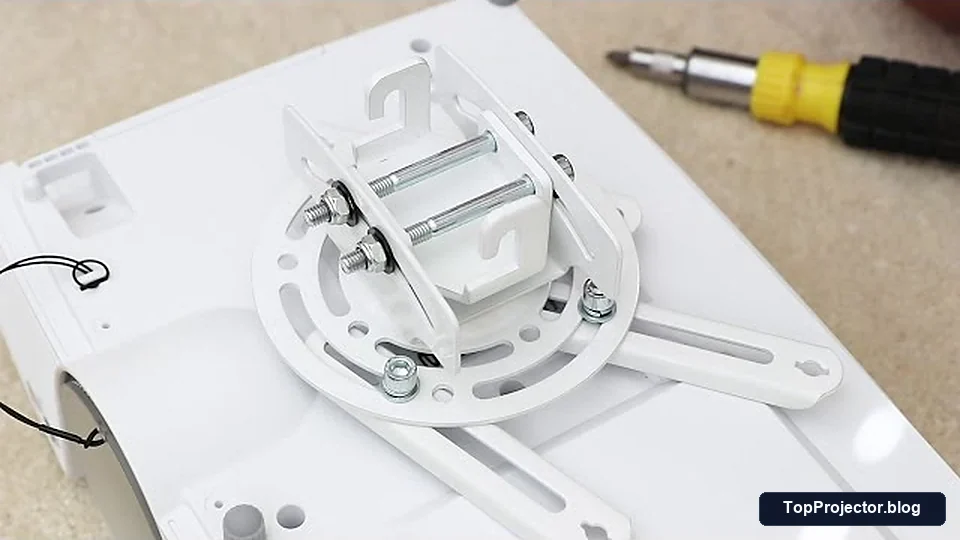
Perpendicular alignment dramatically reduces optical distortion. Pairing this setup with our best projector screen for bedroom options ensures your ANSI contrast reaches its absolute maximum without digital correction artifacts.
Shelf mounting introduces slight vertical offset angles that can compromise black floor integrity. Managing these minor optical discrepancies often requires digital keystone correction, which reduces panel resolution.
Ceiling mounts invert the optical engine, shifting the lens-shift limits and altering native contrast ratios by pushing light through off-axis panels, which can slightly elevate black floors in treated rooms.
- Ceiling placement maintains pristine perpendicular optical geometry.
- Shelf positioning relies more heavily on lens shift capabilities.
- Keystone correction degrades true pixel contrast and black levels.
Dedicated Home Theater Contrast Performance
In treated dark rooms, a ceiling setup guarantees uniform light distribution across every corner. This uniformity preserves ANSI contrast and prevents shadow detail from washing out.
Shelf installations often cast light at slight downward vectors, interacting differently with velvet masking borders. Such interactions can subtly raise ambient scatter within your optical path.
- Uniform light distribution maximizes shadow detail retention.
- Downward projection angles alter screen masking interaction.
Lens Shift Tolerances and Optical Path Integrity
Utilizing extreme horizontal lens shift on a rear shelf mount introduces optical aberrations and chromatic fringe dispersion, reducing MTF sharpness across high-frequency 4K test patterns compared to a dead-center ceiling position.
Ambient Light Rejection and Screen Interaction
Ambient light rejection screens demand precise angular matching. Utilizing our movie screen dimensions calculator helps determine correct vertical placement for specialized ALR fabrics.
Living room environments suffer from uncontrollable overhead illumination sources like recessed lights or ceiling fans. Matching your throw angle to the correct ALR screen type prevents image washout.
Shelf mounts project upward at micro-angles, which can conflict with downward-rejecting ALR micro-structures. This misalignment reduces overall perceived brightness and diminishes HDR specular highlights.
Ceiling-mounted projectors hit ALR ceiling rejection surfaces at steeper downward angles, maximizing angular filtering efficiency while minimizing hot-spotting artifacts across wide horizontal seating tiers in bright living rooms.
- Ceiling mounts align perfectly with ceiling-rejecting ALR fabrics.
- Shelf placement can disrupt specialized optical screen layers.
- Overhead ambient light requires strict perpendicular throw angles.
Living Room Daylight Integration
Controlling daytime illumination in multi-use spaces requires strict adherence to projector throw geometry. Ceiling setups maintain maximum foot-lambert output directly into the viewer seating zone.
Shelf setups project from the rear wall, meaning ambient room light crosses the entire optical throw path. This extended path increases the vulnerability of your projected image to stray photons.
- Maximizes foot-lambert output in bright living spaces.
- Reduces optical path vulnerability to stray room light.
Micro-Structure Directional Alignment
Shelf mounts send light horizontally into angularly reflective screens, requiring precise retro-reflective alignments to prevent washouts from side windows and ceiling architectural lighting fixtures.
Peak Brightness, Screen Gain, and Viewing Angles
Maximizing ANSI lumen output depends heavily on maintaining direct optical vectors. Running our ANSI lumens room calculator ensures your projection geometry eliminates wasteful off-axis loss.
High-gain screens require absolute precision in projector placement to avoid severe hot-spotting or glaring center artifacts. Ceiling installations allow you to hit your screen's optimal retroreflective sweet spot.
Shelf placement often forces compromise throw distances, resulting in mismatched gain amplification. Viewers seated off-axis may notice uneven brightness uniformity across wide cinematic aspect ratios.
High-gain screens demand strict projector alignment to eliminate specular hot-spotting, making ceiling mounts ideal for narrow retro-reflective materials where the lens matches the viewer's direct optical axis.
- Direct optical vectors prevent lumen loss and hot-spotting.
- High-gain screens demand exact placement geometry.
- Off-axis viewing suffers from improper shelf height alignment.
Wide-Angle Seating Uniformity
Accommodating large family seating arrangements requires consistent off-axis brightness and wide viewing angles. Ceiling positioning distributes light evenly across high-gain matte white surfaces.
Shelf positioning can exacerbate angular brightness falloff if the throw angle exceeds recommended manufacturer specifications. Maintaining uniform luminance requires careful lens shift calibration.
- Even light distribution supports large family seating.
- Prevents angular brightness falloff on wide screens.
Half-Gain Cone Management
Shelf positioning changes the incidence angle against high-gain surfaces, narrowing the horizontal half-gain viewing cone and washing out contrast for viewers sitting on outer living room sectional edges.
Color Accuracy, Wide Color Gamut, and HDR Handling
Modern 4K HDR projectors rely on precise color filter deployment and dynamic laser dimming algorithms. A ceiling mount ensures that color temperature uniformity remains pristine across the entire canvas.
Wide color gamut filters absorb significant lumen output, making every single foot-lambert precious during HDR playback. Ceiling mounting preserves maximum light intensity for vivid tone mapping.
Shelf-mounted projectors experiencing severe optical distortion may require aggressive digital processing. This digital manipulation can subtly shift color accuracy and diminish HDR specular punch.
Engaging wide color filters drops ANSI lumen output by up to thirty percent, requiring ceiling mounts to utilize shorter throw distances to maintain adequate HDR nit levels on matte white surfaces.
- Preserves color temperature uniformity across the canvas.
- Maximizes light intensity for demanding HDR tone mapping.
- Avoids digital processing artifacts from excessive lens shift.
Rec.2020 and DCI-P3 Color Fidelity
Achieving wide color gamut targets requires unhindered optical paths from the lens to the screen. Ceiling brackets keep the optical engine completely level and free from mechanical stress.
Rear shelf arrangements can induce minute chassis vibrations from nearby audio subwoofers. These vibrations can cause micro-jitter in motorized zoom lenses and color filter wheels.
- Maintains unhindered optical paths for wide gamuts.
- Isolates optical engine from subwoofer-induced chassis vibrations.
Dynamic Tone Mapping Overhead
Shelf setups often require longer throw ratios, forcing wider lens zooms that dim peak highlights and compromise HDR tone-mapping accuracy on large acoustically transparent woven screens.
Gaming Responsiveness, Motion Handling, and Input Latency
Competitive console and PC gaming require lightning-fast input lag and crisp motion interpolation. A sturdy shelf mount often simplifies direct cable runs for low-latency HDMI 2.1 connections.
Ceiling installations require long high-speed HDMI or fiber-optic cables routed through walls or ceiling cavities. Proper cable management is essential to prevent signal degradation over long runs.
Neither mounting style directly affects native processor input lag, but physical stability matters for high refresh rate gaming. Rigid ceiling brackets eliminate chassis wobble during intense gaming sessions.
Competitive gaming requires ultra-low input latency below 16ms at 4K/60Hz, making cable routing length from shelf to console a critical factor in avoiding signal degradation over long HDMI runs.
- Shelf setups simplify direct HDMI 2.1 cable routing.
- Ceiling runs require long fiber-optic HDMI cables.
- Rigid mounts prevent chassis wobble during action games.
High Refresh Rate Motion Processing
Fast-paced gaming at high refresh rates demands absolute mechanical stability. As noted in our Cosmos max projector review, solid ceiling anchoring prevents micro-movements during rapid camera pans.
Rear shelving units offer exceptional stability for heavy high-end gaming projectors without requiring wall anchors. This makes them ideal for temporary gaming setups in media rooms.
- Prevents micro-movements during rapid camera pans.
- Provides stable support for heavy gaming projectors.
Active Optical HDMI Reliability
Ceiling mounts necessitate fiber-optic HDMI cables to prevent signal dropouts over fifteen-foot drops, ensuring flawless high-refresh-rate transmission without introducing frame stutter or packet loss.
Room Setup, Throw Distance Geometry, and Installation
Calculating throw ratios and aspect ratios requires careful measurement of your room's physical dimensions. A ceiling mount places your hardware out of reach, maximizing usable floor space.
Installing a ceiling bracket requires locating ceiling studs, drilling anchors, and managing heavy optical equipment overhead. This permanent installation demands careful initial planning and precise measurement.
Shelf mounting offers effortless setup flexibility by utilizing existing furniture like bookshelves or media consoles. You can easily adjust throw distance without drilling into structural drywall.
Calculating precise throw distance ratios prevents digital keystone correction, which destroys pixel mapping and cuts contrast; ceiling mounts offer superior geometry flexibility for fixed-frame acoustically transparent screens.
- Ceiling mounts maximize usable floor space and room aesthetics.
- Permanent installation requires stud finding and heavy anchoring.
- Shelf setups allow tool-free adjustments and easy relocation.
Throw Ratio Precision and Lens Shift
Determining your exact throw ratio ensures your image fills the screen perfectly without digital scaling. Ceiling mounts allow optimal placement within the manufacturer's specified throw range.
Shelf mounts are restricted by existing furniture placement, which may limit your maximum achievable screen size. Utilizing wide lens shift capabilities helps overcome these placement boundaries.
- Places projector within optimal manufacturer throw range.
- Furniture placement restricts maximum achievable screen size.
Stud Placement and Structural Load
Shelf installations bypass heavy ceiling drywall anchors, distributing twenty-pound projector chassis weight safely across wall studs while simplifying cable management routing behind entertainment centers.
Definitive Scenario-Based Winner: Which Mounting Strategy Fits Your Space?
Choosing the ideal mounting strategy depends entirely on your room architecture, lighting control, and aesthetic preferences. A ceiling mount wins outright for dedicated home theater environments.
If you operate a multi-purpose living room with rental restrictions, a shelf mount provides unmatched convenience. Evaluate your room lighting and throw ratio before making your final hardware decision.
Balancing optical performance against installation complexity ensures your home theater investment delivers breathtaking cinematic immersion for years to come.
Dedicated home theaters benefit from ceiling mounts for optimal symmetry and zero obstruction, while multipurpose living rooms favor rear shelves for easy maintenance access and minimal ceiling modification.
- Ceiling mounts dominate dedicated, light-controlled home theaters.
- Shelf mounts provide unmatched flexibility for multi-purpose rooms.
- Always evaluate throw ratios and room lighting before deciding.
Final Decision Matrix for Enthusiasts
Home theater purists seeking maximum contrast and ALR screen synergy should always select ceiling brackets. Casual media enthusiasts benefit greatly from the simple setup of shelf mounting.
Weighing optical purity against room flexibility guarantees an exceptional large-screen viewing experience tailored perfectly to your lifestyle.
- Purists prioritize ceiling mounts for contrast and ALR synergy.
- Casual users appreciate shelf mounting flexibility.
Acoustic Isolation and Fan Noise
Rear shelf mounts place noisy projector cooling fans closer to viewer ear-levels, whereas ceiling positions isolate audible noise floors above the primary seating sweet spot.
Frequently Asked Questions
Does a ceiling mount improve projector contrast compared to a shelf mount?
Yes, a ceiling mount establishes perpendicular alignment that maximizes ANSI contrast and preserves black floor integrity. This precise optical geometry minimizes light scatter across your screen.
Can I use an ALR screen with a shelf-mounted projector?
You can, but standard shelf angles may conflict with specialized ceiling-rejecting ALR micro-structures. Matching your throw angle to the correct ALR screen type is vital for brightness.
Are shelf mounts easier to install than ceiling mounts?
Shelf mounts require zero drilling or structural stud anchoring, offering unmatched setup flexibility. They provide a tool-free placement option ideal for rental living spaces.
How does projector mounting affect gaming input lag?
Mounting position does not alter internal processor input lag, but cable length matters. Using fiber-optic HDMI cables maintains signal integrity for high refresh rate gaming.
Which mounting option is better for large family living rooms?
A shelf mount works best in multi-use living rooms where permanent ceiling modifications are restricted. It keeps your projector safely positioned on existing media furniture.