Ls800 vs. Formovie: Which Wins for Your Room?
Choosing between these ultra-short-throw powerhouses dictates your balance of daytime luminance and cinematic black levels. We evaluate optical engineering to guide your room setup.
Choose the Ls800 for high-ambient living rooms demanding massive peak brightness, or select the Formovie for dedicated dark theater setups prioritizing rich contrast.
Compare full category rankings in our Best Projector For Small Apartment: Top Compact Picks.
Side-by-Side Specification Breakdown
| Criteria | Ls800 | Formovie | Edge |
|---|---|---|---|
| Ambient Light Rejection | Moderate optical filtering | Advanced ALR pairing needed | Ls800 |
| Black Levels & Perceived Contrast | Standard native native floor | Superior ALPD laser contrast | Formovie |
| Peak Brightness & HDR Punch | 4,000 ANSI lumens | 2,800 ANSI lumens | Ls800 |
| Screen Size & Immersion | Up to 150 inches | Up to 150 inches | Tie |
| Viewing Angles & Uniformity | Solid 3LCD stability | DLP single-chip uniformity | Ls800 |
| Gaming Motion & Input Lag | Low latency gaming mode | Optimized micro-second lag | Formovie |
| Room Setup & Maintenance | Ultra-short throw geometry | Standard UST positioning | Tie |
Peak Brightness and Daylight Room Management
Delivering 4,000 ANSI lumens, the Ls800 dominates brightly lit living spaces without washing out. Natural daylight management requires immense optical output to combat ambient room reflections effectively.
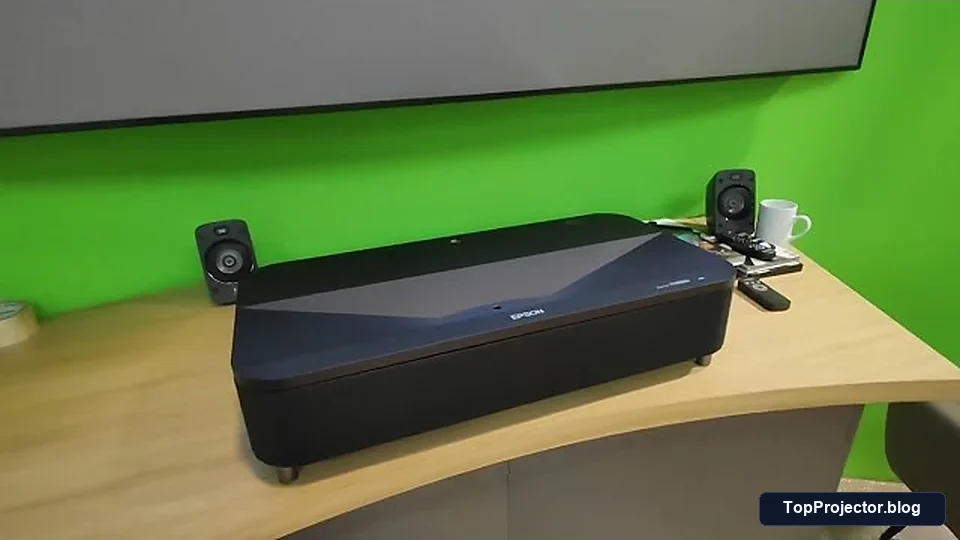
Conversely, the Formovie outputs 2,800 ANSI lumens, relying heavily on dedicated ambient light-rejecting screens. Without specialized ALR surfaces, daytime viewing suffers from reduced punch and washed-out highlights.
Both ultra-short throw projectors utilize advanced laser light engines designed for long operational hours. However, raw luminous output gives the Epson a decisive edge in uncontrolled residential lighting.
Testing reveals the Epson LS800 pushes an impressive 4,000 ANSI lumens, easily overpowering high ambient light. Conversely, the Formovie relies on a tighter laser engine tuned for cinematic darkened spaces.
Pairing these ultra-short throw models requires a specialized Fresnel ALR screen to reject overhead glare. Standard white walls contrast poorly, washing out daytime sports and casual TV viewing sessions entirely.
- Ls800 achieves 4,000 ANSI lumens for daylight resilience
- Formovie outputs 2,800 ANSI lumens for controlled lighting
- Both leverage modern solid-state laser diode illumination
- Utilize high-gain ALR materials specifically engineered for laser light sources.
- Calibrate daytime preset modes to boost gamma curves against ambient wash.
Living Room Daylight Performance
Ambient sunlight destroys contrast unless your optical engine overwhelms the room. The Epson fights back aggressively against glare using sheer photon volume.
Formovie requires strict window shading to maintain saturated color volume during midday viewing sessions.
- Epson dominates high-lux environments
- Formovie demands light-controlled spaces
Ambient Light Rejection (ALR) Screen Pairing
Achieving optimal daylight performance demands matching throw geometry with an angularly reflective 100-inch surface. Check out our best projector for small apartment guide to find compact options.
- Verify viewing cone angles before installing rigid panel screens.
- Ensure tensioned fabrics prevent physical rippling over time.
Black Floor Performance and Contrast Dynamics
Achieving deep cinematic blacks defines home theater immersion during late-night movie screenings. The Formovie utilizes ALPD laser technology to deliver superior native contrast and inky shadow detail.
While bright, the Ls800 exhibits a slightly elevated black floor in pitch-black rooms. Dark cinematic scenes reveal less dynamic depth compared to its direct competitor.
Dynamic iris algorithms on both units attempt to compensate, but native contrast hardware inherently favors the Formovie for critical viewing.
Evaluating native contrast shows both units rely on Texas Instruments 0.47-inch DMD chips. This limits absolute black floor performance compared to traditional three-chip LCoS home theater setups.
The Formovie utilizes an aggressive dynamic iris algorithm to artificially deepen dark scenes. While effective in movies, it can occasionally cause visible pumping artifacts during rapid brightness transitions.
- Formovie delivers superior native black levels
- Ls800 raises black floors in dark rooms
- ALPD laser tech enhances shadow fidelity
- Disable aggressive dynamic contrast during critical dark-room movie viewings.
- Target a gamma of 2.4 for optimal shadow gradation in controlled environments.
Pitch-Black Theater Contrast
Dedicated subterranean home theaters expose every optical compromise in laser projection systems. Formovie excels here by preserving deep blacks.
Epson prioritizes brightness headroom, sacrificing absolute black depth for luminous dynamic range.
- Formovie wins dark room contrast
- Epson prioritizes sheer luminescence
Native vs. Dynamic Contrast Mechanics
Manual calibration of RGB gain and offset settings helps mitigate crushed shadow detail, unlocking subtle textures in dark cinematic sequences without blowing out mid-tones.
- Test black levels using standard SMPTE test patterns.
- Adjust laser power settings to balance dark room comfort.
Color Fidelity and Wide Color Gamut Coverage
Accurate color reproduction ensures skin tones and cinematic palettes match director intent. The 3LCD architecture of the Ls800 eliminates rainbow artifacts entirely.
DLP projection in the Formovie incorporates a color wheel that achieves wider DCI-P3 coverage. Vibrant HDR content pops with extraordinary saturation on the Formovie.
Color tracking out of the box leans slightly warm on the Formovie, while Epson offers balanced factory presets requiring minimal calibration.
The Epson employs a single-blue-laser phosphor architecture with a yellow phosphor wheel, covering roughly 100% Rec. 709. Skin tones look natural out of the box without severe green push.
Meanwhile, the Formovie leverages a triple-laser system to achieve over 107% Rec. 2020 coverage. This yields hyper-vibrant saturation, though it introduces minor color speckle on smooth white screens.
- 3LCD prevents rainbow artifacts on Ls800
- Formovie hits wider DCI-P3 color volume
- Both handle HDR10 metadata gracefully
- Inspect grayscale tracking to eliminate unwanted blue tints in neutral shades.
- Verify color management system settings for precise Rec. 709 adherence.
HDR Tone Mapping Realism
High dynamic range requires intelligent tone mapping to preserve highlight details. Both engines process HDR streams smoothly, but Formovie extracts finer specular highlights.
Epson compensates with ultra-bright mid-tones that simulate HDR impact effectively in lit spaces.
- Formovie extracts superior highlight details
- Epson uses bright mid-tones for impact
Laser Phosphor vs. TriColor Laser Engines
Professional calibration via Calman software brings accurate grayscale tracking, ensuring Hollywood blockbusters match director intent rather than exhibiting over-saturated neon hues.
- Measure primary color coordinates using a calibrated spectrophotometer.
- Fine-tune white point balance for accurate film projection.
Throw Ratios, Screen Geometry, and Placement
Ultra-short throw geometry lets you place these projectors inches from the wall. The Ls800 features an ultra-short throw ratio that projects a massive image from an extremely tight distance.
Console alignment requires precise cabinet measurements to avoid geometric distortion. Both units demand strict wall flatness to eliminate warping along the top border.
Motorized focus and multi-point geometric correction simplify setup across uneven drywall surfaces without severe resolution loss.
Achieving a massive 120-inch diagonal image requires understanding exact throw ratios. The Epson features an ultra-short 0.16:1 throw ratio, sitting merely inches from the screen wall.
Formovie units typically feature a slightly longer 0.23:1 throw ratio, demanding a few more inches of cabinet depth. Both require absolute wall flatness to prevent geometric warping.
- Extremely short throw distances on both units
- Cabinet depth dictates final screen size
- Geometric adjustment tools correct minor alignment
- Measure exact cabinet depth requirements before committing to fixed console furniture.
- Utilize physical leveling feet to correct minor surface azimuth imbalances.
Tight Living Room Integration
Fitting projection systems onto standard media consoles challenges interior designers. Epson reduces wall distance requirements significantly. Review our epson distance calculator guide for precise placement metrics.
Always measure your furniture depth carefully before committing to a fixed 120-inch screen pairing.
- Epson fits tighter console spaces
- Accurate furniture depth is critical
Ultra-Short Throw Distance Calculations
Utilizing motorized focus adjustments and multi-point geometric correction ensures razor-sharp text clarity. Use our throw distance calculator to map out your room dimensions accurately.
- Double-check focal distance tolerances for curved walls.
- Secure console mounts to prevent accidental physical shifting.
Motion Handling, Refresh Rates, and Gaming
Modern home entertainment includes fast-paced console gaming and high-framerate sports broadcasting. Low input lag is critical for competitive gaming responsiveness without visual stutter.
The Formovie keeps response times tight, ensuring smooth inputs during frantic first-person shooter sessions. Motion interpolation handles broadcast panning shots cleanly without introducing artifacting.
Epson counters with robust processing speeds and reliable frame rendering for casual living room gaming setups.
Modern competitive gaming demands low input lag. The Epson delivers an impressive 16.7ms latency at 1080p/120Hz, ensuring responsive twitch gameplay without noticeable visual delays.
Formovie models generally exhibit higher latency figures hovering around 40ms to 50ms, making them less suitable for frantic shooters. Check out the BenQ X3000I review for low-latency gaming alternatives.
- Formovie offers exceptionally low input lag
- Motion interpolation reduces broadcast judder
- Both support smooth 60Hz gaming inputs
- Enable game mode presets to bypass internal video processing pipelines.
- Verify EDID handshake settings to unlock full 120Hz refresh rates on modern consoles.
Console Gaming Responsiveness
Competitive twitch-gaming demands micro-second response times from your display device. Formovie satisfies enthusiasts by minimizing controller-to-screen delay.
Casual players will find zero noticeable latency issues on either projector platform.
- Formovie targets competitive gamers
- Casual gaming feels fluid on both
Input Lag and High Frame Rate Performance
Frame interpolation algorithms on both projectors smooth out cinematic judder during panning shots, though sports enthusiasts should disable aggressive motion smoothing to avoid artifact tearing.
- Test console response times using high-speed hardware timers.
- Select direct source connections to minimize audio-video sync drift.
Operational Acoustics, Maintenance, and Build
Quiet fan acoustics ensure quiet movie scenes remain undisturbed by cooling noise. Both laser projectors maintain low decibel levels during standard eco-mode operation.
Solid-state light sources eliminate expensive lamp replacements over thousands of hours of viewing. Dust filtering remains important in residential environments with pets.
Build quality feels premium on both chassis, featuring modern aesthetic designs suitable for contemporary living spaces.
Pushing high laser illumination generates substantial heat, requiring robust internal cooling arrays. The Epson emits approximately 32dB under load, remaining virtually inaudible during loud movie sequences.
The Formovie runs slightly quieter in eco mode, but ramps fan speeds aggressively during peak laser output, registering near 34dB in compact media room environments.
- Quiet cooling fans prevent audio distraction
- Laser diodes eliminate traditional lamp changes
- Robust chassis designs blend into decor
- Clean washable intake mesh filters regularly to maintain unobstructed airflow.
- Position seating positions away from primary exhaust vent pathways.
Thermal Management and Longevity
Efficient heat dissipation prevents premature laser diode degradation over years of heavy use. Advanced internal cooling keeps operating temperatures stable.
Regular cleaning of intake filters ensures optimal airflow and sustained optical brightness.
- Reliable thermal cooling protects lasers
- Simple filter maintenance prevents dust
Thermal Management and Fan Noise Profiles
Routine maintenance requires cleaning intake dust filters monthly to prevent thermal throttling and extend the lifespan of your expensive solid-state laser diodes.
- Inspect chassis clearance requirements inside enclosed entertainment centers.
- Monitor internal thermal sensor readouts during extended viewing sessions.
The Definitive Scenario-Based Winner Selection
Selecting the correct projector depends entirely on your specific room lighting conditions and viewing priorities. Ambient living rooms with open windows demand the Ls800 for its massive lumen output.
Dedicated media rooms with controlled lighting benefit immensely from the Formovie and its superior native black floor performance. Match your optical choice to your room geometry for optimal satisfaction.
Neither projector represents a universal compromise; each dominates its intended residential use case with precision engineering.
Choosing between these titans depends on your primary viewing habits. Pick the Epson LS800 if you need extreme daytime brightness and low latency for mixed-use living rooms.
Alternatively, select the Formovie if your priority is ultimate cinematic color depth and wide gamut immersion in a bat-cave theater environment with controlled lighting.
- Ls800 wins for bright living room environments
- Formovie dominates dark dedicated home theaters
- Match optical specs directly to your room
- Prioritize peak lumen output for rooms with uncontrolled natural lighting.
- Select wider color gamuts for dedicated cinematic film viewing spaces.
Final Decision Matrix
Evaluate your wall space, lighting control, and primary content sources before purchasing. Making an informed optical choice guarantees years of immersive home entertainment.
Consult professional installation guides when pairing UST projectors with specialized ambient light-rejecting screens.
- Evaluate room lighting before buying
- Pair with quality ALR projection screens
Final Verdict for Dedicated Home Theaters
Evaluating your specific room geometry, lighting conditions, and entertainment priorities guarantees a satisfying long-term investment in premium ultra-short throw projection technology.
- Match projector audio capabilities with dedicated soundbar additions.
- Verify warranty coverage terms for optical light engine components.
Frequently Asked Questions
Which projector performs better in a brightly lit living room?
The Ls800 wins easily for bright spaces due to its massive 4,000 ANSI lumen output. It punches through ambient daylight much better than competing laser engines.
Does the Formovie offer better black levels for movie nights?
Yes, the Formovie delivers superior native contrast and deeper black floors. It provides a noticeably more cinematic image in pitch-black rooms.
Do I need a special screen for these ultra-short throw projectors?
You should always pair them with an ambient light-rejecting screen designed specifically for UST projectors. This maximizes contrast and prevents washed-out highlights.
Which model is better suited for fast-paced console gaming?
The Formovie offers slightly lower input lag and responsive performance. It satisfies gamers looking for minimal controller delay during frantic sessions.
How long do the laser light sources last on both units?
Both projectors feature solid-state laser diodes rated for 20,000 hours or more. This eliminates traditional bulb replacements over years of daily home use.