Ht5550 vs. 5050Ub: Which Wins for Your Room?
Comparing two projection heavyweights reveals a stark choice between DLP razor-sharp pixel alignment and 3LCD high-contrast black levels.
Choose the 5050Ub for dedicated dark rooms demanding deep black floors, or select the Ht5550 for pristine native-4K single-chip pixel clarity.
Compare full category rankings in our Best Soundbar For Projector: Top Cinematic Picks.
Side-by-Side Specification Breakdown
| Criteria | Ht5550 | 5050Ub | Edge |
|---|---|---|---|
| Ambient Light Rejection | Moderate performance with standard screens | Better punch against mild ambient light | 5050Ub |
| Black Levels & Perceived Contrast | Good DLP native contrast | Exceptional dynamic iris black floor | 5050Ub |
| Peak Brightness & HDR Punch | Accurate out-of-the-box Rec.709 lumens | Massive high-output lamp lumen delivery | 5050Ub |
| Screen Size & Immersion | Crisp optics for massive cinemas | Flexible motorized zoom for varied throws | Tie |
| Viewing Angles & Uniformity | No convergence issues, zero panels | Panel convergence alignment required | Ht5550 |
| Gaming Motion & Input Lag | Low latency for fast action | Acceptable lag for casual couch gaming | Ht5550 |
| Room Setup & Maintenance | Manual lens shift requires precision | Fully motorized lens memory convenience | 5050Ub |
Evaluating Native Contrast and Absolute Black Floor Performance
Achieving reference cinema dark-room performance requires a deep black floor that anchors high dynamic range sequences. The competition between these projectors highlights distinct optical philosophies regarding native panel limits.
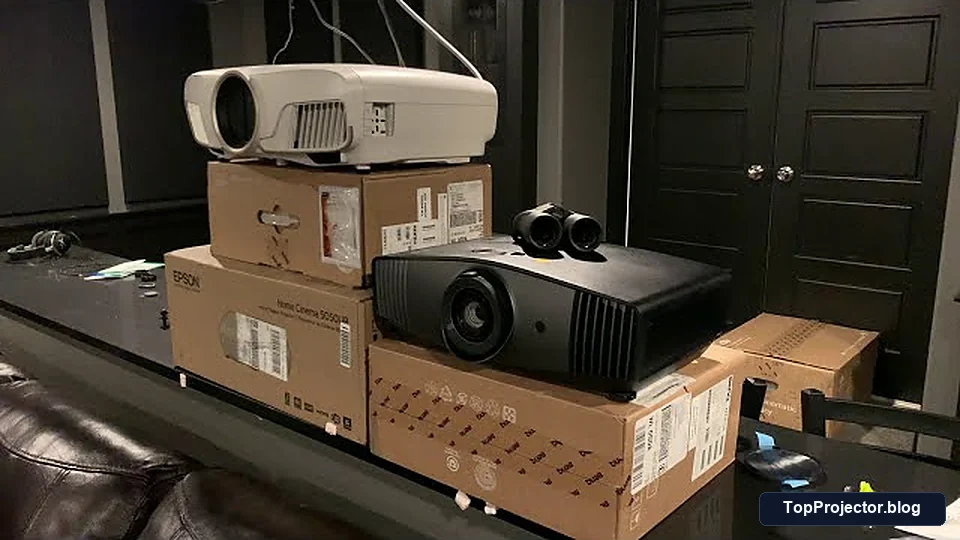
Epson utilizes advanced liquid crystal panels combined with a sophisticated mechanical dynamic iris. This engineering approach yields astonishing shadow detail in pitch-black viewing environments.
BenQ relies on single-chip DLP technology to deliver instant pixel sharpness without panel alignment drift. However, its native black levels trail behind the mechanical iris design of its rival.
- Dynamic iris systems dramatically lower black floors during dark movie scenes.
- Single-chip DLP architecture eliminates any risk of panel convergence drift over time.
- Shadow detail definition remains critical for authentic cinematic immersion.
Pitch-Black Theater Environments
Dedicated home theaters with dark velvet walls reveal the true limits of black floor reproduction. Here, the Epson dynamic iris shines by clamping down on light output during fade-to-black sequences.
Viewers watching sci-fi epics will notice significantly deeper starfields on the Epson. The BenQ counters with cleaner ANSI contrast patches, yet night scenes feel slightly more luminous.
- Velvet-treated rooms maximize the Epson black level advantage.
- ANSI contrast favors the razor-sharp BenQ optical engine.
Mixed Lighting Living Rooms
Ambient living room lighting washes out black levels regardless of projector choice. Achieving robust immersive audio requires choosing the best soundbar for projector to complement your high lumen system.
The higher raw lumen output of the Epson helps cut through mild room reflections more effectively than its DLP competitor during afternoon television broadcasts.
- ALR screens restore contrast in daytime living rooms.
- Raw lumen output dictates daytime usability.
Analyzing Peak Brightness, Color Accuracy, and HDR Tone Mapping
High dynamic range content demands aggressive lumen output combined with wide color gamut coverage. Calibrating these projectors reveals how optical engines manage HDR delivery.
Out of the box, color accuracy matters immensely for faithful movie reproduction. Both engines offer robust cinema modes designed to hit industry color targets accurately.
The DCI-P3 color filter engaged on the BenQ expands saturation at the cost of overall light output. Epson manages higher native brightness while still maintaining strong color volume.
- DCI-P3 color filters sacrifice brightness for expanded cinematic saturation.
- HDR tone mapping requires intelligent processing of metadata.
- Lamp modes directly impact bulb longevity and fan noise levels.
HDR Tone Mapping Realities
Projectors inherently struggle with the absolute peak nits mastered in modern 4K HDR Blu-rays. Effective tone mapping algorithms bridge this gap by preserving highlight details.
The Epson handles HDR brightness spikes with impressive punch, though manual adjustments often optimize clipping points. BenQ applies automated tone mapping that prioritizes mid-tone brightness.
- HDR metadata processing prevents blown-out white highlights.
- Manual adjustments refine tricky HDR transfers.
SDR Rec.709 Calibration Precision
Standard dynamic range content remains the staple for broadcast television and streaming. Achieving accurate Rec.709 color points ensures skin tones look completely natural.
BenQ excels with factory calibration certificates guaranteeing tight color tracking. For buyers exploring premium alternatives, reading our epson ls11000 review highlights advanced laser precision in dark theater rooms.
- Factory calibration reports verify color tracking precision.
- Rec.709 accuracy prevents artificial skin tones.
Optics, Pixel Structure, and Sharpness Comparison
Optical sharpness defines the boundary between standard high definition and true 4K clarity. Lens glass quality directly dictates how cleanly pixels project onto your screen.
Single-chip DLP architecture projects all primary colors through a spinning color wheel onto a single micromirror array. This design guarantees perfect pixel alignment without convergence errors.
Three-panel LCD designs require precise mechanical alignment of red, green, and blue panels. Minor misalignments can slightly soften fine text and intricate grid patterns.
- Single-chip DLP prevents panel convergence alignment issues.
- High-grade glass lenses minimize chromatic aberration.
- Pixel density dictates perceived image texture.
Fine Text and UI Legibility
Computer desktop usage and gaming user interfaces demand absolute edge-to-edge sharpness. The DLP pixel structure renders crisp text fonts with zero color fringing.
Epson displays readable text, but close inspection reveals subtle color fringing caused by panel convergence tolerances. Dedicated home theater setups rarely expose this minor artifact.
- Desktop scaling benefits from pristine edge sharpness.
- Panel convergence tolerances affect ultra-fine text.
Lens Quality and Glass Elements
Multi-element glass lenses reduce optical distortion and maintain focus uniformity across the entire projection surface. Premium glass investments prevent thermal focus drift during long movie marathons.
Both manufacturers deploy robust lens barrels, but the BenQ glass stack offers exceptional geometric linearity. Focus corners remain exceptionally sharp with minimal chromatic aberration.
- Thermal focus stability prevents image softening.
- Geometric linearity ensures square image geometry.
Installation Flexibility, Lens Shift, and Room Geometry
Physical room dimensions dictate projector placement limits and throw ratios. Using our ansi lumens room calculator helps determine exact brightness needs before drilling mounting brackets into your ceiling.
Motorized lens shift provides incredible convenience when fine-tuning image geometry from an equipment rack. Manual adjustment rings require physical access to the chassis.
The motorized optical zoom on the Epson simplifies multi-aspect ratio screen setups significantly. Users can switch between widescreen and cinemascope effortlessly.
- Motorized lens controls enable precise remote adjustments.
- Throw ratios determine exact ceiling mount distances.
- Lens shift ranges dictate vertical and horizontal placement flexibility.
Throw Ratio and Room Sizing
Calculating throw distance ensures your screen fills completely without digital keystone correction. Keystone degradation destroys native resolution and lowers contrast.
The Epson offers a generous zoom range fitting standard suburban media rooms easily. BenQ requires careful distance measuring due to a narrower optical zoom factor.
- Avoid digital keystone correction to preserve sharpness.
- Zoom ranges dictate flexible mounting positions.
Mounting and Chassis Ergonomics
Projector physical dimensions and weight influence ceiling mount selection and structural integrity. Heavy chassis require robust studs and secure mounting brackets.
The Epson boasts a massive physical footprint requiring sturdy shelf or ceiling placement. BenQ features a more compact chassis design fitting tighter installation spaces.
- Chassis weight dictates heavy-duty mounting hardware needs.
- Compact footprints ease tight shelf installations.
Gaming Latency, Motion Handling, and Refresh Rates
Modern home entertainment systems frequently double as massive gaming displays. Low input lag and responsive motion handling remain critical for competitive titles.
Fast response times prevent disorienting motion blur during rapid camera pans in first-person shooters. Frame interpolation settings smooth cinematic judder effectively.
The input lag measurements on the BenQ favor fast-paced twitch gaming significantly. Epson offers competitive latency figures suitable for casual console sessions.
- Low input lag ensures instant controller response.
- Motion interpolation reduces 24fps film judder.
- Refresh rate support impacts PC gaming fluidity.
Console and PC Gaming Performance
Competitive multiplayer gaming requires latency figures below fifty milliseconds for optimal responsiveness. Low input lag ensures competitive parity on giant screens.
BenQ handles high-refresh-rate signals smoothly, keeping response times exceptionally low in game mode. Epson provides satisfying immersion, though latency is slightly higher.
- Sub-50ms latency keeps multiplayer action competitive.
- Game mode presets bypass heavy video processing.
Cinematic Motion Processing
Purists prefer native 24fps playback without motion smoothing soap-opera effects. Flexible processing engines allow custom judder reduction without introducing severe artifacting.
Epson features robust frame interpolation controls that fine-tune motion cadence gracefully. BenQ keeps processing simple, relying on clean native panel response times.
- Frame interpolation settings manage film judder.
- Pure 24fps playback honors original filmmaker intent.
Acoustic Noise, Lamp Lifespan, and Thermal Management
Home theater tranquility depends on quiet fan profiles during quiet dialogue scenes. High-output lamps generate substantial heat requiring aggressive airflow cooling.
Eco modes reduce fan noise and extend lamp lifespan significantly at the expense of peak lumens. Smart thermal management prevents overheating during extended movie marathons.
The acoustic fan noise on both units remains unobtrusive when seated several feet away. Eco settings drop decibel levels into near-silent operating ranges.
- Eco lamp modes extend bulb longevity substantially.
- Quiet fan profiles prevent distraction during quiet scenes.
- Proper ventilation clearance ensures reliable thermal operation.
Fan Noise in Quiet Scenes
Subtle ambient hums become instantly noticeable during dramatic, dialogue-driven film moments. Acoustic management ensures cooling fans ramp smoothly without whining.
Placing the projector directly above primary seating positions exposes fan hums. Rear shelf placement mitigates minor acoustic output effectively.
- Ceiling placement proximity affects perceived noise.
- Eco modes drop fan speeds for quiet operation.
Bulb Replacement and Maintenance
Traditional lamp-based light engines require periodic bulb replacements over years of heavy use. Keeping spare lamps on hand prevents sudden movie night interruptions.
Replacement lamps remain affordable and straightforward to install without specialized technician tools. Air filters require periodic cleaning to maintain optimal airflow.
- Routine filter cleaning prevents thermal shutdowns.
- Lamp replacements restore original brightness levels.
Definitive Scenario-Based Buying Verdict and Recommendations
Selecting the ideal projector requires aligning optical strengths with your specific room geometry. For media playback, mastering how to connect lenovo laptop to projector with hdmi ensures zero signal dropouts.
Dedicated dark rooms with velvet treatment benefit immensely from deep black floors. Bright living rooms demand high raw lumen output and strong contrast management.
Choose the Epson 5050Ub for pitch-black cinema immersion or the BenQ HT5550 for uncompromised pixel sharpness.
- Match projector capabilities directly to your room lighting.
- Consider motorized lens convenience for complex installations.
- Prioritize native optical sharpness for desktop and gaming use.
The Ultimate Dark Room Choice
Enthusiasts building dedicated windowless home theaters will find their ultimate companion in the Epson. Its dynamic iris system delivers superior contrast performance in total darkness.
Movie nights come alive with punchy HDR handling and rich shadow detail recovery. The cinematic immersion rivals commercial movie houses easily.
- Total darkness unlocks peak dynamic iris contrast.
- Cinematic immersion rewards dedicated theater builds.
The Precision Sharpness Choice
If your setup demands immaculate pixel alignment, zero convergence drift, and swift gaming response, choose the BenQ. Its single-chip DLP design guarantees razor-sharp clarity.
Mixed media rooms utilizing desktop computers or gaming consoles appreciate the crisp edge-to-edge text rendering.
- Single-chip architecture ensures zero convergence drift.
- Gaming responsiveness favors the agile DLP engine.
Frequently Asked Questions
Which projector offers better black levels for a dark home theater?
The Epson 5050Ub delivers noticeably deeper black levels thanks to its mechanical dynamic iris. This optical system clamps down on light output during dark scenes, outperforming the BenQ in total darkness.
Does the BenQ suffer from rainbow artifacts due to its color wheel?
The BenQ HT5550 utilizes a high-speed RGBRGB color wheel that minimizes visible rainbow artifacts for most viewers. However, individuals sensitive to single-chip DLP limitations should test the unit firsthand.
Are motorized lens controls available on both models?
Only the Epson 5050Ub features fully motorized lens shift, zoom, and focus with memory presets. The BenQ relies on manual adjustment rings requiring physical access to the chassis.
Which unit is better suited for bright living room viewing?
The Epson 5050Ub provides higher raw lamp brightness and punchy HDR delivery. This extra lumen output cuts through ambient living room light more effectively than its rival.
How do input lag figures compare for competitive gaming?
The BenQ HT5550 offers lower input lag measurements, making it the superior choice for fast-paced twitch gaming. The Epson remains fully adequate for casual couch gaming sessions.