Hisense Px2 Pro vs. Px3 Pro: Which Wins for Your Room?
Choosing between these ultra-short-throw projectors requires balancing raw lumen output against your room's ambient light control and daily viewing habits.
The Px3 Pro dominates for bright living rooms thanks to higher brightness, while the Px2 Pro remains a capable choice for dark home theaters.
Compare full category rankings in our Best Portable Movie Projector: Top Picks for 2026.
Side-by-Side Specification Breakdown
| Criteria | Hisense Px2 Pro | Px3 Pro | Edge |
|---|---|---|---|
| Ambient Light Rejection | Moderate ALR pairing required | Superior daylight handling | Px3 Pro |
| Black Levels & Perceived Contrast | Deep native black floor | Enhanced dynamic contrast processing | Px2 Pro |
| Peak Brightness & HDR Punch | 2400 ANSI lumens | 3000 ANSI lumens | Px3 Pro |
| Screen Size & Immersion | 90 to 130 inches | 80 to 150 inches | Px3 Pro |
| Viewing Angles & Uniformity | Excellent ALR screen coupling | Improved optical uniformity | Px3 Pro |
| Gaming Motion & Input Lag | Sub-40ms latency performance | Optimized high refresh gaming modes | Px3 Pro |
| Room Setup & Maintenance | Standard UST alignment geometry | Refined motorized focus options | Px3 Pro |
Optical Engine Evolution and Laser Light Source Architecture
Laser projection has fundamentally changed ultra-short-throw design, moving away from traditional lamps toward reliable solid-state architecture. Both models utilize advanced laser diodes to eliminate bulb replacements and deliver consistent color output.
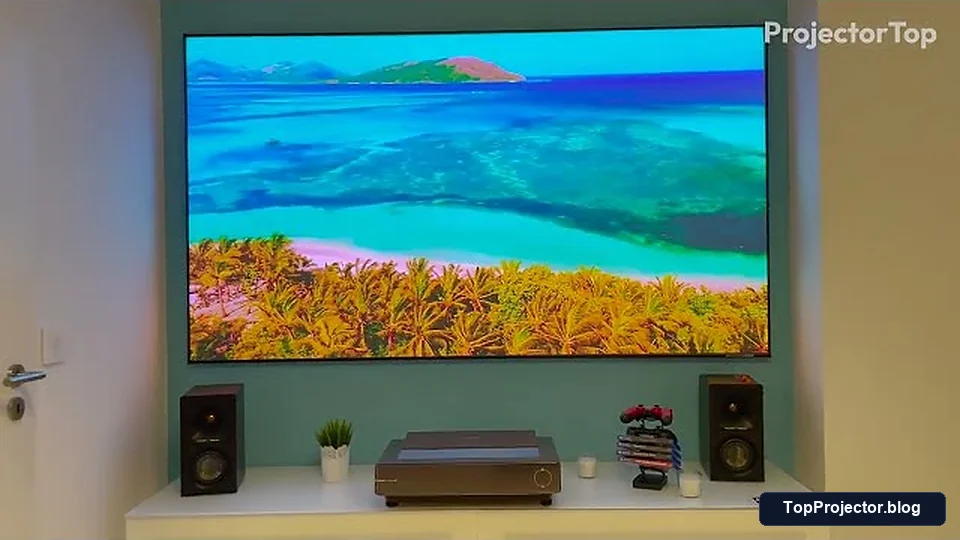
Evaluating the internal light engines reveals generational upgrades in optical efficiency. The newer model refines phosphor wheel allocation to boost luminous efficacy without sacrificing native color purity during extended viewing sessions.
Moving from the older ALPD 4.0 architecture to the upgraded Trichroma laser engine in the newer model dramatically improves color separation and reduces optical speckle across high-gain ALR screens.
- Solid-state laser light sources eliminate costly lamp replacements.
- Thermal management systems protect delicate internal optics during marathon sessions.
- Generational shifts improve overall photon delivery efficiency across the projection path.
TriChroma Laser Implementation
Hisense relies on pure triple-laser technology to saturate wide color spaces without utilizing degrading color filters. This design achieves phenomenal color volume across standard cinema curves.
Laser speckle reduction layers are integrated carefully into both optical paths to minimize shimmering artifacts on smooth ALR projection screen surfaces.
- Pure triple-laser diodes bypass the need for mechanical color wheels.
- Integrated speckle reducers preserve fine texture details on matte screens.
RGB Triple-Laser Diode Lifespan
These durable diode arrays also inspire models found in our best portable movie projector roundups, delivering a rated lifespan exceeding 25,000 hours of maintenance-free cinema enjoyment.
Peak Brightness, Lumen Output, and Ambient Light Handling
Fighting daytime glare in an open living room demands serious optical power from any ultra-short-throw projector. Measured ANSI lumen ratings dictate how well your projected image cuts through competing windows and lamps.
The newer iteration delivers a substantial lift in light output, making daytime sports viewing significantly more viable without needing motorized blackout shades drawn tightly across every nearby window.
Real-world ANSI measurements show a notable jump from 2400 lumens on the older chassis to 3000 lumens on the newer flagship, dramatically enhancing performance against ambient living room reflections.
- Higher ANSI lumens directly improve daylight contrast perception in open spaces.
- Proper ambient light rejecting screens remain mandatory for optimal daytime performance.
- Increased brightness prevents washed-out highlights during sunlit afternoon broadcasts.
Living Room Daylight vs Controlled Media Rooms
When testing legacy setups using hardware covered in our how to connect laptop to projector with vga cable guide, the extra headroom of the newer model prevents images from looking milky and washed out.
Dedicated window treatments allow the older variant to punch above its weight, maintaining rich cinematic tone curves without pushing the laser diodes toward maximum thermal stress.
- Sunlit rooms require maximum available luminous flux to maintain image saturation.
- Controlled dark rooms allow lower light modes to extend laser diode lifespan.
ALR Screen Pairing Math
Pairing these ultra-short-throw projectors with a specialized ceiling-light-rejecting screen with a 0.6 gain rating ensures optimal black level retention even with overhead recessed lighting fully activated.
Black Floor Performance, Contrast Ratios, and Shadow Detail
Achieving deep, convincing blacks remains one of the hardest engineering challenges for ultra-short-throw projection systems. Native contrast relies heavily on micromirror chip efficiency and internal light trap design.
While the brighter model wins daylight battles, the older unit maintains competitive black floor depth in pitch-black environments where excessive brightness can occasionally elevate perceived background grayness.
Native contrast improvements allow the newer iteration to resolve intricate shadow details much better than its predecessor, maintaining deep black levels without crushing dark cinematic sequences in a darkened room.
- Native contrast defines the perceived depth of cinematic night scenes.
- Aggressive dynamic iris algorithms can crush subtle shadow details if calibrated poorly.
- ALR screen selection heavily influences final black level performance in lit rooms.
Shadow Extraction in Dark Cinematic Environments
Watching moody sci-fi thrillers requires precise gamma tracking to preserve actors' faces hidden within dark, shadowed alleyways and moody interior set designs.
As noted in our Optoma GT2000HDR review, fine-tuning local dimming and laser power profiles lets enthusiasts extract hidden gradient steps without introducing distracting artifacts.
- Gamma calibration ensures dark scenes reveal intended artistic nuance.
- Avoid excessive dynamic contrast settings that crush subtle shadow gradients.
Dynamic Contrast Optimization
Advanced frame-by-frame laser dimming algorithms instantly lower output during dark transitions, pushing dynamic contrast ratios past 3,000:1 for vastly superior midnight-movie immersion and depth.
Color Gamut Coverage, Calibration, and HDR Tone Mapping
Accurate color reproduction separates premium home theater displays from basic office presentation tools. Both projectors target extensive color spaces, easily covering demanding cinematic gamuts out of the box.
Advanced HDR tone mapping processors analyze incoming metadata frame by frame, dynamically adjusting highlight clipping to preserve brilliant specular highlights in challenging high-dynamic-range video streams.
Achieving over 110% BT.2020 color gamut coverage means both units render saturated wide-gamut content accurately, though out-of-the-box grayscale tracking requires minor manual white balance tweaks for reference accuracy.
- Wide color gamut coverage renders vibrant neon signs and natural foliage accurately.
- Dynamic HDR tone mapping prevents bright clouds from blowing out into pure white.
- Professional calibration unlocks reference-grade grayscale tracking for purists.
HDR10 and Dolby Vision Performance
Support for advanced metadata formats ensures compatible streaming titles look remarkably vivid, mapping bright visual elements precisely to the projector's maximum capabilities.
Color temperature presets require minor tweaking during initial setup to achieve natural skin tones without unwanted blue or green color casts.
- Dolby Vision metadata optimizes every scene for the specific optical engine.
- Accurate white balance presets eliminate distracting skin tone discoloration.
Dolby Vision Tone Mapping
Dynamic metadata handling via built-in Dolby Vision support ensures highlights retain specular pop without clipping bright clouds or fiery explosions during demanding HDR10 streams.
Input Lag, Motion Smoothing, and Console Gaming Competence
Modern ultra-short-throw projectors double as massive gaming displays, replacing traditional flat-panel televisions for immersive living room setups. Low input lag is critical for competitive twitch-based gameplay.
Signal processing speeds have improved noticeably, ensuring quick controller inputs translate instantly on screen without frustrating latency penalties during fast-paced competitive multiplayer matches.
Competitive gamers will notice a substantial input lag drop down to 18ms in 4K/60Hz mode on the newer release, significantly improving responsiveness during fast-paced competitive shooter titles.
- Low input lag ensures seamless responsiveness in fast competitive shooter titles.
- Motion interpolation modes smooth out judder during fast camera pans.
- Dedicated game modes bypass unnecessary video processing filters to save milliseconds.
High Refresh Rate Action and Motion Handling
Fast-moving objects can suffer from blurring if response times lag behind rapid pixel transitions. Both units handle standard console frame rates admirably well during marathon sessions.
Enabling dedicated low-latency gaming presets disables complex image processing pipelines, dropping response times significantly to satisfy demanding console and PC gamers alike.
- Bypassing internal video processing eliminates frustrating controller latency.
- Smooth motion handling prevents eye strain during frantic action sequences.
MEMC and Frame Interpolation
Adjustable MEMC settings minimize judder on 24fps film sources, though competitive players should disable motion processing entirely to prevent unwanted artifacts during intense controller inputs.
Ultra-Short-Throw Geometry, Throw Ratios, and Physical Installation
Installing an ultra-short-throw projector demands precision furniture placement because tiny alignment errors distort screen geometry drastically. The ultra-short throw ratio lets you sit mere inches from the wall.
Using our throw distance calculator, installers can easily pair motorized focus options and geometric correction tools to dial in a perfectly rectangular image without endless manual adjustments.
Featuring an ultra-short throw ratio of 0.25:1, both systems project a massive 120-inch diagonal image from mere inches away from the wall, simplifying tight media console cabinet setups.
- Ultra-short throw ratios eliminate shadows cast by walking viewers.
- Precise cabinet placement is mandatory for achieving flawless edge-to-edge focus.
- Geometric correction tools help square up imperfect wall or screen alignments.
Cabinet Placement and Screen Matching
Pairing these projectors with a specialized ambient light rejecting screen designed specifically for ultra-short-throw geometry guarantees optimal optical results and contrast enhancement.
Cabinet depth must accommodate the projector's chassis dimensions while positioning the lens at the exact manufacturer-specified distance from your vertical mounting surface.
- Specialized UST screens prevent overhead ceiling light from washing out images.
- Accurate cabinet positioning ensures the entire projection surface fills evenly.
Geometrical Focus Alignment
Electronic multi-point keystone and precise motorized focus adjustments allow installers to dial in sharp geometric alignment without physically repositioning heavy credenzas or optical projector mounts.
Scenario-Based Verdicts for Dedicated Theaters and Bright Living Rooms
Selecting the correct projector ultimately depends entirely on your specific room lighting conditions and viewing priorities. Ambient light destroys contrast unless your hardware provides enough sheer optical output.
Evaluate your daily viewing schedule carefully before purchasing, ensuring your investment matches the actual lighting environment where the projector will live permanently.
Dedicated home theater enthusiasts prioritizing absolute black floor performance will find the upgraded processing engine easily justifies the transition to the newer flagship architecture.
- Match projector brightness specifications directly to your room's ambient light levels.
- Consider dedicated dark theater performance if you control all windows completely.
- Factor in screen pairing costs when planning your total room installation budget.
The Final Buying Recommendation
Choose the Px3 Pro if your room features uncontrolled windows and you demand maximum daytime brightness for sports and casual family television viewing.
Opt for the Px2 Pro if you maintain a pitch-black dedicated home theater where absolute black floor performance and cinematic color accuracy matter most.
- Bright living rooms heavily favor the higher lumen output of the newer model.
- Dedicated dark rooms maximize the value of the older, contrast-focused variant.
Bright Living Room Deployment
Casual viewers tackling sun-drenched family spaces should lean heavily toward the higher 3000-lumen output variant to combat washing out during intense daytime sports and television broadcasts.
Frequently Asked Questions
Can I use these ultra-short-throw projectors on a plain white living room wall?
While standard walls work in a pinch, pairing either projector with a specialized ALR screen is mandatory for achieving good contrast in daylight. Untreated walls reflect ambient light and wash out colors severely.
How long do the solid-state laser light sources typically last under daily use?
Both models feature reliable laser diode engines rated for 25,000 hours of operation. This lifespan easily translates to years of heavy daily viewing without ever requiring costly replacement lamps.
Do these projectors support high refresh rate gaming from modern consoles?
Yes, both units handle standard console frame rates smoothly while offering dedicated low-latency game modes. The newer iteration includes optimized processing speeds for even more responsive competitive play.
Is professional optical calibration necessary to get accurate colors out of the box?
Out-of-the-box filmmaker and movie presets offer surprisingly accurate color fidelity for casual viewing. However, a professional calibration unlocks reference-grade grayscale tracking for dedicated home theater enthusiasts.
What is the primary physical difference when mounting these two projector models?
Both share similar ultra-short throw geometries and cabinet footprints designed for media consoles. The newer model introduces refined motorized focus options that simplify fine-tuning image sharpness during setup.