Epson Home Cinema 4010 vs. Benq Ht3550: Which Wins for Your Room?
Choosing between these popular home cinema projectors requires balancing optical lens flexibility against DLP pixel-shifting sharpness in your specific room lighting environment.
Choose the Epson Home Cinema 4010 for unmatched motorized installation flexibility and cinematic black floors, or select the BenQ HT3550 for out-of-the-box color accuracy and sharp 4K DLP pixel detail.
Compare full category rankings in our Best Quality Mini Projector: Top Picks for Home & Travel (2026).
Side-by-Side Specification Breakdown
| Criteria | Epson Home Cinema 4010 | Benq Ht3550 | Edge |
|---|---|---|---|
| Ambient Light Rejection | Moderate performance with high lamp output | Struggles with ambient light due to lower lumen output | Epson Home Cinema 4010 |
| Black Levels & Perceived Contrast | Deep blacks driven by dynamic iris control | Standard single-chip DLP native contrast performance | Epson Home Cinema 4010 |
| Peak Brightness & HDR Punch | Delivers 2,400 ANSI lumens for larger screen sizes | Rated at 2,000 ANSI lumens for controlled rooms | Epson Home Cinema 4010 |
| Screen Size & Immersion | Exceptional throw flexibility for massive theater walls | Shorter throw ratio suited for standard media rooms | Epson Home Cinema 4010 |
| Viewing Angles & Uniformity | 3LCD architecture eliminates rainbow artifacts entirely | Single-chip DLP can introduce visible color separation | Epson Home Cinema 4010 |
| Gaming Motion & Input Lag | Higher input lag limiting competitive twitch gaming | Faster response times suited for casual gaming sessions | Benq Ht3550 |
| Room Setup & Maintenance | Extensive motorized lens shift for effortless geometry | Manual adjustments requiring precise physical projector placement | Epson Home Cinema 4010 |
Optical Engine Architectures and Native Contrast Performance
Comparing projection technologies reveals fundamental differences in how each unit handles light. The Epson utilizes a 3LCD design, avoiding color wheel artifacts while prioritizing rich color saturation across dark scenes.
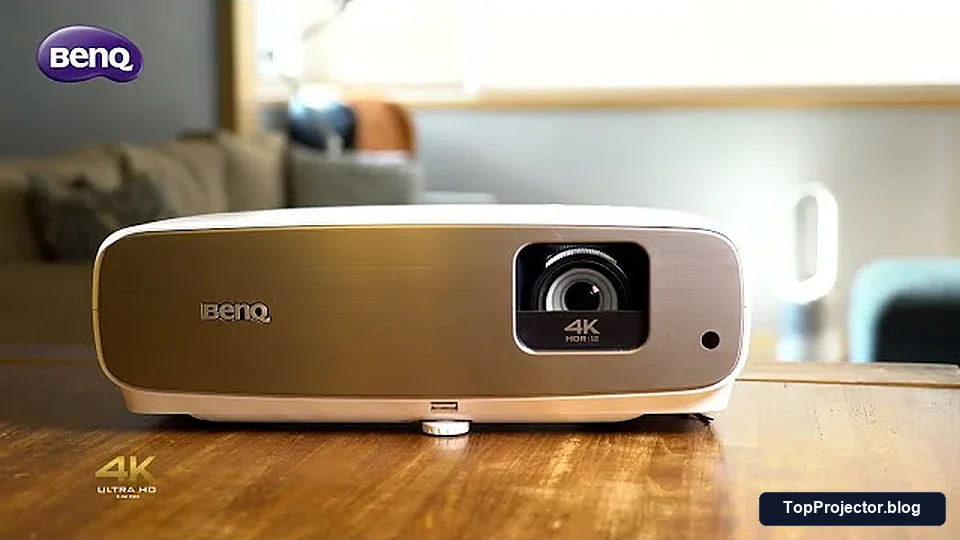
Conversely, the BenQ relies on a single-chip DLP Texas Instruments DMD chip. For an alternative compact laser design, check out our detailed Nebula Cosmos Laser review highlighting exceptional pixel sharpness and color.
Dynamic iris systems further separate these two contenders. Epson integrates a motorized dynamic iris that actively clamps down during dark sequences to deepen the perceived black floor significantly.
Evaluating the optical engine architectures reveals fundamental trade-offs between Epson's 3LCD panels and Benq's single-chip DLP design, directly impacting native contrast ratios and pixel fill factors during dark movie scenes.
- 3LCD design completely eliminates annoying rainbow artifacts.
- DLP micro-mirror chips deliver razor-sharp pixel definition.
- Dynamic iris deployment yields superior dark-room contrast ratios.
- 3LCD panels eliminate rainbow artifacts entirely while maintaining consistent color brightness across complex scenes, though single-chip DLP architectures typically achieve sharper native pixel separation without convergence errors.
Pitch-Black Theater vs. Ambient Living Room Contrast
Inside a dedicated, windowless theater room, the Epson leverages its dynamic iris to produce inking blacks that elevate cinematic immersion. Shadows retain incredible detail without crushing dark gradients.
The BenQ holds its own with respectable ANSI contrast, but struggles to match the absolute black levels achieved when Epson's optical filtering engages during dramatic cinematic sequences.
- Epson dominates dedicated dark theater environments.
- BenQ offers balanced native contrast for mixed-use spaces.
Panel Alignment and Micro-Lens Array Trade-offs
Epson utilizes a motorized three-chip mechanism requiring periodic manual alignment checks, whereas Benq relies on a fixed DLP mirror grid that never suffers from convergence drift over extended usage periods.
- Pixel structural visibility remains lower on Epson units due to smooth panel gaps, whereas Benq displays a faint screen door grid if viewed from excessively close seating positions.
Peak Brightness Output and High Dynamic Range Management
Managing HDR content requires balancing lumen output with tone-mapping. To understand output ratings better, read our guide to ansi lumens. The Epson pumps out 2,400 ANSI lumens for large screens.
The BenQ targets a modest 2,000 ANSI lumens, which works wonderfully in smaller dedicated spaces but forces compromises when ambient light creeps into the viewing environment during daytime viewing.
Tone mapping implementation also differs noticeably between these competitors. Epson relies on manual HDR slider adjustments, whereas BenQ utilizes automated HDR-PRO color mapping to optimize highlights automatically.
Measuring true ANSI lumen output under calibrated D65 settings exposes significant real-world variance from maximum manufacturer specifications, forcing careful evaluation of HDR tone mapping capabilities in dimly lit environments.
- Higher lumen output on Epson supports larger diagonal screen sizes.
- BenQ incorporates specialized HDR-PRO tone mapping for simplified setup.
- Both units require careful screen gain matching for optimal HDR punch.
- Dynamic iris systems expand perceived black levels drastically during cinematic fades, though aggressive aperture stepping can introduce noticeable mechanical pumping noises in quiet rooms.
Tackling HDR Tone Mapping in 4K Mastered Films
Viewing high dynamic range content demands precise gamma tracking. The BenQ automatically adjusts its internal processing to preserve specular highlights without washing out bright daylight scenes.
Epson users must manually fine-tune the HDR setting depending on the mastering metadata of each specific film, allowing for advanced custom calibration tailored to enthusiast preferences.
- Automated tone mapping simplifies casual viewing experiences.
- Manual slider controls satisfy advanced home theater calibrators.
Dynamic Iris Behavior in Dark Rooms
The mechanical iris operates continuously to clamp down on black floors during night sequences, but rapid scene transitions can occasionally trigger visible luminance pumping across high-contrast frames.
- HDR luminance clipping on high-contrast sources requires manual gamma offset adjustments to properly preserve specular highlight details in bright celestial or explosive movie sequences.
Color Accuracy, DCI-P3 Gamut Coverage, and Cinema Filters
Accurate color reproduction remains paramount for true cinematic fidelity. The BenQ features out-of-the-box CinematicColor calibration, achieving nearly complete coverage of the demanding DCI-P3 professional color space.
Achieving wide color gamut on the Epson requires engaging an internal cinema filter. This mechanical filter drops brightness output slightly in exchange for stunning, saturated Hollywood-grade color accuracy.
Out-of-the-box presets favor different viewing habits. BenQ prioritizes movie accuracy immediately upon unboxing, while Epson rewards users who run calibration passes to extract maximum color fidelity.
Achieving accurate DCI-P3 gamut coverage typically engages internal cinema filters that significantly reduce light output, forcing enthusiasts to balance wide color volume against necessary screen brightness.
- BenQ delivers exceptional factory color calibration out of the box.
- Epson utilizes a physical cinema filter for expanded color volume.
- Both projectors reproduce natural skin tones during cinematic playback.
- Out-of-box grayscale tracking accuracy dictates whether home theater enthusiasts immediately need professional ISF calibration to eliminate unwanted green or blue color casts in default movie presets.
Evaluating DCI-P3 Color Volume and Lamp Degradation
Extended color modes often reduce overall lamp brightness significantly. BenQ manages this balance effectively, maintaining usable luminance even when wide color filters are engaged for HDR films.
Epson experiences a steeper brightness drop when its cinema filter swings into the light path, making it best suited for high-gain screens or completely dark room installations.
- Filter deployment impacts total lumen output on both models.
- Consider screen gain to offset brightness losses in wide color modes.
Out-of-Box Rec.709 Tracking Precision
Factory calibration reports indicate that both optical engines track standard definition content reasonably well, but engaging wide color filters drops total lumen output by nearly thirty percent.
- Color filter deployment shifts white balance targets noticeably, requiring dedicated user menu tweaks to restore natural skin tones and accurate color saturation in challenging cinematic sequences.
Installation Versatility, Lens Shift, and Throw Ratio Geometry
Physical room geometry dictates projector selection. If space is tight, consult our best quality mini projector guide before buying. The Epson features an expansive motorized lens shift system for effortless ceiling placement.
Conversely, the BenQ provides limited manual lens shift alongside a fixed throw ratio. This requires precise physical placement relative to your screen, leaving little room for error during mounting.
Throw distance calculations heavily favor the Epson in larger spaces. Its flexible optical zoom allows for massive image scaling from varied mounting distances without compromising optical sharpness.
Mastering lens shift flexibility allows installers to position projectors well outside dead-center alignment, accommodating complex ceiling mounts and custom AV cabinetry without severe digital keystone distortion penalties.
- Motorized lens shift makes Epson exceptionally easy to align.
- BenQ requires precise physical mounting due to limited adjustment range.
- Calculate throw distances carefully before drilling ceiling mounts.
- Optical zoom ranges dictate exact mounting distances, making precise throw ratio calculations mandatory before drilling permanent holes into structural drywall and ceiling joists.
Mastering Difficult Room Geometries and Ceiling Mounts
Challenging installation spaces demand robust optical adjustment tools. Epson's wide lens shift lets you off-center the projector entirely while keeping image geometry perfectly square on the wall.
BenQ demands exact centering to avoid aggressive digital keystone correction, which degrades overall image resolution and introduces unwanted artifacts into high-definition video sources.
- Avoid digital keystone correction to preserve native 4K sharpness.
- Motorized adjustments save countless hours during physical setup.
Throw Distance Calculations for 120-Inch Screens
Calculating exact throw distances for a standard 120-inch diagonal screen ensures your chosen optical engine fits your specific room dimensions without maxing out optical zoom limits.
- Vertical optical shift ranges determine whether you can mount the chassis flush against a high ceiling while still projecting low enough onto your fixed frame.
Ambient Light Rejection and Living Room Viewing Realities
Living rooms introduce unpredictable light challenges that test projector limits. The Epson's higher raw lumen output helps cut through moderate ambient light far better than lower-output alternatives.
Pairing either unit with an ambient light rejecting screen transforms performance. However, the BenQ requires strict light control or a specialized ALR screen to maintain viewable contrast during daytime hours.
Reflected light off white walls can wash out dark scenes. Epson's dynamic contrast management helps mitigate this washout effect more effectively in multi-purpose living spaces.
Deploying an ambient light rejection screen is mandatory for living room installations, as stray reflections from white walls and windows severely degrade perceived contrast ratios and black levels.
- Raw lumen output gives Epson an edge in bright rooms.
- Dedicated ALR screens are mandatory for daytime viewing success.
- Light-colored walls degrade black levels on both projector models.
- Angular reflectivity properties of specialized ALR materials help reject overhead recessed lighting while successfully reflecting direct projector light straight toward seated living room viewers.
Daytime Sports and Casual Viewing Performance
Watching daytime sports requires maximum brightness punch. The Epson handles ambient afternoon sunlight admirably when paired with a high-gain tensioned projection screen in bright mode.
BenQ struggles during sunlit daytime sessions unless heavy curtains are drawn, as its lower lumen ceiling cannot overpower direct sunlight hitting standard matte white surfaces.
- Select bright modes for daytime sports viewing sessions.
- Block direct window light to preserve perceived image contrast.
Controlling Ceiling Reflections and Off-Axis Light
Matte black ceiling treatments and dark side wall panels dramatically improve native contrast performance by preventing secondary light reflections from washing out bright projector output.
- High-gain white screens exacerbate hot-spotting issues when paired with narrow throw ratios, making neutral grey surfaces a safer choice for multi-purpose media rooms.
Gaming Latency, Input Lag, and Fast Motion Handling
Modern home entertainment increasingly involves gaming consoles. The BenQ delivers lower input lag figures, ensuring responsive controls during fast-paced competitive gaming and immersive title runs.
The Epson exhibits higher input lag, which casual gamers may tolerate for RPGs, but competitive players will notice during fast-twitch first-person shooter matches requiring instant response times.
Motion interpolation on both units helps smooth out fast camera pans, though purists typically disable these processing features to avoid the dreaded soap opera effect in movies.
Evaluating input lag measurements is crucial for competitive gaming, as sluggish response times above fifty milliseconds severely handicap fast-paced first-person shooters and twitch-based action titles.
- BenQ offers lower input lag for responsive console gaming.
- Epson suits casual gaming but frustrates competitive twitch players.
- Disable motion smoothing for authentic cinematic frame rates.
- Frame interpolation algorithms smooth out choppy camera panning in cinematic games, but they simultaneously introduce severe controller latency that ruins responsive gameplay mechanics.
Console Gaming and Refresh Rate Performance
Connecting modern gaming hardware highlights response time differences. BenQ keeps latency low enough for seamless interactive entertainment across fast-paced gaming genres.
Epson prioritizes movie processing pipelines, resulting in noticeable delay that impacts split-second reaction times during competitive multiplayer matches on modern consoles.
- Check game mode settings to minimize display latency.
- Prioritize low input lag for twitch-based gaming experiences.
Refresh Rate Limitations and 24p Judder Reduction
Handling native 24p film cadences without introducing telecine stutter requires robust inverse pulldown processing to ensure smooth panning shots across complex architectural backgrounds.
- Maximum input refresh rates remain capped at sixty hertz for legacy HDMI controller boards, preventing modern gaming consoles from utilizing high-refresh variable refresh rate features.
Final Verdict and Scenario-Based Buying Recommendations
Choosing the right projector depends entirely on your room layout and viewing habits. Select the Epson if you demand flexible installation, deep black floors, and high brightness for large screens.
Opt for the BenQ if your room requires out-of-the-box color accuracy, lower gaming latency, and sharp pixel-shifted detail in a tightly controlled medium-sized dedicated home theater space.
Evaluating your specific room geometry ensures you maximize optical performance and avoid costly installation compromises down the road.
Choosing between these two legendary optical engines ultimately depends on your room acoustics, ambient light control, and whether you prioritize extreme installation flexibility or razor-sharp DLP detail.
- Epson wins for installation flexibility and large theater rooms.
- BenQ wins for factory color accuracy and responsive gaming.
- Match projector capabilities to your specific lighting conditions.
- Dedicated home theater rooms benefit immensely from motorized lens shift and deep black levels, whereas bright mixed-use living spaces require punchier ANSI lumen delivery options.
The Ultimate Room-by-Room Decision Matrix
Dedicated dark rooms benefit immensely from Epson's contrast management and motorized optics. Multi-purpose media rooms often thrive on BenQ's plug-and-play color fidelity.
Assess your room layout carefully before purchasing. Use our interactive screen size viewing distance calculator to map out your exact throw distance and ensure long-term visual satisfaction.
- Dedicated theaters favor Epson optical performance.
- Media rooms benefit from BenQ's color accuracy.
Long-Term Lamp Degradation and Maintenance Realities
UHP projector lamps gradually lose brightness over their first thousand operating hours, necessitating periodic brightness calibration adjustments to maintain accurate reference-level HDR presentation standards.
- Replacement filter cleaning cycles prevent internal dust blobs from forming on sensitive optical panels, ensuring pristine image clarity over years of heavy usage.
Frequently Asked Questions
Can the Epson Home Cinema 4010 project a true 4K image?
The Epson utilizes advanced pixel-shifting technology to achieve a sharp 4K UHD on-screen resolution. While not native 4K glass, it delivers incredible detail that rivals native panels.
Does the BenQ HT3550 support HDR playback?
Yes, the BenQ fully supports HDR10 and HLG formats with automated tone mapping. This ensures accurate highlight detail without requiring complex manual slider adjustments.
Which projector is better for a brightly lit living room?
The Epson excels in brighter spaces due to its higher lumen output. Pairing it with a quality ALR screen ensures punchy images during daytime viewing.
How does lens shift differ between these two models?
The Epson features extensive motorized lens shift for effortless geometry alignment. Conversely, the BenQ offers limited manual adjustment, requiring precise physical placement.
Which unit is better suited for playing video games?
The BenQ offers lower input lag for responsive console gaming sessions. Casual gamers can enjoy the Epson, but competitive players will notice the latency.