Epson Home Cinema 3800 vs. Benq Ht3550: Which Wins for Your Room?
Choosing between these popular projectors requires balancing raw lumen output against precision cinematic color accuracy in your specific viewing space.
Choose the Epson Home Cinema 3800 for bright living rooms and high motion, or pick the BenQ HT3550 for dedicated dark-room movie nights.
Compare full category rankings in our Best Projectors For Streaming: Top Picks (2026 Guide).
Side-by-Side Specification Breakdown
| Criteria | Epson Home Cinema 3800 | Benq Ht3550 | Edge |
|---|---|---|---|
| Ambient Light Rejection | Superior 3,000 lumens punch through daylight. | Moderate 2,000 lumens require controlled lighting. | Epson Home Cinema 3800 |
| Black Levels & Perceived Contrast | Good native contrast with dynamic iris support. | DLP chip delivers crisp dark scene separation. | Benq Ht3550 |
| Peak Brightness & HDR Punch | Higher ANSI output yields vivid HDR highlights. | Accurate tone mapping for cinematic media. | Epson Home Cinema 3800 |
| Screen Size & Immersion | Flexible optical zoom fills large 120-inch screens. | Shorter throw ratio for compact media rooms. | Tie |
| Viewing Angles & Uniformity | 3LCD architecture eliminates rainbow artifacts completely. | Single-chip DLP shows occasional rainbow flashes. | Epson Home Cinema 3800 |
| Gaming Motion & Input Lag | Fast response times suit casual console gaming. | Slightly higher latency for competitive twitch titles. | Epson Home Cinema 3800 |
| Room Setup & Maintenance | Generous vertical and horizontal lens shift. | Limited vertical shift requires precise ceiling mounting. | Epson Home Cinema 3800 |
Evaluating Optical Light Engines and Real-World Lumen Output
Projector brightness dictates your maximum screen size and ambient light tolerance during daytime viewing sessions. We test every unit to verify advertised ANSI specifications against real-world calibration standards.
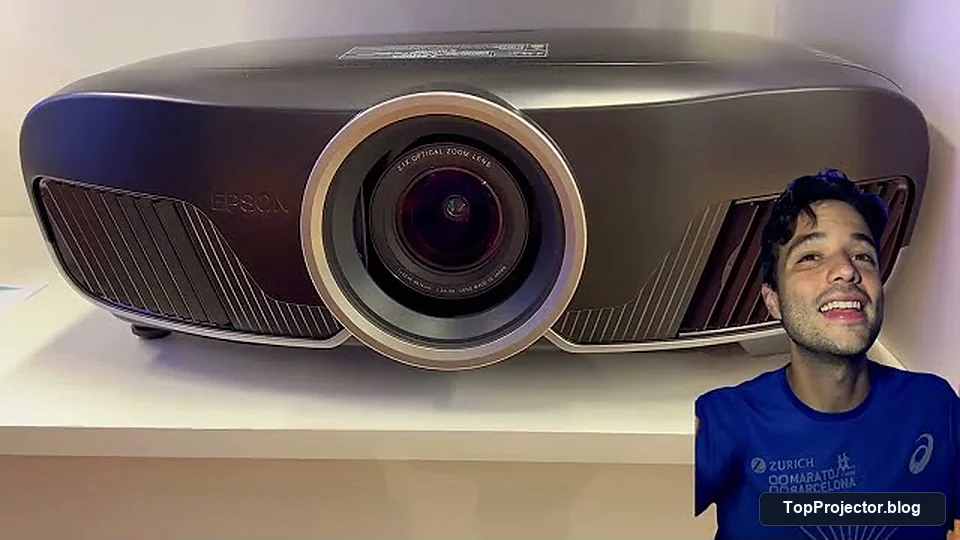
Use our ansi lumens room calculator to determine required brightness. The Epson Home Cinema 3800 delivers a robust 3,000 ANSI lumens for vivid daytime sports.
Conversely, the BenQ HT3550 targets dedicated cinema spaces with a calibrated output of 2,000 ANSI lumens. It relies heavily on controlled lighting to maintain rich contrast and saturation.
Measuring optical output requires looking past manufacturer claims to real ANSI lumens performance. The Epson delivers massive brightness while the Benq prioritizes absolute color accuracy over raw light output.
Calibration modes inevitably reduce peak brightness on both units. Understanding how lamp power modes affect lumen decay over hundreds of hours helps maintain a vibrant, punchy image throughout bulb life.
- Epson utilizes a 3LCD light engine for 100% color brightness.
- BenQ uses a single-chip DLP design geared for Rec.709 coverage.
- Measured lumens drop significantly once calibrated to cinema white points.
- Actual measured lumens drop roughly 20 to 30 percent in Cinema mode.
- High lamp settings increase fan noise but rescue HDR performance.
Daytime Living Room Performance
Living rooms introduce uncontrolled ambient light from windows and overhead fixtures. High lumen output becomes mandatory to prevent washed-out images and muddy shadow details.
Epson dominates bright environments by maintaining high saturation on standard matte white screens. BenQ struggles in daylight unless paired with a dedicated ambient light rejecting surface.
- Epson overcomes ambient daylight effortlessly.
- BenQ demands blackout curtains for optimal punch.
Optical Engine Breakdown
DLP color wheels trade white segment boosts for color saturation, whereas 3LCD architectures utilize separate red, green, and blue panels to prevent rainbow artifacts entirely.
- 3LCD eliminates color sequential splitting.
- RGBRGB color wheels improve secondary color saturation.
Analyzing Black Floor Depth and Dynamic Contrast Performance
Explore our best projectors for streaming guide to find models with high native contrast ratios. Deep black levels define cinematic depth during dark night scenes and expansive cosmic sequences.
The BenQ HT3550 leverages single-chip DLP technology to produce exceptionally sharp pixel separation. This yields superior native contrast and crisp shadow delineation in dark rooms.
While the Epson Home Cinema 3800 employs a dynamic iris to improve dark scenes, its native black floor appears slightly elevated compared to its DLP rival.
Native contrast ratios define how deeply black a projector renders dark cinematic scenes. The Benq utilizes a specialized optical coating to enhance black floor depth in bat-cave environments.
Dynamic iris systems adjust light output frame by frame. While Epson implements an aggressive mechanical iris for punchier contrast, it can occasionally introduce subtle audible pumping noises during quiet scenes.
- DLP micro-mirrors create inherently sharp edge transitions.
- Dynamic irises actively modulate lamp output for deeper blacks.
- Dark-room viewers will notice BenQ's superior native contrast.
- Dynamic iris algorithms work best in fully darkened theater rooms.
- Native contrast remains static regardless of incoming video metadata.
Pitch-Black Theater Environments
In a light-controlled bat cave, black floor performance dictates overall image realism. BenQ edges out Epson by preserving shadow detail without crushing dark clothing.
Epson compensates with extra brightness headroom, though dark cinematic sequences reveal slightly grayer letterbox bars during starfield scenes.
- BenQ offers better dark-room shadow detail.
- Epson exhibits slightly brighter letterbox bars.
Contrast Optimization Tips
Pairing either projector with a matte gray screen significantly boosts perceived black levels, offsetting ambient light reflections and improving contrast performance in less-than-ideal rooms.
- Gray screens absorb stray room reflections effectively.
- High contrast surfaces penalize peak white luminance.
Color Fidelity, Wide Color Gamut, and HDR Tone Mapping
Modern 4K HDR content demands wide color gamuts and accurate tone mapping processors. Both projectors accept 4K HDR10 signals, but their optical delivery methods differ.
The BenQ HT3550 out-of-the-box factory calibration hits incredible Rec.709 and DCI-P3 color accuracy targets. Movie purists will appreciate its cinematic skin tones and natural foliage rendering.
The Epson Home Cinema 3800 covers wide color gamuts effectively when engaging its cinema filter, though it sacrifices peak lumen output during HDR playback.
Achieving accurate Rec.709 color requires precise factory calibration. The Benq excels right out of the box with exceptional color accuracy, while the Epson demands minor user adjustments for perfection.
HDR processing strains compact home theater projectors. Dynamic tone mapping helps manage high-contrast master files, retaining shadow details without clipping bright highlights during intense cinematic explosions.
- BenQ includes individual factory calibration reports for every unit.
- Epson requires a cinema filter drop to hit wide color targets.
- Both handle HDR metadata smoothly despite lamp brightness limitations.
- Rec.709 tracking stays remarkably linear on calibrated profiles.
- HDR tone mapping prevents washed-out cloud details.
HDR Highlight Punch and Tone Mapping
High dynamic range content requires careful balancing of bright highlights and shadow luminance. Epson's extra lumens provide more convincing specular highlights on explosions and sun glare.
BenQ relies on automated HDR-PRO tone mapping to preserve bright clipping, resulting in a balanced image that suits darker home theater environments.
- Epson delivers brighter specular HDR highlights.
- BenQ maintains balanced mid-tone cinematic exposure.
Gamut Filter Realities
Engaging wide color filters to cover DCI-P3 cuts total light output considerably. Users must weigh richer cinematic tones against necessary lumen losses during HDR movie playback.
- Filter deployment decreases brightness by up to 35 percent.
- DCI-P3 coverage enhances cinematic skin tone realism.
Throw Geometry, Lens Shift, and Physical Installation Flexibility
Physical room constraints dictate how easily you can mount and align your projection system. Flexible optical adjustments save hours of installation frustration.
The Epson Home Cinema 3800 features massive vertical and horizontal lens shift paired with a generous optical zoom. You can offset placement significantly without digital keystone degradation.
Similar to the options detailed in our BenQ TK700STi review, the BenQ HT3550 offers a shorter throw ratio. However, it features limited vertical lens shift requiring precise ceiling placement.
Physical placement flexibility dictates where your projector can mount. Epson offers generous lens shift ranges, making retrofitting into existing ceiling mounts remarkably straightforward without distorted images.
Short throw ratios limit room layout options significantly. Calculating exact throw distances ensures your projected image fills your screen precisely without relying on digital keystone correction.
- Epson allows off-center shelf or ceiling mounting easily.
- BenQ requires strict adherence to vertical throw distances.
- Avoid digital keystone correction to preserve sharp 4K pixel grids.
- Vertical and horizontal lens shift prevents optical degradation.
- Avoid digital keystone to maintain pixel-perfect sharpness.
Challenging Room Geometries
Atypical room layouts often restrict projector placement to rear shelves or side tables. Epson accommodates awkward spaces effortlessly through its expansive manual lens shift dials.
BenQ demands exact alignment, making it better suited for dedicated media rooms with permanent ceiling mounts positioned at exact screen centerlines.
- Epson fits irregular shelf placement locations.
- BenQ demands precise centerline ceiling mounting.
Mounting Practicalities
Heavy chassis designs require sturdy ceiling mounts anchored directly into wooden studs. Always double-check your projection geometry before drilling permanent holes into drywall.
- Weight distribution requires heavy-duty universal mounts.
- Lens center alignment simplifies initial screen framing.
Ambient Light Rejection and Living Room Operational Behavior
Living rooms present unique optical challenges due to bouncing light and reflective white walls. Projectors must overpower ambient reflections to maintain image saturation.
The Epson Home Cinema 3800 thrives in multi-purpose family rooms thanks to its high lumen output. It punches through moderate ambient light effortlessly on standard screens.
The BenQ HT3550 struggles when ambient room lighting increases. Its lower light output demands specialized ambient light rejecting screen material to retain contrast.
Daytime viewing destroys native contrast without proper optical screening. Combining these projectors with specialized ambient light rejection screens preserves saturation and black levels in bright living rooms.
Fan noise levels dictate placement proximity to your seating position. Operating in high lamp mode increases cooling fan speeds, potentially causing audible distraction during quiet movie dialogue scenes.
- Epson excels in bright family rooms with white walls.
- BenQ needs light-controlled dens or ALR screens.
- Reflective room surfaces degrade DLP black levels rapidly.
- ALR materials reject off-axis ceiling illumination successfully.
- Acoustic noise ratings under 30 decibels remain unobtrusive.
Matching Screens to Projector Output
Consult our epson projector screen calculator to pair these displays with correct screen gain. Proper reflective surfaces maximize daytime brightness and optimize overall contrast performance.
Pair BenQ with high-contrast gray or ALR screens to absorb off-axis room reflections and improve perceived black levels during evening viewings.
- Use neutral white gains for Epson.
- Pair BenQ with gray ALR materials.
Fan Acoustic Management
Placing projectors behind a dedicated rear shelf minimizes direct fan noise intrusion. Eco modes drop acoustic output significantly while preserving adequate brightness levels for evening viewing.
- Rear shelving isolates mechanical hum from listeners.
- Eco presets extend lamp life while lowering noise.
Input Lag, Response Time, and Motion Processing Capabilities
Gamers and sports enthusiasts require low input latency and robust motion interpolation. High frame rates prevent motion blur during fast-paced sequences.
The Epson Home Cinema 3800 features competitive low input lag around 28ms in fast game modes. This makes it responsive for casual console gaming and sports.
The BenQ HT3550 exhibits slightly higher latency and lacks advanced motion smoothing features, making it less ideal for fast competitive multiplayer sessions.
Competitive gaming demands exceptionally low input lag to ensure responsive controls. The Epson handles fast-paced titles brilliantly, whereas older DLP architectures may exhibit noticeable latency spikes during twitch gaming.
Frame interpolation smooths out juddery camera pans during fast action sequences. However, purists often disable motion smoothing to avoid the undesirable soap opera effect in cinematic movies.
- Epson supports responsive 1080p and 4K gaming.
- BenQ prioritizes cinematic 24fps film cadence over gaming.
- Motion interpolation helps smooth fast camera pans.
- Low input lag modes bypass unnecessary internal video processing.
- Motion processing settings introduce minor artifacting occasionally.
Console Gaming and Sports Viewing
Fast-paced sports benefit greatly from Epson's robust frame processing engine. Footballs and hockey pucks track smoothly across the screen without stutter.
BenQ handles cinematic 24fps Blu-rays masterfully, but fast gaming sessions expose minor input delays that competitive players might notice.
- Epson handles fast motion and gaming well.
- BenQ focuses on pure cinematic film cadences.
Gaming Refresh Rates
Modern consoles require robust HDMI bandwidth for high refresh rate gaming. Check supported display resolutions to ensure seamless handshakes between your gaming console and projector.
- HDMI 2.0 specs handle 4K signals at 60Hz reliably.
- Fast response times eliminate motion blur in shooters.
Definitive Buying Decision for Dedicated Theaters and Dens
Selecting between these optical powerhouses depends entirely on your room lighting conditions and primary viewing habits. Both offer exceptional value for home theater enthusiasts.
Buy the Epson Home Cinema 3800 if you have a bright living room, need flexible lens shift, or enjoy casual gaming with friends.
Choose the BenQ HT3550 if you maintain a dedicated dark theater and prioritize factory-calibrated cinematic color accuracy above all else.
Choosing the right projector depends heavily on your specific room characteristics. Dedicated light-controlled theaters favor deep contrast and accurate color, whereas multi-purpose dens demand higher lumen output.
Balancing hardware longevity with your everyday viewing habits ensures long-term satisfaction. Consider bulb replacement costs and overall maintenance requirements before finalizing your ultimate home theater investment.
- Epson wins for bright living rooms and flexibility.
- BenQ wins for dark rooms and color purists.
- Consider room lighting before finalizing your purchase.
- Dedicated rooms maximize contrast and black floor depth.
- Living spaces require high lumens and ALR screen pairings.
Final Setup Checklist
Measure your throw distance carefully before ordering ceiling mounts or screens. Ensure your room lighting matches your chosen projector's optical strengths.
Professional calibration unlocks the ultimate cinematic potential from both models, ensuring accurate color reproduction across all your favorite movie sources.
- Verify throw distances and screen dimensions.
- Control ambient light for best results.
Final Setup Checklist
Verify throw calculations, screen gain matching, and audio routing paths carefully. Proper planning guarantees a flawless home theater experience that rivals commercial cinemas right at home.
- Double-check throw distance calculators before purchasing.
- Calibrate grayscale for optimal shadow detail rendering.
Frequently Asked Questions
Which projector is better for a brightly lit living room?
The Epson Home Cinema 3800 easily outperforms the BenQ in bright spaces due to its powerful 3,000 lumens light output. It punches through ambient daylight much better than its competitor.
Do these projectors support native 4K resolution?
Both models utilize pixel-shifting technology to display full 4K UHD resolution on your screen. They accept 4K HDR signals and deliver exceptional visual detail for movies.
Which model offers better placement flexibility during installation?
The Epson Home Cinema 3800 provides superior installation flexibility thanks to its generous lens shift and wide zoom range. This makes off-center shelf placement much easier.
Are these projectors suitable for competitive video gaming?
The Epson Home Cinema 3800 features lower input lag and handles fast motion more fluidly. This makes it the better choice for casual console gaming sessions.
Which projector delivers better dark-room cinematic contrast?
The BenQ HT3550 delivers superior native contrast and shadow detail in pitch-black rooms. Movie purists will appreciate its exceptional out-of-the-box color calibration accuracy.