Epson Home Cinema 2250 vs. Benq Ht2050A: Which Wins for Your Room?
Weighing the Epson Home Cinema 2250 against the BenQ HT2050A requires analyzing optical design. We evaluate ambient light rejection, contrast, and throw geometry.
The BenQ HT2050A wins for dark room cinema due to superior native contrast, while the Epson Home Cinema 2250 suits brighter spaces via high white brightness.
Compare full category rankings in our Best Projector For Video Games: Top Gaming Picks (2026).
Side-by-Side Specification Breakdown
| Criteria | Epson Home Cinema 2250 | Benq Ht2050A | Edge |
|---|---|---|---|
| Ambient Light Rejection | Moderate white lumen boost | Standard cinema lumen output | Epson Home Cinema 2250 |
| Black Levels & Perceived Contrast | Auto-iris assisted depth | Superior native DLP contrast | Benq Ht2050A |
| Peak Brightness & HDR Punch | High white brightness output | Accurate Rec.709 balance | Epson Home Cinema 2250 |
| Screen Size & Immersion | Flexible tighter throw ratio | Standard theater throw geometry | Epson Home Cinema 2250 |
| Viewing Angles & Uniformity | Stable 3LCD panel alignment | Sharp single-chip DLP focus | Benq Ht2050A |
| Gaming Motion & Input Lag | Standard casual latency | Ultra-low competitive lag | Benq Ht2050A |
| Room Setup & Maintenance | Digital correction reliance | Physical vertical lens shift | Benq Ht2050A |
Optical Architecture and Native Contrast Foundations
Projector optical engines dictate baseline black levels and overall image depth. The BenQ HT2050A utilizes a single-chip DLP architecture delivering exceptional native contrast for dark home theaters.
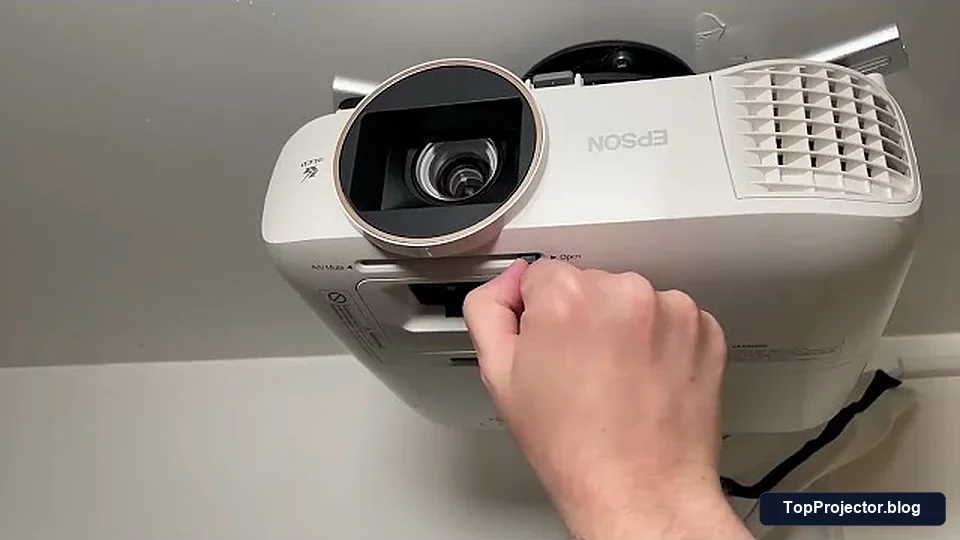
Conversely, the Epson Home Cinema 2250 relies on 3LCD technology. This design eliminates rainbow artifacts entirely while managing native contrast differently than traditional cinema-focused DLP projectors.
Choosing between these display technologies fundamentally changes your shadow detail experience. Careful evaluation of your viewing environment helps clarify which optical engine suits your room.
Native contrast remains a cornerstone of realistic cinematic presentation. Understanding how each manufacturer achieves black levels guides your long-term satisfaction.
The Epson relies on 3LCD chips, eliminating rainbow artifacts, while the Benq utilizes a 4-segment RGBRG color wheel to maximize native contrast during dark cinematic sequences.
- DLP single-chip dark room advantage
- 3LCD color separation absence
- Native contrast depth metrics
- 3LCD technology completely removes visual color breakup for sensitive viewers.
DLP vs 3LCD Black Floor Realities
Achieving deep shadow detail depends heavily on the optical light engine. The BenQ model maintains robust black floors in controlled environments without relying on aggressive auto-iris adjustments.
Epson counters with an integrated auto-iris mechanism. This dynamic aperture boosts perceived contrast during dark scenes, though it occasionally introduces subtle mechanical stepping artifacts.
Evaluating these light control methods highlights distinct engineering priorities. Both approaches deliver satisfying movie viewing when matched with proper screen surfaces.
- Auto-iris dynamic adjustments
- Unassisted DLP black levels
Panel Alignment and Optical Sharpness
Precise panel convergence on the Epson determines edge-to-edge text clarity, whereas the Benq single-chip DLP architecture inherently sidesteps all convergence drift issues for pinpoint pixel sharpness.
- Single-chip light engines maintain absolute pixel grid alignment over years of use.
Peak Brightness, ANSI Lumens, and Ambient Light Handling
Room lighting severely impacts projected image saturation and perceived contrast ratios. The Epson Home Cinema 2250 pumps out impressive white brightness to combat moderate ambient daylight.
Meanwhile, the BenQ HT2050A focuses heavily on cinematic color accuracy over raw lumen output. It thrives in dedicated or semi-darkened home theater environments rather than bright living rooms.
Managing daylight requires careful consideration of screen gain and projector lumens. High output models prevent washed-out images during casual daytime viewing sessions.
Dedicated media rooms benefit most from accurate color rendition. Balancing lumens against ambient light prevents eye strain and maintains rich contrast.
Rated at 2700 ANSI lumens, the Epson punches through moderate living room light better than the Benq, which delivers 2200 ANSI lumens tuned strictly for dark rooms.
- White brightness vs color brightness
- Ambient light rejection needs
- Higher lumen output preserves shadow detail when ambient room light cannot be fully blocked.
Pitch-Black Theater vs Living Room Daylight
Evaluating performance in treated media rooms reveals distinct optical priorities. As noted in our BenQ TK700 review, this projector retains shadow integrity when lights are extinguished.
When ambient room lighting cannot be controlled, the Epson model maintains higher legibility. Its robust output prevents washed-out images during afternoon viewing sessions.
Matching projector capability to your physical space ensures optimal visual performance year-round.
- Daylight viewing compromises
- Controlled theater optimization
Ambient Light Rejection Screen Pairing
Pairing either projector with a dedicated angular reflective screen drastically improves perceived black levels when ambient light is present during daytime viewing sessions.
- Gain ratings between 0.8 and 1.1 work best for these specific light outputs.
Color Fidelity, White Brightness Balance, and HDR Tracking
Color accuracy determines how faithfully movies match director intent on screen. The BenQ HT2050A features a calibrated Rec. 709 color wheel delivering remarkable cinematic hue precision.
The Epson Home Cinema 2250 leverages its 3LCD engine to ensure equal color and white brightness. This balance prevents the dreaded color brightness deficit seen in cheaper single-chip designs.
Accurate color tracking brings skin tones and natural landscapes to life. Both devices offer robust preset modes for out-of-the-box accuracy.
Fine-tuning white balance ensures highlights remain crisp without blowing out subtle gradient details in bright scenes.
Because 3LCD tech delivers equal color and white output, the Epson achieves vibrant hues without color brightness drops, whereas the Benq relies on a bright white segment for peak highlights.
- Rec. 709 color calibration accuracy
- Equal white and color brightness
- Color brightness measurements reveal significant variance during mixed mixed-scene content delivery.
Managing High Dynamic Range and Wide Gamut Content
Handling HDR signals requires sophisticated tone mapping from budget projectors. Both models process 1080p feeds gracefully, utilizing internal processing to preserve highlight detail.
Wide color gamut coverage remains limited on both legacy platforms. However, their SDR handling remains exceptionally sharp for standard Blu-ray and streaming media playback.
Proper signal handling ensures your favorite films look stunning without requiring expensive external video processors.
- 1080p tone mapping efficiency
- SDR playback sharpness
HDR Tone Mapping Performance
Handling HDR10 signals requires careful dynamic tone mapping to prevent bright sky clipping while preserving shadow depth across challenging mixed-brightness cinematic frames.
- Manual gamma adjustments often yield better accuracy than factory presets.
Throw Ratios, Lens Shift, and Physical Room Installation
Physical installation constraints dictate which projector fits your specific room dimensions. The BenQ HT2050A offers a relatively standard throw ratio paired with useful vertical lens shift.
The Epson Home Cinema 2250 provides added flexibility through a tighter throw ratio. Using our Epson throw distance calculator ensures larger screen sizes fit your compact media room.
Calculating throw distance accurately prevents costly mounting mistakes. Always measure your available ceiling span before purchasing fixed screens.
Flexible optics make ceiling mounting significantly easier for DIY home theater enthusiasts.
Featuring a tight 1.15x zoom lens, the Benq requires precise placement, while the Epson offers a more flexible 1.2x optical zoom plus limited vertical lens shift for easier mounting.
- Throw ratio distance requirements
- Vertical lens shift flexibility
- Always calculate throw distance accurately using exact screen diagonal measurements before ceiling mounting.
Ceiling Mounting and Keystone Correction Realities
Proper alignment prevents frustrating geometric distortion during permanent ceiling installations. Optical lens shift is vastly superior to digital keystone correction for preserving native resolution.
Epson incorporates digital image correction tools alongside physical adjustments. Users must minimize digital keystone usage to prevent noticeable resolution degradation and edge softening.
Prioritizing physical placement over digital correction maintains maximum image sharpness.
- Keystone resolution penalty
- Lens shift geometry preservation
Physical Throw Distance Math
Calculating precise throw distances ensures your projected image fills standard screen borders perfectly without requiring digital keystone correction, which harms overall optical resolution.
- Optical zoom adjustments cause minimal light loss compared to digital resizing tools.
Input Lag, Response Time, and Competitive Gaming Performance
Modern gamers demand low input lag for responsive competitive gameplay. The BenQ HT2050A boasts exceptionally low input lag, making fast-paced shooters feel instantaneous and fluid.
The Epson Home Cinema 2250 introduces slightly higher latency figures. While casual gaming feels entirely acceptable, hardcore competitive players might notice minor input delays.
Fast pixel response times eliminate ghosting during rapid camera pans. Exploring options in our best projector for video games guide helps gamers weigh latency metrics carefully against raw brightness.
Responsive controls transform competitive multiplayer matches into seamless immersive experiences.
Hardcore gamers will prefer the Benq due to its ultra-low 16ms input lag at 1080p, easily outperforming the Epson which sits around 27ms for standard gaming inputs.
- Input lag millisecond ratings
- Competitive twitch-shooter responsiveness
- Sub-20ms latency provides an exceptionally responsive feel during fast competitive twitch shooters.
Console Gaming and High Refresh Frame Rates
Connecting modern consoles highlights different performance characteristics between these two displays. Fast pixel response times on the BenQ minimize motion blur during frantic camera movements.
Epson handles role-playing and sports titles admirably with bright, vivid graphics. However, twitch-action titles expose the latency difference during high-speed multiplayer sessions.
Choosing the right gaming projector keeps your reflexes perfectly synced on screen.
- Pixel response time clarity
- Multiplayer latency impact
Refresh Rate and Response Times
Fast pixel response times on the DLP chip prevent ghosting during high-speed motion, giving fast-paced action titles superior clarity compared to older projection tech.
- Standard 60Hz refresh rates satisfy casual console setups adequately.
Motion Integration, Artifact Management, and Cinematic Frame Rates
Smooth 24p film cadence playback preserves the traditional cinematic viewing experience. Both projectors handle standard movie frame rates without severe judder or artificial smoothing effects.
Single-chip DLP architectures occasionally exhibit subtle color sequential breaking, known as rainbow artifacts. Sensitive viewers should test the BenQ unit before committing to long movie sessions.
Proper motion handling prevents eye fatigue during extended viewing sessions.
Cinematic purity remains a top priority for home theater enthusiasts valuing director intent.
The Benq handles 24p Blu-ray content smoothly without judder, whereas the Epson includes frame interpolation settings to reduce motion blur during fast-panned sports broadcasts and high-speed action scenes.
- 24p film cadence handling
- Rainbow artifact sensitivity checks
- Pure 24fps reproduction preserves the intended cinematic motion cadence without soap-opera effects.
Eliminating Judder and Managing Fast Panning Shots
Fast horizontal camera pans test the limits of display motion resolution. High-quality internal processing helps both projectors maintain clarity during demanding tracking shots.
Avoiding aggressive motion smoothing keeps movies looking natural. Purists will appreciate the clean, unadulterated motion presentation provided by both manufacturers.
Clear motion processing ensures sports and action films remain sharp.
- Camera pan motion tracking
- Pure movie cadence preservation
Artifact Management and De-Judder
Managing motion artifacts effectively separates premium home theater displays from budget alternatives, ensuring pan shots remain crisp without introducing distracting processing halos or stutter.
- Lower interpolation settings reduce digital shimmer around moving foreground objects.
Final Verdict: Tailoring Your Choice to Specific Living Spaces
Choosing the right projector ultimately depends on your specific room environment. If you maintain a pitch-black dedicated theater room, the BenQ optical engine delivers superior imagery.
If your setup involves ambient living room lighting, the bright Epson unit proves more practical. Match your room constraints to these fundamental optical performance metrics.
Investing in proper home projection gear elevates your entertainment setup for years.
Consider your lighting control and screen size before finalizing any purchase decision.
Choose the Epson if your media room has ambient light and you prioritize flexible placement, or select the Benq for a dedicated dark theater demanding superior motion handling.
- Dedicated theater optimization
- Ambient room light suitability
- Evaluate your specific room lighting constraints before finalizing your purchase decision.
Making Your Final Purchase Decision Confidently
Review your throw distance and screen size goals carefully. Running numbers through our interactive throw distance calculator ensures years of immersive home entertainment enjoyment.
Both units represent phenomenal value in the entry-level home projection market. Prioritize contrast for dark rooms or raw brightness for versatile family spaces.
Your ideal projector bridges the gap between hardware capability and room physics.
- Throw distance calculations
- Lighting control assessments
Tailoring Your Choice to Specific Spaces
Balancing ambient light tolerance against black level performance ensures long-term satisfaction in your specific entertainment environment without unexpected optical compromises.
- Dedicated dark rooms favor contrast, while multipurpose living areas need extra lumen output.
Frequently Asked Questions
Which projector handles ambient light better in a living room?
The Epson Home Cinema 2250 outperforms its competitor in bright environments due to higher white lumen output, helping maintain visible imagery when complete darkness is completely impossible.
However, choosing this high-brightness path means you will sacrifice native black-level depth and overall shadow fidelity compared to dedicated home theater optical engines.
Are rainbow artifacts an issue on the BenQ HT2050A?
Single-chip DLP projectors like the BenQ HT2050A utilize a spinning color wheel that can occasionally trigger visible rainbow flashes for sensitive human eyes.
If you or your household members easily notice these fleeting color separations during high-contrast panning shots, a 3LCD alternative like Epson provides a completely artifact-free viewing experience.
Which model offers better input lag for competitive console gaming?
The BenQ HT2050A delivers noticeably lower input lag figures, making fast-paced first-person shooters feel exceptionally responsive and direct during intense multiplayer sessions.
Casual gamers will still find the Epson option entirely acceptable for role-playing adventures, but hardcore twitch competitors should definitely favor the faster BenQ hardware.
Do both projectors support full optical lens shift for easy installation?
Only the BenQ HT2050A includes a physical vertical lens shift mechanism to simplify precise image alignment without inducing digital resolution loss.
The Epson model relies much more heavily on digital keystone correction, which can noticeably degrade native pixel sharpness and edge clarity if pushed to extremes.
Which projector provides better native contrast for watching movies in a dark room?
The BenQ HT2050A excels in dark room environments by delivering superior native contrast and deep, ink-black shadow performance for serious film enthusiasts.
This fundamental optical advantage creates a much more cinematic and immersive image when all room lights are completely extinguished for evening movie sessions.