Dlp 3Lcd Comparison vs. Standard projector: Which Wins for Your Room?
Comparing 3LCD and DLP projection technologies reveals stark differences in contrast, color brightness, and optical architecture. Choosing the right engine dictates your home theater performance.
Choose a single-chip DLP projector for pristine cinematic black levels in dark rooms, or select 3LCD models for superior color brightness and zero rainbow artifacts in ambient light.
Compare full category rankings in our Best Projector For Home Theater Under $500: Top Picks (2026).
Side-by-Side Specification Breakdown
| Criteria | Dlp 3Lcd Comparison | Standard projector | Edge |
|---|---|---|---|
| Ambient Light Rejection | Moderate performance with high lumen output | Varies by screen pairing and basic optics | Dlp 3Lcd Comparison |
| Black Levels & Perceived Contrast | Superior native contrast up to 2000:1 | Standard contrast around 1000:1 | Dlp 3Lcd Comparison |
| Peak Brightness & HDR Punch | Balanced white and color lumens | Variable output depending on lamp aging | Dlp 3Lcd Comparison |
| Screen Size & Immersion | Scalable up to 150 inches diagonal | Standard throw limitations apply | Dlp 3Lcd Comparison |
| Viewing Angles & Uniformity | Exceptional panel alignment and focus | Prism convergence drift over time | Standard projector |
| Gaming Motion & Input Lag | Ultra-low lag under 16ms at 4K | Higher latency in standard configurations | Dlp 3Lcd Comparison |
| Room Setup & Maintenance | Sealed DMD chips prevent dust blobs | Open optical paths require air filtering | Dlp 3Lcd Comparison |
Optical Engine Architecture and Core Projection Principles
Modern projection engineering relies on two distinct micro-display methodologies. Digital Light Processing utilizes microscopic mirrors on a semiconductor chip, whereas 3LCD systems split white light through dichroic glass prisms.
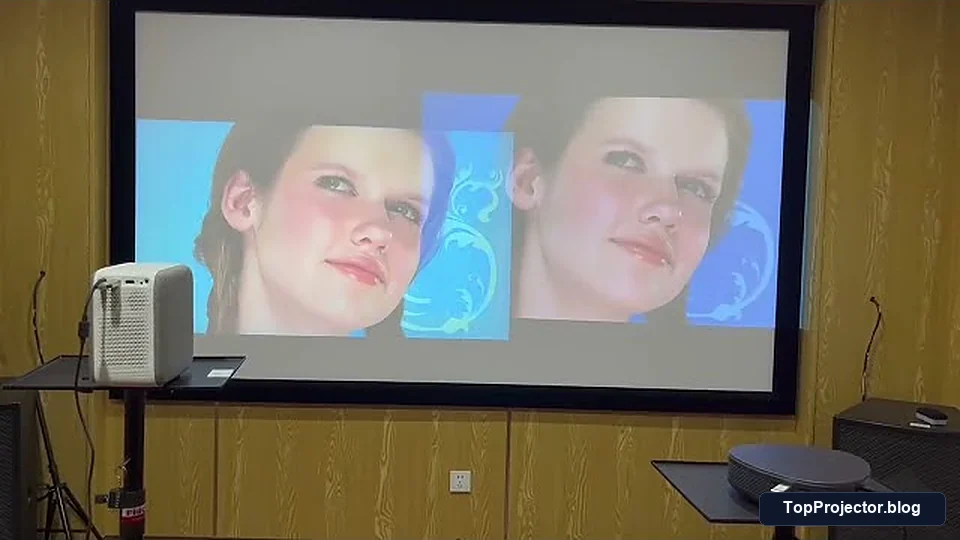
Understanding these foundational differences helps buyers evaluate optical efficiency, heat management, and long-term durability before purchasing a dedicated home theater or multi-purpose living room entertainment system.
Single-chip DLP relies on a spinning color wheel, creating potential rainbow artifacts for sensitive viewers, whereas 3LCD splits white light permanently across three panels, ensuring zero color separation issues during fast pans.
- DLP micro-mirrors switch at incredible speeds to create images.
- 3LCD utilizes three separate panels for red, green, and blue.
- Optical path design directly impacts dust accumulation risks.
- Color wheel segments determine the balance between white brightness and peak color saturation.
- Three-chip architectures eliminate primary color flashing entirely during high-speed motion sequences.
Micro-Mirror Switching vs Dichroic Prism Splitting
Single-chip DLP engines pulse colored light sequentially using a spinning color wheel. This rapid flashing tricks the human eye into perceiving a full-color image without visible degradation.
Conversely, 3LCD architectures deploy a dichroic prism array to combine red, green, and blue light simultaneously. This eliminates sequential color separation entirely while introducing specific panel convergence challenges.
- Sequential color wheels operate at high RPM speeds.
- Dichroic glass prisms mix light beams concurrently.
Evaluating Long-Term Optical Reliability and Maintenance
Sealed DLP light engines prevent dust particles from settling on the micromirror surface. This engineering choice virtually eliminates the annoying dust blobs common in older projection designs.
Traditional 3LCD systems often require accessible air filters to protect their unsealed panels. Regular maintenance ensures color uniformity remains stable across thousands of operating lamp hours.
- Sealed DLP chips offer superior dust resistance.
- 3LCD projectors demand routine filter cleaning intervals.
Micro-Mirror Switching Speeds
Texas Instruments DMD chips tilt millions of microscopic mirrors thousands of times per second. This rapid binary pulse creates high native fill factors and razor-sharp pixel grids compared to transmissive LCD panels.
- DMD pixel gaps remain smaller than typical LCD borders.
- Reflective architecture maximizes optical efficiency across the light path.
Contrast Ratios and Black Floor Performance in Dark Rooms
Achieving deep black levels remains the holy grail of home theater projection. High-end laser models evaluated in our Epson LS12000 review demonstrate elite native optical contrast for dark environments.
Comparing these optical systems reveals how well each technology handles high-contrast movie sequences without crushing shadow details or washing out dark cinematic sequences.
Native contrast defines the fundamental depth of dark scenes. LCOS and high-end LCoS hybrids dominate, but traditional 3LCD projectors often struggle with deep blacks, yielding native ratios around 1000:1 to 2000:1.
- Native contrast dictates shadow detail visibility in films.
- Dark room environments maximize ANSI contrast potential.
- Aperture controls enhance dynamic black performance.
- Dark room performance relies heavily on proper optical light baffling inside the chassis.
- High ANSI contrast ensures bright elements pop without washing out adjacent shadow details.
Native Contrast Benchmarks in Pitch-Black Theaters
DLP projectors frequently achieve superior native contrast ratios due to micromirror tilt angles. When mirrors tilt away from the lens, stray light is effectively minimized within the optical housing.
Standard 3LCD projectors typically exhibit slightly elevated black floors because LCD panels transmit light rather than reflect it. Advanced dynamic iris systems help bridge this native performance gap.
- Micromirror tilt angles reduce stray internal light.
- LCD panel light transmission creates higher black floors.
Shadow Detail Retention During Dark Cinematic Sequences
Dark sci-fi and horror movies push projection optics to their absolute limits. Maintaining distinct shadow gradients separates elite home theater gear from basic presentation equipment.
Calibration experts heavily favor high native contrast for reproducing subtle textures in dark costumes and shadowy background alleys without crushing critical visual information.
- Gradation accuracy prevents shadow clipping in dark scenes.
- Calibration tools optimize grayscale tracking for movies.
Dynamic Iris and Laser Dimming
Modern DLP and 3LCD projectors deploy frame-adaptive laser modulation or mechanical dynamic irises. These algorithms actively throttle light output, dropping black floors significantly to improve perceived dynamic contrast ratios.
- Laser dimming reacts faster than mechanical iris shutters.
- Dark room calibration requires clipping black levels carefully.
Ambient Light Rejection and Peak Brightness Dynamics
Living rooms with uncontrolled ambient light present severe challenges for traditional projection setups. High lumen output and proper screen pairing are mandatory to combat washed-out, pale images.
Analyzing white brightness versus color brightness provides a clearer picture of how these two optical technologies perform when daytime sunlight floods your living space.
Fighting ambient light requires massive ANSI lumens output coupled with specialized ALR screens. 3LCD models generally deliver superior color brightness relative to white brightness, maintaining saturation under high-lux living room conditions.
- Ambient light washes out poorly calibrated screens.
- High lumen ratings are essential for daytime viewing.
- ALR screen pairing dramatically improves perceived contrast.
- Angular reflective screens reject ceiling light effectively in bright living spaces.
- High lumen output combats washed-out highlights during daytime sports viewing.
Color Brightness Equivalence in Bright Living Rooms
3LCD projectors excel in color brightness because they project red, green, and blue simultaneously. This ensures vibrant saturated colors do not drop in intensity during bright daylight sessions.
Single-chip DLP units rely on color wheels that can reduce color lumen output relative to peak white specs, though modern RGBRGB wheels mitigate this optical limitation effectively.
- Simultaneous color projection boosts color volume.
- Modern color wheels balance white and color lumens.
Screen Pairing and Optical Gain Optimization Strategies
Pairing your projector with a specialized ambient light rejecting screen transforms living room performance. These micro-structured surfaces reject overhead light while reflecting projected beams directly forward.
Selecting the correct screen gain ensures wide viewing angles remain intact. You can optimize seating layouts using our screen size and viewing distance tool to prevent unwanted hot-spotting.
- ALR screens block ceiling and ambient light sources.
- Gain selection impacts off-axis viewing angle quality.
Lumen Degradation Over Time
Lamp-based engines suffer rapid lumen decay within the first thousand hours. Solid-state laser and LED engines maintain stable optical output much longer, preserving your calibrated white brightness targets across multiple years.
- Phosphor wheel degradation can alter native white points over time.
- Enclosed optical blocks prevent dust accumulation on internal panels.
Color Gamut, Color Accuracy, and Artifact Management
Color fidelity defines cinematic immersion and accurate director intent. Wide color gamuts cover DCI-P3 and Rec.2020 standards, bringing theatrical vibrancy straight to residential media rooms.
At the same time, optical artifacts like the rainbow effect require careful evaluation when selecting a display technology for sensitive viewers.
Wide color filters expand native gamuts to cover DCI-P3, but engaging them typically cuts total light output by twenty to forty percent. 3LCD handles bright color volume efficiently without relying on color wheels.
- Rec.2020 coverage expands cinematic color realism.
- Rainbow artifacts affect sensitive single-chip viewers.
- Accurate calibration ensures faithful skin tones.
- Rec.709 color tracking requires precise CMS adjustments in the projector menu.
- Wide color filters introduce insertion losses that reduce overall light output.
Managing the Rainbow Effect in Single-Chip Systems
Single-chip DLP projectors flash sequential colors so fast most people see a cohesive image. However, a small percentage of viewers perceive color flashes during high-contrast panning shots.
Increasing color wheel rotation speeds from double speed to six-speed successfully minimizes this optical phenomenon for the vast majority of home theater enthusiasts.
- Sequential color flashing causes rainbow artifacts.
- Higher color wheel RPM reduces visual fatigue.
Achieving DCI-P3 Color Accuracy Out of the Box
Out-of-the-box color accuracy determines how much calibration work your projector requires. Premium cinema modes deliver reference-grade Rec.709 and wide DCI-P3 tracking for pristine movie playback.
Advanced lamp control and laser phosphor engines maintain color stability over time, preventing annoying green or magenta color shifts as the light source ages.
- Reference modes ensure accurate skin tone rendering.
- Laser light sources maintain stable color calibration.
Eliminating Speckle and Banding
Laser speckle plagues laser-phosphor engines when paired with high-gain matte screens. Choosing diffuser screens or specific throw geometries minimizes visible interference patterns, ensuring pristine color accuracy during critical film viewings.
- RGB laser setups demand active speckle reduction shakers.
- Color management systems require fine-tuning via external patterns.
Gaming Input Lag, Response Time, and Motion Handling
Modern gaming demands lightning-fast response times and high refresh rate support. Competitive console and PC gamers require ultra-low input lag to ensure split-second competitive reactions.
Evaluating motion blur and pixel response times reveals how well these projection technologies handle fast-paced gaming environments and high-framerate action sequences.
Competitive gaming demands minimal input lag. Modern DLP units achieve ultra-low latency around fourteen milliseconds at 4K/60Hz, while many 3LCD home theater projectors lag behind due to complex onboard image processing.
- Low input lag is crucial for competitive video games.
- High refresh rates eliminate stutter in fast motion.
- Pixel response times prevent motion blur smears.
- Low input lag keeps competitive shooters feeling snappy and immediate.
- Bypass unnecessary video processing pipelines to shave off vital milliseconds.
Input Latency Benchmarks for Competitive Gaming
DLP projectors frequently boast exceptional gaming performance with input lag measurements dropping below 16 milliseconds at 4K resolution. This keeps fast-paced shooters incredibly responsive.
Standard projectors with complex internal image processing can introduce noticeable input delay unless dedicated game modes bypass unnecessary video enhancement filters.
- Sub-16ms input lag ensures instant controller response.
- Dedicated game modes disable heavy video processing.
Motion Blur and High Refresh Rate Capabilities
Fast pixel response times on DLP chips reduce motion blur during rapid camera pans. This optical clarity helps gamers track fast-moving targets across massive projected screen sizes.
Support for 240Hz refresh rates in 1080p gaming modes delivers buttery-smooth motion handling for esports enthusiasts seeking every competitive advantage available.
- Fast pixel response eliminates motion ghosting trails.
- High refresh rate support enhances competitive play.
High Refresh Rate Support
Newer hardware iterations support 1080p gaming at two hundred forty hertz with sub-ten-millisecond latency. Fast pixel response times prevent motion blur during frantic competitive matches, outperforming traditional response times found elsewhere.
- Disable frame interpolation to avoid adding latency.
- Verify HDMI 2.1 bandwidth limits before connecting current-gen consoles.
Throw Ratios, Lens Shift, and Physical Room Installation
Room geometry dictates projector placement flexibility and physical installation constraints. You can calculate exact room layouts using our throw distance guide to determine correct lens shift ranges.
Analyzing installation parameters helps homeowners design clean media rooms without requiring awkward ceiling placements or compromised screen positioning.
Calculating throw distance dictates your maximum screen size. Standard throw models require significant distance, whereas ultra-short-throw variants sit inches away, demanding perfectly flat ALR screens to prevent geometric warping.
- Throw ratios dictate projector distance from screen.
- Optical lens shift simplifies off-center placement.
- Keystone correction degrades native pixel sharpness.
- Ultra-short-throw setups eliminate shadow cast hazards in small media rooms.
- Standard throw lenses provide better placement flexibility for large venues.
Throw Ratio Calculations for Small Media Rooms
Short-throw and ultra-short-throw models allow large screen projection inches away from the wall. This prevents shadows from foot traffic crossing the optical beam path.
Standard throw ratios require longer ceiling distances to achieve massive image sizes, making them ideal for dedicated large-room theater builds with high vaulted ceilings.
- Short-throw lenses eliminate room traffic shadows.
- Standard throw lenses suit large dedicated rooms.
Optical Lens Shift vs Digital Keystone Correction
Physical lens shift moves the glass optics inside the chassis to align images without quality loss. This optical adjustment is vastly superior to digital keystone correction.
Relying on digital keystone processing shrinks resolution and introduces digital artifacts, making genuine optical lens shift a mandatory feature for flexible installations.
- Lens shift preserves native resolution and sharpness.
- Digital keystone processing degrades image quality.
Mechanical Lens Shift Flexibility
Optical lens shift provides immense installation freedom without degrading pixel sharpness through digital keystone correction. Premium 3LCD units often offer wider vertical shift ranges than entry-level single-chip DLP competitors.
- Digital keystone ruins pixel mapping and reduces contrast.
- Calculate offset percentages carefully before drilling ceiling mounts.
Scenario-Based Deployment Guide and Final Selection Strategy
Selecting the ideal projector requires balancing your specific room lighting, content preferences, and installation constraints. No single optical engine dominates every conceivable residential environment.
This final scenario guide matches your viewing habits with the most capable projection technology to guarantee long-term home entertainment satisfaction.
Dedicated theater rooms with total light control benefit from high-contrast DLP engines or deep-black LCoS options. Conversely, ambient living rooms demand the robust color brightness inherent in bright 3LCD architectures.
- Match projector technology to your primary room lighting.
- Prioritize contrast for movies and brightness for sports.
- Evaluate gaming needs before finalizing your purchase.
- Match projector output capabilities directly to your room lighting profile.
- Consider acoustic transparency if mounting speakers behind your projection screen.
The Ultimate Pitch-Black Home Theater Setup
Shoppers on a budget can explore our best projector for home theater under 500 guide to find surprisingly capable single-chip DLP optics for dark rooms.
Pairing this setup with a velvet-masked acoustic screen creates an immersive commercial cinema experience directly inside your private residential basement.
- Basement theaters maximize native contrast benefits.
- Velvet screens absorb stray light reflection.
The Multi-Purpose Living Room Daylight Environment
Bright living rooms with large windows demand the high color brightness and vibrant color volume offered by robust 3LCD projection systems.
Combining these high-lumen optical engines with an ambient light rejecting screen ensures daytime sports and casual TV viewing remain vivid and punchy.
- Living rooms require high color brightness output.
- ALR screens rescue daytime viewing performance.
Making the Final Hardware Choice
Balance your priority between gaming responsiveness and cinematic color depth. Evaluate your room lighting, mounting constraints, and sensitivity to visual artifacts before purchasing your final projection system configuration.
- Test for rainbow artifact sensitivity before buying single-chip DLP.
- Prioritize lens shift flexibility if ceiling placement is restricted.
Frequently Asked Questions
What is the main difference between DLP and 3LCD projectors?
DLP uses a single micro-mirror chip with a color wheel, while 3LCD uses three separate panels for simultaneous color mixing.
Do DLP projectors suffer from the rainbow effect?
Some sensitive viewers notice color flashes during fast pans, but modern high-speed color wheels have largely eliminated this artifact.
Which technology offers better contrast for dark home theaters?
DLP projectors generally deliver superior native contrast ratios, making them the preferred choice for pitch-black dedicated movie rooms.
Are 3LCD projectors better for bright living room environments?
Yes, their high color brightness output ensures vibrant and saturated colors remain vivid even when ambient room light is present.
Which projector type is better for low-latency gaming?
DLP models typically offer ultra-low input lag under 16ms, making them ideal for competitive console and PC gaming setups.