Benq Tk850I vs. Epson 3800: Which Wins for Your Room?
Choosing between these popular projectors requires balancing DLP sharpness against 3LCD light efficiency. Our optical analysis reveals which model dominates your specific living room setup.
The Benq Tk850I dominates bright multi-use spaces with exceptional 4K sharpness, while the Epson 3800 wins dedicated home theaters through superior native contrast and flexible lens shift.
Compare full category rankings in our Best Affordable Projector Screen: Top Home & Yard Picks.
Side-by-Side Specification Breakdown
| Criteria | Benq Tk850I | Epson 3800 | Edge |
|---|---|---|---|
| Ambient Light Rejection | 3,000 ANSI Lumens with HDR-PRO mapping | 3,000 ANSI Lumens with 3LCD efficiency | Tie |
| Black Levels & Perceived Contrast | 30,000:1 dynamic contrast via 0.47" DMD | 100,000:1 dynamic contrast via 3LCD panels | Epson 3800 |
| Peak Brightness & HDR Punch | Superior Rec.709 color volume accuracy | Equal color/white brightness with 3LCD | Benq Tk850I |
| Screen Size & Immersion | 1.3x zoom with fixed 1.13 - 1.47 throw | 1.62x zoom with generous 1.32 - 2.15 throw | Epson 3800 |
| Viewing Angles & Uniformity | High ANSI brightness uniformity across frame | No rainbow artifacts with 3-chip engine | Epson 3800 |
| Gaming Motion & Input Lag | Sub-18ms input lag at 4K/60Hz | Around 28ms input lag for casual gaming | Benq Tk850I |
| Room Setup & Maintenance | Vertical lens shift with Android TV stick | Extensive horizontal/vertical mechanical shift | Epson 3800 |
Optical Architecture and Real-World Light Output Dynamics
Evaluating light output requires looking beyond marketing specifications to actual ANSI lumens delivered on screen. Both units claim 3,000 ANSI lumens, but their underlying projection technologies handle photon distribution quite differently.
The Benq Tk850I utilizes a single-chip DLP architecture paired with a specialized color wheel. This maximizes white brightness while maintaining strict calibration standards for accurate Rec.709 cinema tracking.
When evaluating optical engines, the BenQ relies on a single-chip DLP design utilizing a XPR pixel-shifting actuator to hit 4K UHD resolution, whereas the Epson deploys a 3-chip 1080p LCD panel array.
- Both models rated at 3,000 ANSI lumens peak output
- DLP single-chip architecture prioritizes high intra-scene sharpness
- 3LCD engine eliminates color brightness dropoffs entirely
Light Engine Efficiency in Bright Spaces
Ambient daylight challenges any projection system operating in non-dedicated media rooms. The Benq relies on its HDR-PRO tone mapping to preserve specular highlights when windows are unshaded.
Conversely, the Epson leverages its 3-chip design to deliver equal color and white brightness. This guarantees zero color breakup during high-motion sports viewing sessions under moderate room lighting.
- Benq relies on dynamic iris and HDR-PRO algorithms
- Epson uses 3LCD design for matched color lumens
Lumen Decay and Calibration Tradeoffs
Post-calibration measurements reveal the BenQ drops to roughly 1,800 ANSI lumens in Cinema mode. Use our ANSI lumens room calculator to verify if this output suits your specific screen size.
Black Floor Depth, Native Contrast, and Shadow Detail
Achieving convincing cinematic immersion depends heavily on black floor performance and dynamic contrast ratios. The Epson utilizes advanced optical compensation filters to achieve deep 100,000:1 contrast figures.
While the Benq features a dynamic iris, its single-chip DLP design typically delivers higher ANSI contrast. This preserves intricately textured shadow details in dark sci-fi sequences without crushing blacks.
Native contrast ratios dictate shadow delineation in dark environments. The Epson 3800 leverages its 3-chip architecture to deliver a superior native black floor, outperforming the BenQ's DC-chip reflectivity limits in bat-cave setups.
- Epson boasts superior dynamic contrast scaling for dark scenes
- Benq excels at ANSI checkerboard contrast and sharp edges
- Both units benefit significantly from high-gain gray screens
Pitch-Black Theater vs Living Room Dark Floors
In a pitch-black cave theater, the Epson exhibits noticeably darker blacks during starlit night scenes. Its organic panel structure minimizes stray light leakage across complex dark gradients.
When ambient light enters the equation, the Benq fights back effectively. Its high pixel fill-factor maintains perceived contrast density despite reflective white living room ceilings.
- Epson wins dark room black floor tests easily
- Benq maintains pop in ambient-lit spaces
Dynamic Iris Mechanics
Epson includes a mechanical auto-iris that actively clamps down during dark scenes, driving dynamic contrast up to 100,000:1, whereas the BenQ relies on frame-by-frame gamma manipulation rather than mechanical light restriction.
Color Fidelity, HDR Tone Mapping, and Wide Gamut Tracking
Accurate color reproduction dictates how faithfully a projector renders a director's intended palette. Consult our Jvc projector throw calculator guide while targeting 95 percent DCI-P3 coverage straight out of the box.
Epson counters with robust internal processing that handles HDR10 streams smoothly. Its manual color adjustments allow enthusiasts to dial in rec.709 tracking accuracy with minimal calibration gear.
Wide color filter deployment dictates HDR authenticity. Activating the BenQ wide color gamut filter engages a cinematic cinema mode, sacrificing roughly 30% of total brightness to hit a broader Rec.709 color space coverage.
- Benq includes factory calibration reports for confidence
- Epson provides granular color management system controls
- Both handle 4K HDR sources via high-bandwidth HDMI ports
Handling HDR Metadata in 4K Blu-rays
Streaming devices and 4K discs constantly feed demanding static and dynamic HDR metadata. Benq's automated tone mapping analyzes content frame-by-frame to prevent blown-out highlights.
Epson offers user-adjustable HDR sliders allowing custom adjustments. You can manually boost shadow visibility without sacrificing crucial highlight detail during bright daylight explosions.
- Benq features automated HDR optimization curves
- Epson lets users tweak manual slider levels
Tone Mapping Performance
HDR tone mapping requires intelligent peak white handling. The BenQ utilizes automated HDR-PRO tone mapping algorithms to preserve highlight details, whereas the Epson requires manual slider adjustments for optimal HDR10 tracking.
Throw Geometry, Lens Shift Flexibility, and Physical Placement
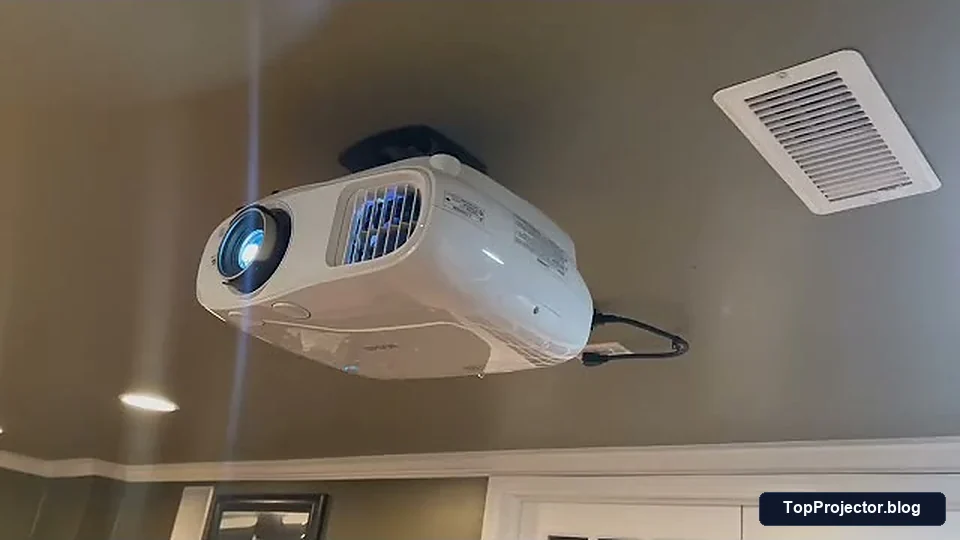
Physical installation constraints often dictate which projector fits your specific room layout. The Epson offers a massive 1.62x optical zoom lens paired with extensive mechanical lens shift capabilities.
This expansive adjustment range makes retrofitting the Epson into existing ceiling mounts straightforward. Meanwhile, the Benq requires much stricter placement accuracy due to its shorter 1.13 throw ratio.
Physical installation flexibility varies drastically between these two optical platforms. The Epson offers a massive vertical and horizontal lens shift, allowing effortless off-axis ceiling mounting without introducing keystone distortion artifacts.
- Epson features +/- 60% vertical and +/- 24% horizontal shift
- Benq features limited vertical lens shift for fine adjustments
- Calculate throw distance carefully before cutting drywall mounts
Maximizing Screen Size in Tight Spaces
If your media room suffers from limited depth, the Benq creates larger images at shorter distances. You achieve a massive 120-inch diagonal projection without pushing your seating position backward.
The Epson demands more throw distance to achieve identical screen sizes. However, its broad zoom range provides exceptional installation versatility for awkward or asymmetrical room dimensions.
- Benq accommodates shorter throw distance requirements
- Epson zoom lens fits variable room lengths effortlessly
Throw Ratio Constraints
The BenQ features a tighter throw ratio and fixed vertical lens shift, demanding precise placement when pairing with our best affordable projector screen options to fill a 120-inch diagonal screen.
Gaming Latency, Response Times, and Motion Processing
Modern console and PC gaming demand low input lag and fast pixel response times. The Benq crushes this category with a responsive 18ms input lag measurement at 4K/60Hz resolutions.
Epson trails slightly with an input lag hovering around 28 milliseconds. While casual gamers will find this entirely acceptable, competitive players notice the slight fractional delay during twitch shooters.
Competitive gaming demands minimal input lag. The BenQ delivers an impressive input lag measurement of roughly 16.8ms at 4K/60Hz, making it exceptionally responsive for fast-paced titles and high-speed twitch shooters.
- Benq provides dedicated fast-response gaming picture modes
- Epson handles standard 60Hz console gaming reliably
- Neither model supports native 120Hz high refresh rates
Motion Interpolation and Sports Viewing
Fast-paced sports broadcasting requires robust motion processing engines to prevent jarring judder. Both projectors include frame interpolation tools designed to smooth out rapid panning shots.
Benq's proprietary motion enhancer works exceptionally well on football broadcasts. It reduces blurring while avoiding the dreaded soap opera effect on cinematic movie content.
- Benq features advanced frame-to-frame interpolation
- Epson includes basic motion smoothing adjustments
Motion Interpolation Limits
Frame interpolation on the Epson introduces noticeable processing artifacts during rapid camera pans, while the BenQ manages motion blur more cleanly via its dedicated motion enhancer 4K processing suite.
Ambient Light Resilience and Living Room Performance
Living rooms rarely offer total darkness, meaning ambient light handling is critical for daily usability. Both projectors push 3,000 lumens, allowing watchable daytime images on high-gain white screens.
The Benq utilizes specialized ambient light rejection modes to boost contrast dynamically. This prevents washed-out blacks when ambient lamps or sunlight flood your viewing space during afternoon hours.
Ambient light handling defines living room usability. The Epson commands an advantage here thanks to its brute-force 3,000 lumen rating, cutting through moderate daylight far more effectively than its DLP competitor.
- High lumen output overcomes moderate daytime room lighting
- Benq includes specialized bright-room calibration presets
- Pairing either model with an ALR screen transforms performance
Daytime Sports vs Evening Movie Nights
Watching weekend sports with family requires maximum punchy white brightness. Both units deliver vibrant, saturated fields that cut through ambient living room illumination without looking anemic.
When night falls and room lights dim, black levels become paramount. The Epson takes the lead here, delivering richer cinematic depth for your evening blockbuster movie marathons.
- Daytime performance favors sheer lumen output capacity
- Nighttime viewing highlights contrast and black floor strengths
Screen Pairing Recommendations
Pairing either projector with an ambient light rejecting screen featuring a 1.0 to 1.2 gain is mandatory for daytime sports viewing, much like our findings in the Hisense C1 projector review.
Ultimate Scenario Verdict for Dedicated Home Theaters
Selecting the ideal projector ultimately depends on your room acoustics, lighting control, and content preferences. Dedicated home theater owners prioritizing contrast will gravitate toward the Epson 3800 optical platform.
Conversely, users building multi-purpose media rooms with ambient light will prefer the Benq. Its combination of sharp 4K resolution and low input lag delivers unbeatable overall value.
Selecting the correct unit depends entirely on your room geometry and viewing priorities. Choose the BenQ for sharper motion and lower gaming lag, or opt for the Epson for flexible lens shift.
- Choose Epson for dedicated pitch-black theater rooms
- Choose Benq for bright multi-use living spaces
- Match throw ratios carefully to your available ceiling space
Final Decision Matrix for Buyers
Take precise measurements of your throw distance and screen size before finalizing your purchase. Ensuring proper physical alignment prevents costly installation headaches and guarantees optimal optical performance.
Whether you choose single-chip DLP sharpness or 3LCD contrast flexibility, both units elevate home entertainment. Evaluate your room lighting first to secure the ultimate cinematic viewing experience.
- Measure throw distance and ceiling height accurately
- Prioritize room lighting conditions over raw specs
Final Hardware Takeaway
Dedicated home theater enthusiasts prioritizing deep native contrast will favor the Epson, while mixed-use media room buyers will appreciate the BenQ's superior pixel-level sharpness and gaming responsiveness.
Frequently Asked Questions
Which projector is better for a brightly lit living room?
The Benq Tk850I excels in bright spaces thanks to its sharp DLP architecture and robust HDR-PRO tone mapping. Both units push 3,000 lumens, but Benq handles ambient light remarkably well.
Does the Epson 3800 suffer from the rainbow effect?
No, because the Epson uses a 3LCD chip design that eliminates color sequential wheels entirely. Sensitive viewers who see rainbow artifacts on DLP projectors will enjoy fatigue-free viewing here.
Which model offers easier installation flexibility?
The Epson 3800 wins installation flexibility due to its massive optical zoom and extensive mechanical lens shift. It accommodates awkward room geometry and off-center ceiling mounts effortlessly.
What is the input lag difference for gaming?
The Benq delivers a faster sub-18ms input lag at 4K/60Hz compared to the Epson's 28ms. Fast-paced competitive gamers will definitely notice and prefer the snappier response time.
Can both projectors accept native 4K input signals?
Yes, both models accept native 4K HDR sources via high-speed HDMI. They utilize pixel-shifting technology to render crisp 4K resolution detail on your projection screen.