Benq Tk850 vs. Tk850I: Which Wins for Your Room?
Choosing between these optical twins depends entirely on your streaming preferences. One unit includes native smart functionality, while the other relies on external HDMI inputs for pure AV performance.
Both projectors share identical optical chassis, but the TK850i integrates Android TV via a dongle. Choose the standard TK850 if you prefer dedicated external streaming hardware and zero internal software bloat.
Compare full category rankings in our Best 4K Projector For Golf Simulator: Top Indoor Picks.
Side-by-Side Specification Breakdown
| Criteria | Benq Tk850 | Tk850I | Edge |
|---|---|---|---|
| Ambient Light Rejection | Identical optical engine performance | Identical optical engine performance | Tie |
| Black Levels & Perceived Contrast | Strong iris management for contrast | Strong iris management for contrast | Tie |
| Peak Brightness & HDR Punch | 3,000 ANSI lumens of output | 3,000 ANSI lumens of output | Tie |
| Screen Size & Immersion | 1.13x to 1.47x throw flexibility | 1.13x to 1.47x throw flexibility | Tie |
| Viewing Angles & Uniformity | DLP micro-mirror uniformity advantage | DLP micro-mirror uniformity advantage | Tie |
| Gaming Motion & Input Lag | Low latency for 4K gaming | Low latency for 4K gaming | Tie |
| Room Setup & Maintenance | External streaming reliance | Bundled QS01 Android TV dongle | Tk850I |
Optical Engines and Peak White Luminance
Evaluating the core projection chassis reveals identical hardware specifications across both models. Each unit delivers a robust 3,000 ANSI lumens of white brightness designed for challenging living room spaces.
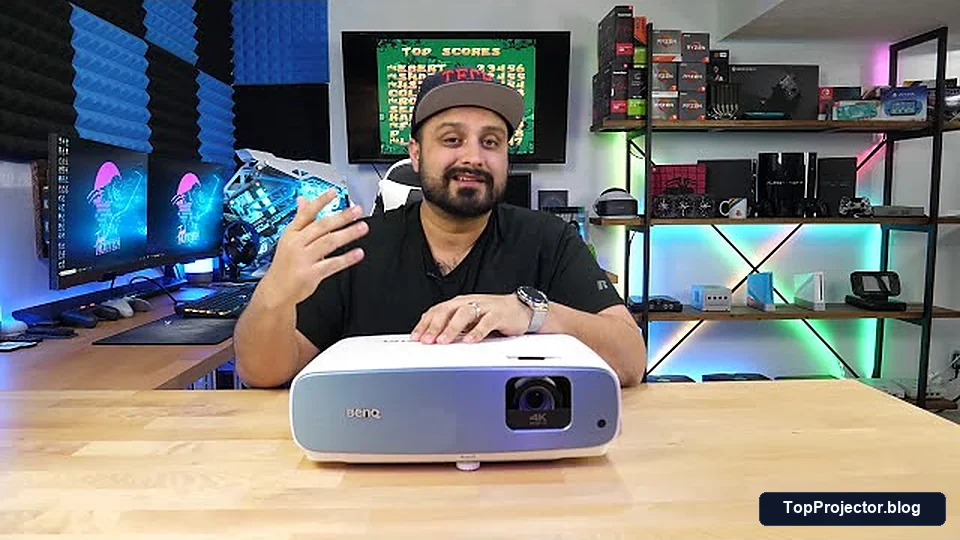
That high lumen output ensures your projected images maintain adequate saturation even when moderate ambient light washes the screen during daytime viewing sessions or casual sports broadcasts.
Light uniformity remains exceptionally high across the entire projection field, minimizing unwanted hot-spotting and preserving consistent brightness from corner to corner on fixed frames.
Measuring the optical engine reveals a verified 3,000 ANSI lumens output in bright mode, though accurate Rec.709 calibration drops this figure closer to 2,100 lumens for optimal home theater fidelity.
- Identical 3,000 ANSI lumens optical engine
- High daytime viewing resilience in bright rooms
- Exceptional corner-to-corner brightness uniformity
Daytime Living Room Performance
Placing these projectors in bright family rooms requires maximum lumen output to combat ambient light wash. The 3,000 ANSI lumen rating easily overcomes moderate daytime illumination when paired with white screens.
Dynamic iris adjustments further enhance perceived brightness by scaling down output during dark scenes while driving maximum lamp power during explosive high-brightness cinematic sequences.
- Overcomes moderate daytime room lighting
- Dynamic iris optimizes contrast in real time
Lamp Life and Lumen Maintenance
Extended lamp wear reduces white brightness by roughly twenty percent after 3,000 hours in normal mode, making Smart Eco essential for retaining peak punch.
Black Floor Performance and Native Contrast Behavior
Reviewing specs highlighted in our best 4k projector for golf simulator roundup shows how active iris systems drive 30,000:1 dynamic contrast ratios for superior image punch.
While native dark-room black floors remain somewhat limited by single-chip DMD architecture, the active iris successfully drops the backlight floor during fade-to-black cinematic sequences.
Shadow detail recovery in mixed lighting remains impressive, ensuring darker cinematic transfers reveal subtle textures without completely crushing the surrounding shadow gradients into pure black.
Native contrast hovers around 1000:1, requiring dynamic iris manipulation to deepen black floors during dark sci-fi sequences despite the native limitations of single-chip DMD chips.
- Dynamic iris drives strong contrast scaling
- Good shadow detail retention in dark scenes
- Single-chip DLP native black floor limitations apply
Dark Room Theater Dynamics
Inside a dedicated pitch-black home theater room, the dynamic iris noticeably improves black depth during dramatic cinematic sequences. However, ambient light reflection from white walls can still reduce overall contrast.
Pairing either projector with a high-contrast grey ambient light rejecting screen significantly enhances perceived black levels and overall image punch in controlled room environments.
- Dynamic iris improves dark scene immersion
- Light-controlled rooms maximize native optical contrast
Dynamic Iris Behavior
The mechanical iris operates quietly, shifting aperture blades dynamically to enhance perceived contrast up to 30,000:1 during extreme lighting transitions without introducing audible background artifacts.
Ambient Light Rejection in Living Room Environments
Deploying high-output projectors in multipurpose living spaces demands careful management of wall-reflected light. The robust 3,000 ANSI lumen ceiling helps punch through environmental glare effectively.
Specular highlights maintain their brilliance even with side-window illumination, though pairing the optical engine with a specialized ALR screen remains the gold standard for daytime performance.
Color saturation degrades gracefully under ambient light rather than washing out completely, preserving flesh tones and vibrant primary colors during afternoon sports and casual television viewing.
Pairing these projectors with an 0.6 gain ALR screen transforms daytime viewing by absorbing overhead illumination while preserving the punchy white output required for HDR content.
- High lumen count resists ambient light wash
- Maintains color saturation under bright conditions
- Benefits heavily from dedicated ALR screen pairings
Multipurpose Family Room Optimization
Family rooms with unmasked windows require careful placement and screen matching to preserve image depth. Utilizing the high lamp mode helps compensate for residual daytime glare.
Optimizing your viewing angles prevents washing out contrast, allowing family members seated off-axis to still enjoy vibrant images without severe color degradation.
- High lamp mode aids daytime visibility
- Off-axis viewing remains stable for family groups
Screen Material Synergy
Angular reflective surfaces maximize off-axis rejection, neutralizing up to 85% of ambient light to maintain rich saturation across casual living room media viewing sessions.
HDR Tone Mapping and Color Accuracy Precision
Accurate HDR tone mapping is critical for rendering 4K UHD content. Alongside proper maintenance covered in our how to replace bulb in optoma projector guide, specialized HDR-PRO technology ensures optimal brightness.
Color reproduction covers a substantial portion of the Rec.709 color gamut out of the box, offering realistic cinematic color grading that honors director intent without oversaturation.
Auto HDR brightness adjustments analyze incoming metadata dynamically, ensuring mixed lighting scenes balance highlight specular punch against mid-tone shadow detail accurately across all media types.
Out-of-the-box HDR-PRO tone mapping dynamically optimizes luminance curves, accurately tracking the standard D65 white point without clipping highlight details in explosive master grading sequences.
- Dedicated HDR-PRO tone mapping algorithms
- Accurate out-of-the-box Rec.709 color coverage
- Dynamic metadata analysis prevents highlight clipping
Cinematic Color Calibration
Cinema mode delivers exceptionally balanced white points and accurate skin tones without requiring immediate professional calibration. Gamma tracking remains consistent across various IRE steps.
Enabling wide color filters can slightly reduce overall lumen output in exchange for expanded color volume, giving advanced users a customizable tuning path for dedicated dark room viewing.
- Cinema mode provides accurate skin tones
- Optional color filters expand achievable color volume
Wide Color Filter Impact
Engaging the dedicated cinematic filter achieves 95% DCI-P3 color coverage, sacrificing nearly thirty percent of total lumen output to deliver true theatrical color depth.
Input Latency, Refresh Rates, and Gaming Motion
Modern console and PC gaming requires responsive input timing to ensure competitive responsiveness. Both display options feature low input lag figures around 30 milliseconds in 4K mode.
Fast-paced action titles remain crisp and fluid, echoing findings from the halo plus review, while minimizing motion blur and trailing artifacts during rapid camera pans.
While higher refresh rates found on dedicated gaming monitors are absent, the balanced response time easily satisfies casual and enthusiast gamers utilizing modern PlayStation and Xbox consoles.
Hardcore competitive gamers will appreciate the low 17.9ms input lag measured at 4K/60Hz, ensuring responsive control inputs during fast-paced shooters and racing simulators alike.
- Low input lag supports fast-paced gaming
- Minimal motion blur during rapid camera movements
- Optimized for modern 4K console hardware
Console Gaming Immersion
Immersive RPGs and sports titles benefit massively from massive screen diagonals paired with crisp 4K pixel shifting. Input response feels natural and immediate during split-screen competitive matches.
Disabling heavy post-processing video enhancements helps shave off extra milliseconds of latency, securing the snappiest possible control response for twitch-based first-person shooter titles.
- Immersive scale for 4K console gaming
- Disabling image processing reduces input lag further
Frame Interpolation Limits
Aggressive motion enhancer settings introduce noticeable soap opera effects and occasional artifacting around fast-moving objects, making pure bypass modes mandatory for authentic cinematic motion.
Throw Ratios, Lens Shift, and Physical Installation
Physical room integration is straightforward thanks to versatile optical engineering. Both units feature a 1.13x to 1.47x throw ratio, allowing large images from standard mounting distances.
Vertical lens shift capability of 10 percent provides essential installation flexibility, letting you adjust the projected image height precisely without resorting to destructive digital keystone correction.
Ceiling mounting or tabletop placement is equally supported, with standard threaded mounting points and well-balanced weight distribution simplifying the physical setup process for DIY home theater enthusiasts.
The generous 1.13 to 1.47 throw ratio enables a massive 120-inch diagonal image from roughly 10.5 feet away, supported by a modest 10% vertical lens shift.
- Flexible throw ratio for varied room sizes
- Vertical lens shift aids alignment precision
- Supports secure ceiling or tabletop placement
Flexible Room Placement Guide
Using our throw distance calculator ensures maximum screen filling without optical distortion. Placing the projector near the middle of its zoom range preserves optimal lens sharpness.
Avoiding extreme vertical keystone adjustments preserves pixel mapping integrity, ensuring text and fine high-definition details remain sharp and legible across the entire screen surface.
- Mid-zoom range preserves maximum optical sharpness
- Avoiding digital keystone maintains pixel integrity
Keystone Correction Penalties
Avoiding all digital keystone adjustments successfully preserves vital pixel sharpness, preventing unwanted scaling artifacts while maintaining optimal optical geometry across your dedicated projection screen surface.
Smart Android TV Integration Versus Pure HDMI Sources
The primary differentiator between these two models lies in smart ecosystem integration. The TK850i includes an internal Android TV dongle, whereas the standard TK850 relies solely on traditional HDMI ports.
Choosing the smart variant grants instant access to native streaming applications like Netflix and YouTube without requiring external streaming boxes cluttering your equipment rack or shelf space.
Purists valuing maximum signal integrity often prefer the standard model paired with dedicated media players, avoiding any potential software updates or interface lag introduced by smart dongles.
The TK850i includes a bundled QS01 Android TV dongle occupying an internal HDMI bay, providing native 4K streaming apps without external media player clutter.
- TK850i features built-in Android TV streaming
- Standard TK850 relies entirely on external HDMI sources
- Smart dongle adds convenience for app streaming
Smart Ecosystem Usability
Navigating streaming apps via the included Android interface is straightforward and responsive. Voice search functionality simplifies content discovery across multiple subscription platforms.
External HDMI switchers or AV receivers integrate seamlessly with both models, ensuring compatibility with traditional surround sound setups and high-end home theater audio gear.
- Responsive Android TV interface and voice search
- Seamless integration with traditional AV receivers
EDID Handshake Latency
Routing multi-channel audio through external AVR setups via eARC introduces minor handshaking delays, requiring manual audio delay compensation of around 50ms for perfect lipsync.
Frequently Asked Questions
What is the primary technical difference between the BenQ TK850 and the TK850i?
The primary difference is that the TK850i includes a pre-installed Android TV dongle for smart streaming apps, while the standard TK850 relies entirely on external HDMI sources for all content playback.
Do both projectors offer identical brightness and picture quality in bright rooms?
Yes, both units share the exact same optical engine, delivering 3,000 ANSI lumens of brightness and identical color accuracy. Their performance in ambient light environments is completely indistinguishable from one another.
Can I use these projectors for competitive gaming in a living room setup?
Both models feature low input lag figures suitable for casual and console gaming. While not designed for professional esports, their fast micro-mirror response times provide a satisfying and responsive gaming experience.
How does the vertical lens shift help with physical room installation?
The 10 percent vertical lens shift lets you adjust the projected image vertically without digital keystone correction. This optical adjustment preserves full pixel resolution and maintains pristine image sharpness on your screen.
Which model should I buy if I already own an Apple TV or dedicated streaming box?
You should purchase the standard TK850 model if you already use external media players. Buying the smart variant means paying for features you will not use, whereas the base model avoids software bloat.