Benefits Of Projector vs. Tv: Which Wins for Your Room?
Weighing projectors and flat-panel displays requires understanding optical physics, ambient light rejection, and physical room geometry. Discover which display technology dominates your specific viewing environment.
Projectors provide unmatched cinematic scale for controlled lighting spaces, while flat-panel TVs win in bright family rooms and casual multi-angle daylight viewing environments.
Compare full category rankings in our Best Motorised Projector Screen: Top Automated Picks.
Side-by-Side Specification Breakdown
| Criteria | Benefits Of Projector | Tv | Edge |
|---|---|---|---|
| Ambient Light Rejection | Requires specialized ALR screens or dark rooms | Handles high ambient light with native panel brightness | Tv |
| Black Levels & Perceived Contrast | Dependent on room reflections and black floor limits | Superior native contrast and true black rendering | Tv |
| Peak Brightness & HDR Punch | Typically 1500 to 3000 ANSI lumens on large surfaces | Easily exceeds 1000 to 2000 nits for small-area HDR punch | Tv |
| Screen Size & Immersion | Effortlessly spans 100 to 150 inches for true cinema scope | Capped physically and logistically around 85 to 98 inches | Benefits Of Projector |
| Viewing Angles & Uniformity | Prone to hot-spotting depending on screen gain properties | Flawless off-axis viewing with uniform panel luminance | Tv |
| Gaming Motion & Input Lag | Modern laser units achieve competitive 15ms to 25ms lag | Blazingly fast with native 4K/120Hz and variable refresh rates | Tv |
| Room Setup & Maintenance | Requires ceiling mounts, precise throw ratios, and screen alignment | Simple tabletop placement or standard VESA wall hanging | Tv |
Optical Physics of Ambient Light and Screen Gain
Projectors project light through open air onto a reflective surface, making them inherently vulnerable to ambient room illumination. Uncontrolled window light washes out contrast instantly.
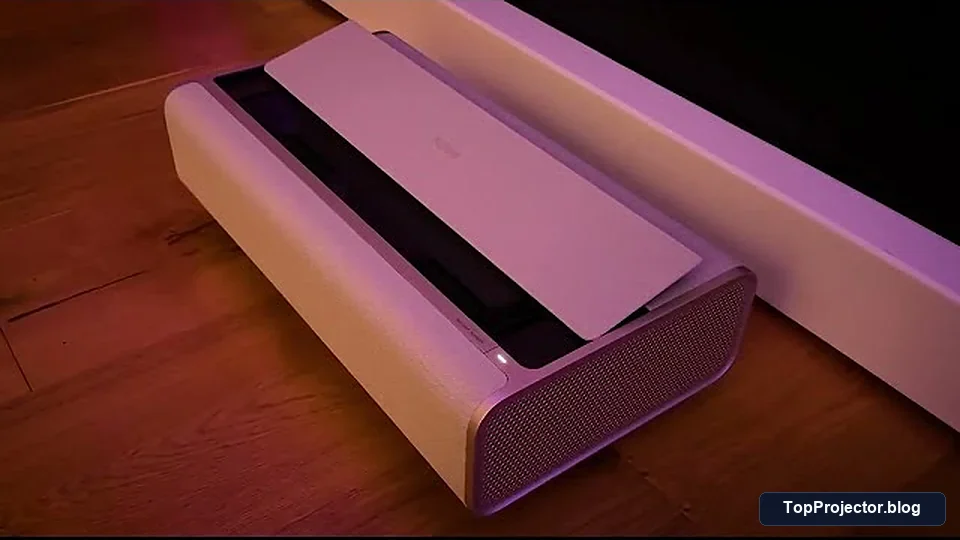
Choosing the right high-gain or ambient light rejecting screen is mandatory for daytime viewing success. Standard white walls destroy black floor performance immediately in bright spaces.
Flat-panel displays generate their own internal illumination directly toward the viewer. This self-emissive or backlit nature allows TVs to cut through high ambient room light effortlessly.
- Projectors require specialized ALR screens to combat daylight washout.
- TVs emit direct light that easily overpowers normal living room lighting.
- Room reflectivity heavily impacts projector contrast more than flat panels.
Pitch-Black Dedicated Home Theaters
In completely light-controlled dedicated theater rooms, projectors excel by eliminating frame borders entirely. You achieve a pure, immersive commercial cinema experience at home.
Dark velvet walls absorb stray light reflections, allowing high-end laser projectors to showcase exceptional shadow detail and deep cinematic contrast ratios.
- Total light control unlocks the true potential of high-end home theater projectors.
- Absorptive wall treatments prevent stray optical reflections from degrading contrast.
Daytime Living Room Battles
Using an optoma projector throw calculator guide helps prevent placing optics incorrectly in sunlit rooms. Ambient sunlight drastically degrades dynamic range and native contrast without proper screen matching.
Ultra-short-throw laser models paired with specialized Fresnel screens mitigate daylight issues significantly. However, a traditional flat-panel TV still remains vastly superior for casual daytime viewing.
- Daytime living rooms challenge standard projection optics severely.
- UST projectors paired with Fresnel ALR screens offer viable daytime alternatives.
Black Floor Dynamics and Dynamic Contrast Performance
Black floor depth defines the perceived realism and three-dimensional pop of any projected or displayed image. Projector black levels depend entirely on room light reflections.
If white room boundaries reflect projected light back onto the screen, black levels elevate noticeably. This phenomenon reduces ANSI contrast drastically compared to controlled lab tests.
OLED and mini-LED televisions manage black levels locally with pixel-level dimming zones. They deliver true absolute blacks that projection technology struggles to replicate in normal rooms.
- Room light scatter raises the black floor on projection setups.
- OLED and mini-LED televisions achieve near-infinite native contrast ratios.
- Projector contrast relies heavily on room surface absorption properties.
Laser Phosphor vs. LED Light Engines
Modern solid-state laser engines provide consistent lumen output and expanded color gamuts over traditional lamps. They maintain stable brightness performance across thousands of operating hours.
Laser dimming algorithms help lower black levels during dark cinematic scenes. Yet, they cannot match the pixel-level light shutoff found in self-emissive television panels.
- Laser light engines deliver stable, long-lasting brightness without lamp degradation.
- Dynamic laser dimming improves dark-scene performance noticeably.
Panel Technology and Native Contrast
DLP, LCoS, and 3LCD chipsets each handle native contrast differently in home environments. LCoS projectors typically offer the deepest black floors among projection technologies.
Despite advanced optical engineering, televisions retain a massive advantage in native contrast due to direct pixel control and absence of throw-distance scatter.
- LCoS chips provide superior native contrast for dedicated theater enthusiasts.
- Televisions avoid optical scatter entirely by using direct emissive panels.
Massive Scale Versus Pixel Density and Viewing Distance
Pairing your optical setup with our best motorised projector screen options ensures an uncompromised physical image. Scaling effortlessly from 100 to 150 inches creates genuine cinematic immersion without flat panel limits.
Televisions max out practically and financially around 85 to 98 inches for standard consumers. Anything larger introduces extreme freight delivery hurdles and structural wall mounting challenges.
Consulting our screen size and viewing distance tool ensures optimal pixel density. Normal viewing distances easily mask individual pixel structures even at a massive 120-inch diagonal size.
- Projectors deliver massive 120-inch scales that TVs cannot match affordably.
- Large televisions require complex freight logistics and reinforced wall studs.
- Viewing distance naturally masks pixel grids on large projected images.
120-Inch Projection vs. 85-Inch Flat Panels
Stepping up from an 85-inch flat panel to a 120-inch projection screen completely transforms movie night. The visual field of view widens to fill your peripheral vision.
This massive scale envelops the viewer in action sequences, replicating true commercial movie theater geometry right inside your custom residential media space.
- A 120-inch image increases visual field immersion exponentially over smaller TVs.
- Cinematic aspect ratios fill massive projector screens with breathtaking scope.
Angular Resolution and Screen Door Artifacts
Older projection technologies suffered from visible pixel grids known as the screen door effect. Modern 4K pixel-shifting engines eliminate this artifact effectively at normal seating ranges.
Televisions maintain exceptionally high pixel density across all sizes, ensuring razor-sharp text and graphics even when sitting inches away from the active display panel.
- Modern 4K pixel shift virtually eliminates visible screen door artifacts.
- Televisions maintain superior pixel density for close-up monitoring tasks.
Color Gamut Tracking and High Dynamic Range Mapping
Accurate color tracking ensures movies and television shows appear exactly as directors intended. High-end home theater projectors cover vast cinematic color spaces like DCI-P3.
High dynamic range mapping on projectors requires careful calibration due to limited peak lumen output. Projectors must balance highlight specular punch against overall image brightness.
Televisions handle HDR content natively with high peak nits and advanced local tone mapping algorithms. They extract every ounce of specular highlight detail from 4K HDR sources.
- Projectors achieve wide color gamuts using advanced laser phosphor filters.
- TVs utilize high peak nit output for superior HDR specular highlights.
- Projector HDR mapping requires careful calibration for optimal shadow detail.
Rec.709 vs. DCI-P3 Color Volume
Standard high-definition content relies on the Rec.709 color space, which modern projectors handle effortlessly. Ultra-high-definition cinematic content demands wider DCI-P3 or BT.2020 color volume coverage.
Cinematic laser projectors utilize cinema filters to achieve over 90 percent of DCI-P3. This delivers rich, saturated hues that rival commercial digital cinema houses.
- Rec.709 is easily handled by almost all modern display technologies.
- Cinema filters allow projectors to hit wide DCI-P3 color gamuts accurately.
Tone Mapping 4K HDR Content
Projectors cannot match the 1000+ nit peak brightness of premium television panels. Consequently, they rely on dynamic tone mapping to remap HDR brightness curves properly.
Advanced onboard processors analyze incoming metadata frame by frame to optimize highlight details. This ensures bright skies and explosions retain texture without clipping.
- Dynamic tone mapping optimizes limited projector lumens for HDR media.
- Televisions display high nit peaks without complex dynamic curve manipulation.
Motion Resolution, Refresh Rates, and Input Latency
Fast-moving sports and action movies demand robust motion handling to prevent blur and judder. Projectors rely on frame interpolation and fast response times for clarity.
Competitive gaming requires ultra-low input lag to ensure instant visual feedback on screen. Modern gaming projectors have reduced latency down to competitive thresholds.
Televisions remain the undisputed kings of gaming performance and motion resolution. They feature native 120Hz refresh rates and HDMI 2.1 bandwidth for next-gen consoles.
- Modern gaming projectors achieve impressive 15ms input lag figures.
- Televisions offer native 4K/120Hz support with variable refresh rates.
- Motion interpolation helps projectors smooth out fast camera pans effectively.
Competitive Gaming and Input Lag
Historically, projectors suffered from sluggish input latency that made fast-twitch gaming frustrating. Today's dedicated gaming laser models feature specialized low-latency modes for responsiveness.
Flat-panel TVs still dominate the competitive gaming landscape with near-zero input lag. They support ALLM and VRR natively across multiple HDMI 2.1 high-bandwidth inputs.
- Gaming projectors now feature dedicated low-latency input modes.
- TVs offer superior gaming integration with HDMI 2.1 and VRR support.
Sports Motion Handling and Judder
Watching fast-paced sports on a massive projected screen provides unmatched stadium-like immersion. However, camera pans across turf can expose slight motion blur on certain panels.
Televisions handle high frame rate sports broadcasts cleanly with instantaneous pixel response times. They eliminate motion judder without introducing distracting soap-opera processing artifacts.
- Massive screens enhance live sports viewing with incredible stadium immersion.
- Fast pixel response times prevent motion blurring during rapid camera tracking.
Acoustic Transparency and Room Integration Mechanics
Acoustically transparent projection screens allow you to place speakers directly behind the image. This creates realistic audio matching where dialogue originates right from characters' mouths.
Flat-panel televisions force speakers to sit below, above, or around the glass frame. This separates the audio source slightly from the visual center of action.
Physical room integration favors televisions for plug-and-play simplicity. Projectors demand careful ceiling calculations, throw distance measurements, and professional screen installation.
- Acoustically transparent screens enable true center-channel speaker placement.
- Televisions offer simple tabletop or wall-mounted installation convenience.
- Projectors require precise throw ratio planning and secure ceiling mounts.
Invisible In-Wall Speakers and AT Screens
Acoustically transparent woven screens let high frequencies pass through with minimal attenuation. Combining these with in-wall speakers delivers a pristine, uncluttered aesthetic.
This configuration mimics professional commercial cinema design, hiding all audio hardware behind a massive, seamless projected viewing surface for maximum immersion.
- Woven AT screens pass high-frequency audio cleanly without degradation.
- Hidden audio hardware creates a clean, professional home theater look.
Physical Installation and Maintenance Realities
Setting up a projector involves aligning optical lenses, adjusting keystone settings, and securing heavy mounts. Routine maintenance also includes cleaning air filters periodically.
Televisions require virtually zero maintenance once mounted safely to a wall. You plug them in, connect your sources, and enjoy immediate content playback.
- Projectors require careful optical alignment and periodic filter cleaning.
- Televisions offer hassle-free plug-and-play installation for any room.
Ultimate Scenario-Based Decision Framework
Selecting between a projector and a television depends entirely on your room lighting and usage habits. Neither technology universally defeats the other across every scenario.
If your primary goal is epic movie nights in a controlled space, a projector wins easily. If you watch daytime news and sports in a bright room, buy a TV.
Evaluate your ambient light levels, seating distance, and aesthetic preferences carefully before purchasing. Matching display tech to your room ensures long-term home entertainment satisfaction.
- Match your display technology directly to your room lighting conditions.
- Prioritize projectors for cinematic scale in dark or controlled spaces.
- Choose televisions for bright living rooms and effortless daily operation.
The Dedicated Cinema Room Profile
For smaller spaces, reading our epson epiqvision mini ef12 review highlights compact laser portability. Build your dream setup using a high-end 4K laser projector and an acoustically transparent screen.
This dedicated setup delivers unbeatable visual scale and authentic theater sound staging that flat-panel TVs simply cannot replicate in specialized dark environments.
- Dedicated dark rooms maximize the optical strengths of modern projectors.
- Scale and audio staging create the ultimate home cinema experience.
The All-Purpose Family Room Profile
Busy family living rooms exposed to daytime sunlight require the resilience of a large flat-panel television. High native brightness and wide viewing angles accommodate daily traffic.
A quality mini-LED or OLED television delivers vibrant HDR performance and effortless usability for casual family viewing without needing complex light control.
- Family rooms benefit most from bright, reliable flat-panel televisions.
- Daytime viewing requires the high native luminance of modern TV panels.
Frequently Asked Questions
Can I use a projector in a bright living room during the day?
Yes, but you must pair an ultra-short-throw laser projector with a specialized ambient light rejecting screen. However, a flat-panel television still provides much better daytime contrast in bright rooms.
How long do modern projector lamps and laser light engines last?
Traditional mercury lamps typically last between 3,000 and 5,000 hours before replacement is required. Modern solid-state laser engines easily exceed 20,000 hours of maintenance-free operation.
Are projectors good for playing fast-paced video games?
Modern gaming projectors feature specialized low-latency modes with response times around 15ms to 25ms. While great for casual gaming, competitive players may still prefer gaming TVs.
What is the main difference in picture quality between TVs and projectors?
Televisions offer superior native contrast, deep black levels, and high peak brightness for HDR. Projectors trade absolute black depth for massive cinematic scale and immersive field of view.
Do I need a special screen, or can I project onto a white wall?
You can project onto a flat white wall for basic viewing, but it absorbs light and ruins contrast. Using a dedicated projection screen drastically improves brightness, color accuracy, and black levels.