Ansi Lumens vs. Iso Lumens: Which Wins for Your Room?
Understanding projector brightness standards helps you choose the right light source. ANSI and ISO lumens measure output differently, directly impacting your home theater performance and living room setup.
For strictly controlled home theaters, ANSI lumens provide time-tested predictability. Meanwhile, ISO lumens offer better alignment with international standards for modern living room projection setups.
Compare full category rankings in our Best Miniature Projector: Top Picks for 2026.
Side-by-Side Specification Breakdown
| Criteria | Ansi Lumens | Iso Lumens | Edge |
|---|---|---|---|
| Ambient Light Rejection | Moderate predictability | Advanced standard testing | Iso Lumens |
| Black Levels & Perceived Contrast | Consistent native baselines | Optimized white balance | Ansi Lumens |
| Peak Brightness & HDR Punch | Traditional 9-point grid | Comprehensive multi-zone | Iso Lumens |
| Screen Size & Immersion | Reliable up to 150 inches | Scalable for massive gains | Iso Lumens |
| Viewing Angles & Uniformity | Standardized corner metrics | Strict uniformity formulas | Iso Lumens |
| Gaming Motion & Input Lag | Independent of lumens | Independent of lumens | Tie |
| Room Setup & Maintenance | Universal industry trust | Growing global adoption | Ansi Lumens |
Evaluating Optical Standards and Measurement Physics
Evaluating projector brightness requires understanding how testing laboratories measure light output. Both standards attempt to quantify luminous flux, but their sampling grids and environmental controls differ significantly across testing environments.
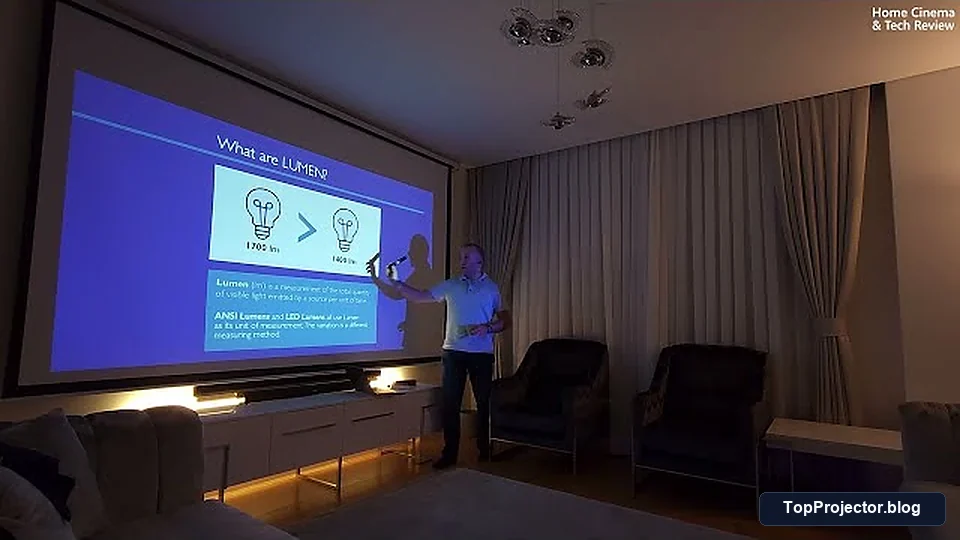
The American National Standards Institute relies on a classic nine-point grid methodology. Technicians measure white fields across specific screen coordinates, averaging the results to determine overall output.
International Organization for Standardization specifications modernize this process. They incorporate rigorous multi-zone evaluation algorithms designed to reflect complex laser and LED illumination engines accurately.
Understanding ANSI lumens requires analyzing nine-point grid illumination math. Manufacturers measuring peak output often skew metrics compared to strict American National Standards Institute testing protocols implemented in totally dark chambers.
- ANSI uses a time-tested nine-point sampling grid.
- ISO incorporates advanced multi-zone evaluation matrices.
- Both metrics quantify total luminous flux output.
Historical Context of ANSI Testing
Traditional lamp-based projectors relied heavily on ANSI ratings for decades. This established a reliable baseline for home theater enthusiasts comparing bulb performance in dark rooms.
Manufacturers could easily replicate these tests in controlled laboratory environments without advanced digital sensors.
- Lamp-based systems favored ANSI.
- Simple lab setups ensured high repeatability.
Modern Evolution Toward ISO Protocols
Solid-state light sources introduced complex spectral power distributions that challenged older metrics, similar to what we observed in our Optoma GT2000HDR review. ISO specifications accommodate phosphor wheels and RGB laser diodes far better today.
Consumers gain a more realistic expectation of perceived brightness during daily viewing sessions.
- Solid-state engines require advanced metrics.
- Laser and LED sources benefit from ISO accuracy.
ISO 21118 Standard Mechanics
- The ISO 21118 standard provides a globally unified measurement framework. It mandates specific ambient suppression and standardized throw distances to eliminate marketing inflation plaguing unverified brightness claims across modern digital displays.
Illuminance vs. Luminance Math
- Calculating screen-level lux involves dividing lumen output by your projection surface area in square meters. This critical metric dictates actual perceived brightness rather than raw projector emission values.
Black Levels, Contrast Ratios, and Dark Room Performance
Achieving deep black levels in a bat-cave theater depends on optical precision rather than raw lumen output. High brightness ratings can sometimes wash out native contrast if light engines lack proper black floor control.
ANSI metrics have historically aligned closely with traditional dynamic iris adjustments and native LCoS or DLP panel native contrast capabilities.
When evaluating ISO-rated projectors in pitch-black rooms, pay close attention to dynamic range. Excessively high output can strain your eyes during late-night movie marathons.
True native contrast relies heavily on micro-mirror tilt angles and optical light engines. High ANSI lumen ratings frequently compromise black floor depth unless dynamic iris mechanisms aggressively modulate laser diode output.
- Native contrast dictates dark room immersion.
- High lumens can compromise black floor depth.
- Dynamic iris systems help manage bright output.
Pitch-Black Theater Optimization
Dedicated projection caves demand careful calibration to preserve shadow detail, while exploring options like our best miniature projector picks helps optimize compact spaces. A projector rated at 1500 ANSI lumens delivers superior cinematic atmosphere.
Managing reflections off dark velvet walls prevents stray light from bouncing back onto your projection screen.
- Control reflections with dark room treatments.
- Lower lumen counts prevent eye fatigue.
Native Panel Performance
LCoS panels excel at delivering inky blacks regardless of the lumen testing standard used. DLP technology counters with sharp pixel fill factors that enhance perceived contrast.
Always balance your brightness choice with your screen's gain factor.
- LCoS provides exceptional black floor depth.
- DLP offers sharp digital pixel definition.
ANSI vs On/Off Contrast
- Standard ANSI contrast measures simultaneous white and black checkerboard patterns. This metric exposes native optical stray light control far better than inflated manufacturer on/off specs measured sequentially.
Laser Dimming Algorithms
- Modern solid-state light sources utilize frame-by-frame laser dimming to enhance dark room dynamic range. This software intervention drops black levels significantly during cinematic sequences without crushing shadow details.
Ambient Light Rejection and Living Room Realities
Living rooms present formidable challenges for home theater projectors due to uncontrolled ambient sunlight and overhead fixtures. Overcoming washout requires robust lumen output paired with specialized ALR screen material.
ISO ratings often reflect real-world mixed lighting scenarios more accurately than legacy metrics. This helps buyers select projectors capable of punching through daylight without losing color saturation.
Pairing a high-lumen laser projector with a directional ALR screen transforms a bright den into a daytime sports viewing paradise, especially when utilizing our projector central calculator guide for precise mounting geometry.
Ambient light rejection materials transform daytime viewing by absorbing off-axis environmental illumination. Pairing high-lumen projectors with angular reflective screens maintains vivid color saturation even with uncovered windows.
- Ambient light demands high luminous output.
- ALR screens reject off-axis environmental illumination.
- Living rooms require careful projector placement.
Daytime Sports and Casual Viewing
Watching weekend football requires high peak brightness to maintain contrast under harsh overhead lights. ISO-rated projectors often provide the extra headroom needed for vivid daytime images.
Viewers notice a dramatic improvement in daytime saturation when using modern laser light engines.
- High peak brightness aids daytime sports.
- Laser engines maintain vibrant color saturation.
Screen Gain Synergy
Choosing a neutral or positive gain screen amplifies the perceived brightness of your projector. However, high gain surfaces can introduce hotspots and narrow your optimal viewing angles.
Calculate your throw distance carefully to ensure uniform illumination across the entire fabric surface.
- Positive gain boosts image brightness.
- Watch out for potential hot-spotting issues.
Gain Factors and Viewing Cones
- Choosing a 1.3 gain screen boosts central punch but narrows usable horizontal viewing cones. Homeowners must balance off-axis brightness dropoff against ambient light rejection performance in multi-seat media spaces.
Lumen-to-Screen Size Ratios
- Achieving standard 30 foot-lamberts for HDR requires matching lumen output precisely to screen diagonal. Undersizing your light engine results in washed-out daylight images that fail cinematic standards.
Color Accuracy, White Balance, and HDR Tone Mapping
Accurate color reproduction is essential for preserving director intent during high dynamic range playback. Lumens measurements alone do not guarantee faithful Rec.709 or DCI-P3 color gamuts.
ANSI testing protocols traditionally measure white light output, which can sometimes exceed color lumen output on older lamp designs. Modern laser projectors often achieve near-parity between white and color brightness.
ISO specifications take broader color sampling into account, ensuring that vibrant cinematic scenes do not suffer from desaturated flesh tones or skewed white balance.
Achieving accurate Rec. 709 color space calibration often sacrifices up to thirty percent of maximum white brightness. Calibrators must balance RGB filters against raw lumen output for natural cinematic palettes.
- Color brightness matters as much as white brightness.
- HDR tone mapping requires substantial dynamic range headroom.
- ISO metrics account for multi-color phosphor outputs.
HDR Tone Mapping Performance
Mastering high dynamic range content demands intelligent processing inside the projector chassis. Peak white highlights pop dramatically when driven by a robust, well-calibrated light source.
Dynamic tone mapping algorithms analyze each frame in real-time to prevent clipping in bright cloud sequences.
- Real-time processing prevents highlight clipping.
- HDR content benefits from high luminous headroom.
Wide Color Gamut Filters
Engaging a cinematic color filter expands your projector's gamut to cover DCI-P3 fully. This mechanical step inevitably reduces total lumen output by twenty to forty percent.
Balance your need for absolute color fidelity against the ambient light levels in your viewing environment.
- Color filters reduce total light output.
- DCI-P3 coverage enhances cinematic immersion.
DCI-P3 Color Volume Limits
- Expanding color volume to cover DCI-P3 necessitates specialized phosphor wheels or RGB laser diodes. Lesser LED units struggle to maintain adequate luminance when hitting wide color gamut targets.
Dynamic Tone Mapping Processors
- Advanced dynamic tone mapping analyzes high dynamic range metadata frame by frame. This hardware processing prevents bright highlights from clipping while preserving shadow depth in mixed lighting environments.
Motion Handling, Input Lag, and Gaming Responsiveness
Modern video games require lightning-fast refresh rates and minimal input lag to ensure competitive responsiveness. While lumen ratings do not directly dictate processing speed, thermal management impacts both.
High-brightness laser projectors generate substantial heat, requiring sophisticated internal cooling fans that must balance acoustics with frame rate processing.
Competitive gamers should prioritize low input lag specifications over maximum lumen output when selecting a multi-purpose entertainment room projector.
Competitive gaming demands input lag measurements falling below twenty milliseconds at native 4K resolutions. High refresh rate support ensures fluid camera movement during fast-paced competitive multiplayer sessions.
- Input lag remains critical for fast-paced gaming.
- Thermal management affects fan noise levels.
- Refresh rates dictate smooth motion handling.
Low Latency Gaming Modes
Enabling dedicated gaming modes bypasses complex image processing pipelines to reduce latency significantly. Input lag values under 16 milliseconds ensure fluid competitive gameplay.
Fast frame interpolation further reduces motion blur during high-speed racing and shooter titles.
- Bypassing processing reduces lag times.
- Low latency is vital for competitive titles.
High Refresh Rate Projection
Next-generation consoles support 120Hz output at 1080p resolution for ultra-smooth motion. Ensuring your projector accepts high refresh rate signals is more vital than chasing peak lumens.
Check manufacturer specifications for specific input resolution and refresh rate compatibility matrices.
- 120Hz support delivers buttery smooth motion.
- Verify native input signal compatibility.
Frame Interpolation Artifacts
- Activating motion smoothing or frame interpolation introduces noticeable soap opera effects and visual artifacts. Purists disable these processing modes entirely to preserve director-intended cinematic frame cadences.
Micro-Mirror Switching Speeds
- Digital micromirror devices rely on ultra-fast switching speeds to render 4K pixel shift content. These rapid hardware cycles dictate motion clarity and eliminate trailing edges during panning shots.
Throw Ratios, Optics, and Installation Geometry
Physical room geometry dictates your choice of throw ratio, lens shift flexibility, and screen size. Consult our screen size viewing distance tool to determine ideal display dimensions for your layout.
Long-throw traditional projectors offer massive scaling flexibility for custom home theaters with dedicated ceiling mounts. Precision glass optics prevent chromatic aberration across corners.
Always calculate your exact throw distance using manufacturer calculators before drilling permanent mounts into drywall or ceiling studs.
Calculating precise throw ratios prevents costly mounting errors during dedicated theater room planning. Ultra-short-throw models require specialized flat surfaces to eliminate geometric distortion across large screen areas.
- Throw ratios determine projector placement distance.
- Lens shift simplifies off-axis physical installation.
- Precision glass optics ensure edge-to-edge sharpness.
Ultra-Short-Throw Living Room Setups
UST projectors sit inches from the wall, projecting massive images without casting shadows. These units rely heavily on precise calibration to prevent geometric distortion across flat surfaces.
Pairing a UST model with a lenticular ALR screen maximizes contrast in brightly lit family rooms.
- UST units sit flush against media consoles.
- Lenticular screens reject overhead ceiling light.
Dedicated Ceiling Mount Precision
Ceiling mounting provides a clean, permanent aesthetic for traditional home theater rooms. Generous optical lens shift allows installers to adjust image position without digital keystone degradation.
Avoiding digital keystone correction preserves every single pixel of native resolution.
- Optical lens shift preserves native resolution.
- Ceiling mounts hide cabling out of sight.
Lens Shift Flexibility
- Generous optical lens shift ranges let installers offset projectors vertically and horizontally without inducing keystone degradation. Hardware shift preserves native pixel mapping unlike digital keystone correction tools.
Glass Element Quality
- Premium glass lens arrays minimize chromatic aberration and corner softness across complex multi-element optical designs. Cheap plastic optics degrade focus uniformity and reduce perceived panel sharpness over time.
Definitive Scenario-Based Selection Guide
Choosing between ANSI and ISO lumens ultimately depends on your specific room architecture and viewing habits. Dedicated basement theaters with controlled lighting favor predictable traditional metrics.
Bright family rooms with large windows and white walls benefit from modern standards that account for complex solid-state illumination physics and real-world spectral output.
Assess your environmental lighting before purchasing to guarantee optimal home theater performance for years.
Selecting your ideal display requires balancing ANSI lumen output against specific room lighting conditions. Dedicated dark rooms prioritize high native contrast over maximum brightness capabilities.
- Match the standard to your room lighting.
- Basements favor traditional calibrated brightness.
- Living rooms require robust solid-state output.
The Ultimate Dark Room Setup
Build your dream cinema in a windowless basement using a high-contrast projector with moderate output. This configuration delivers inky blacks and prevents eye strain during long viewing sessions.
Invest in acoustic masking panels and dark velvet wall treatments for maximum immersion.
- Windowless spaces maximize contrast potential.
- Moderate lumen output prevents eye fatigue.
The Ultimate Daylight Living Room
Transform your main living area into an entertainment hub using a high-lumen laser projector. Combine it with a high-end ambient light rejection screen to combat daytime glare effectively.
Enjoy vivid sports and streaming content without pulling your blackout curtains every single afternoon.
- Laser light engines overpower daytime glare.
- ALR screens preserve rich color saturation.
Living Room Deployment Matrix
- High-ambient living spaces demand at least 3000 lumens paired with ambient light rejecting screen material. This combination ensures vibrant daylight performance without washing out dark cinematic sequences.
Dedicated Cinema Optimization
- Dedicated home theaters benefit from accurate color calibration and lower lumen outputs to maximize black floor depth. Controlled lighting environments let precision optics shine without distraction.
Frequently Asked Questions
What is the primary difference between ANSI lumens and ISO lumens?
ANSI lumens measure white light brightness using a traditional nine-point testing grid. ISO lumens utilize a more comprehensive multi-zone evaluation standard that better accommodates modern solid-state laser light engines.
Which brightness standard is better for a dedicated home theater?
For pitch-black rooms, ANSI lumens offer time-tested predictability and reliability. They help enthusiasts dial in precise black floor performance without excessive light output causing eye strain.
Do ISO lumens guarantee better color accuracy in bright rooms?
ISO standards account for broader color sampling during testing phases. This generally translates to more accurate color volume when evaluating laser projectors in challenging living room environments.
Can I trust manufacturer brightness claims without standard specifications?
Manufacturer marketing claims often exaggerate unverified peak brightness figures. Always look for standardized ANSI or ISO ratings to ensure honest performance comparisons across different projector models.
How does ambient light affect my choice of projector lumens?
High ambient light in living rooms washes out lower output projectors completely. Choosing a model with robust ISO-rated output paired with an ALR screen ensures vibrant daytime viewing.