300 ANSI Lumens vs. 3000 Lumens: Which Wins for Your Room?
Navigating projector brightness requires balancing ambient light and screen size. Discover whether ultra-low or high-output projection fits your viewing space.
Choose 300 ANSI lumens strictly for pitch-black dedicated home theaters, while 3000 lumens is essential for living rooms with ambient daylight.
Compare full category rankings in our Best Outdoor Projector For Day And Night: Top Picks.
Side-by-Side Specification Breakdown
| Criteria | 300 ANSI Lumens | 3000 Lumens | Edge |
|---|---|---|---|
| Ambient Light Rejection | Unusable in daylight | Handles moderate light | 3000 Lumens |
| Black Levels & Perceived Contrast | Deep ink blacks | Elevated black floor | 300 ANSI Lumens |
| Peak Brightness & HDR Punch | Subdued highlights | High specular punch | 3000 Lumens |
| Screen Size & Immersion | Limited to 80-100 inches | Powers 150+ inch screens | 3000 Lumens |
| Viewing Angles & Uniformity | Dependent on dark walls | Maintains uniform pop | 3000 Lumens |
| Gaming Motion & Input Lag | Varies by chip type | Low latency standard | 3000 Lumens |
| Room Setup & Maintenance | Quiet, compact LED/laser | Requires robust cooling | 300 ANSI Lumens |
Ambient Light Behavior and Optical Physics
Evaluating projector brightness demands a strict understanding of ambient light physics. Photons from room lamps easily wash out low-output optical engines.
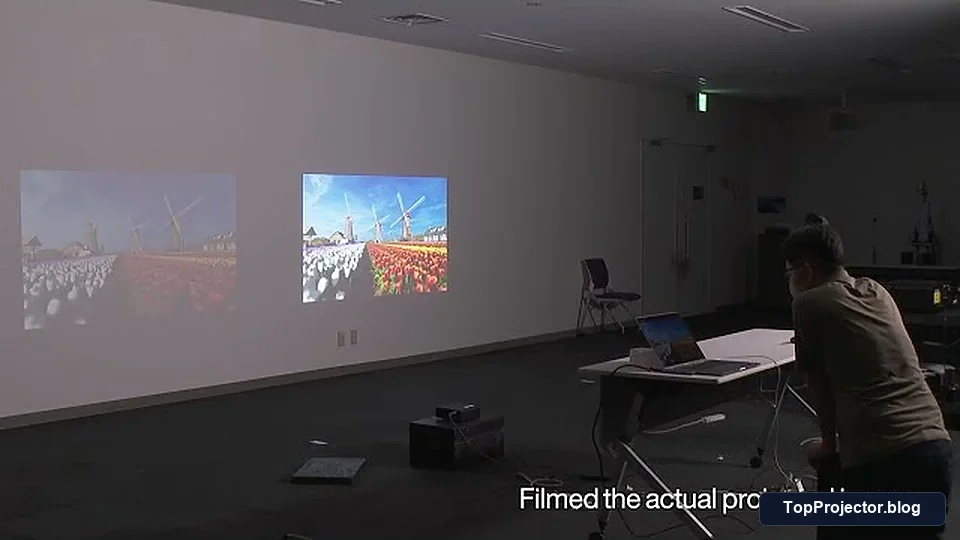
A 300 ANSI lumen projector relies entirely on darkness, making options from our best outdoor projector for day and night guide essential if you need daytime backyard visibility.
Conversely, 3000 lumen engines generate enough luminous flux to fight ambient reflections. They maintain legible text and rich skin tones during daylight hours.
Optically, room lumens always battle screen gain factors. Pairing high output with an ALR screen yields astonishing daytime contrast performance.
- 300 ANSI lumens demands absolute light control.
- 3000 lumens overcomes moderate ambient living room light.
- Screen gain multiplies or diminishes projector output effectively.
Dedicated Dark Room Performance
Inside a windowless basement, optical demands shift dramatically away from sheer brute force. Low-output engines shine brilliantly without competing light sources.
Controlling reflection bounce off white ceilings becomes your primary challenge here. Dark velvet treatments maximize the native black levels of weak sources.
- Zero ambient light allows low-output optimization.
- Ceiling reflections degrade ANSI contrast quickly.
Living Room Daylight Confrontation
Daylight introduces millions of competing photons onto your projection surface. Weak optical engines instantly turn washed out and completely unwatchable.
Pushing 3000 lumens through a specialized ambient light rejection surface conquers daytime glare. Your movies remain saturated and vibrant.
- Windows act as major contrast enemies.
- High lumen output preserves daytime watchability.
Black Levels, Contrast Ratios and Shadow Detail
Achieving deep black levels requires minimizing light leakage from the projector bulb. Low-output LED models naturally excel at rendering dark shadow details.
A 300 ANSI lumen machine produces minimal residual light when displaying black. This creates incredible native contrast in darkened theater rooms.
High-output 3000 lumen projectors struggle with elevated black floors. Their powerful light sources leak luminescence into supposedly dark cinematic scenes.
Dynamic iris systems help mitigate this issue on bright projectors. However, true cinema purists still prefer lower-output optical blocks for films.
- Low lumens yield superior native black levels.
- High lumens often suffer from gray-looking blacks.
- Dynamic irises help bridge contrast performance gaps.
Shadow Distinction in Dark Scenes
Dark movie sequences test the dynamic range limits of any projection system. Low-lumen projectors reveal subtle textures hidden in gloomy shadows.
Bright projectors frequently crush shadow details into an opaque black mass. Calibrating gamma curves helps recover lost nighttime visual information.
- Subtle shadow gradients favor low-output sources.
- Gamma calibration restores lost dark-scene details.
Managing Elevated Black Floors
Brighter light engines emit residual photons even during fade-to-black sequences. This limitation makes dark room viewing feel slightly washed out.
Using gray-tinted projection screens effectively absorbs ambient room scatter. Such screens lower perceived black levels on high-output units.
- Residual light causes milky black floors.
- Gray screens restore perceived contrast ratios.
Peak Brightness, HDR Punch and Screen Gain
High Dynamic Range content demands immense peak brightness to render specular highlights accurately. Dim projectors fail to produce convincing HDR specular sparkle.
A 300 ANSI lumen source lacks the horsepower required for proper HDR mapping. Highlights like exploding suns appear dull and flat.
Modern 3000 lumen projectors deliver the necessary peak luminance for HDR metadata. Metal reflections and fire bursts pop with realistic intensity.
Pairing high lumen output with a positive gain screen maximizes brightness. Use our projector screen distance calculator guide to optimize your throw distance and prevent hot-spotting artifacts.
- HDR content requires high peak luminance values.
- Low lumens cannot map specular highlights effectively.
- Screen gain must match your optical output.
Specular Highlight Rendering
Specular highlights give digital video its lifelike three-dimensional depth. High-lumen engines reproduce glints of light with striking visual realism.
Low-output projectors compress bright tones into a uniform gray band. You lose the blinding impact intended by master colorists.
- Highlights provide crucial visual depth cues.
- Compression destroys intended artistic impact.
HDR Tone Mapping Strategies
Projectors must dynamically remap high-nit mastering data for lower screen brightness. High-output units handle this mathematical translation with ease.
Low-output machines require aggressive tone curve boosting to look acceptable. This processing often introduces banding and color clipping artifacts.
- Tone mapping bridges mastering and projection limits.
- Aggressive boosting creates visible color banding.
Screen Size, Throw Ratios and Spatial Immersion
Screen size directly dictates how your projector's lumens get distributed. Spreading light across a massive surface drastically reduces perceived image brightness.
A 300 ANSI lumen projector is strictly restricted to smaller 80-inch screens. Exceeding this size results in an unwatchably dim picture.
Powerful 3000 lumen optical engines effortlessly illuminate massive 150-inch screens. Consult our screen size and viewing distance tool to maintain stunning cinematic punch across expansive surfaces.
Always calculate your foot-lambert target before finalizing screen sizes. Proper optical math prevents disappointing installation results.
- Large screens dilute available projector lumens.
- Low-lumen models max out near 80 inches.
- High-lumen units easily power 150-inch canvases.
Maximizing Field of View
A wider field of view enhances your overall cinematic immersion significantly. High-lumen projectors allow massive screen sizes without sacrificing punch.
Restricting your image size to accommodate weak lumens limits immersion. You sacrifice theatrical scope for basic image visibility.
- Wide views improve cinematic immersion levels.
- Dim projectors compromise your desired screen size.
Throw Distance and Light Falloff
Inverse square law dictates that light intensity drops over distance. Placing your projector far back diminishes image brightness noticeably.
High-lumen units tolerate longer throw distances much better than weak alternatives. This flexibility simplifies challenging living room mounting setups.
- Light falloff impacts distant screen placements.
- High output ensures brightness over long throws.
Color Accuracy, Wide Gamut and Motion Handling
Color saturation depends heavily on light source purity. As noted in our Epson EF12 smart laser review, modern laser engines utilize advanced multi-phosphor wheels for extraordinarily vivid palettes.
A 300 ANSI lumen LED projector maintains solid color accuracy in dark rooms. Its native color gamut often covers Rec.709 standards cleanly.
Pushing 3000 lumens through standard color filters can sometimes dilute accuracy. Advanced calibration ensures cinematic color fidelity remains intact.
Motion handling relies on internal processing rather than sheer brightness. Pairing low input lag with smooth frame interpolation yields crisp motion.
- Laser light engines deliver vibrant color saturation.
- Low lumens maintain clean Rec.709 color fidelity.
- Motion processing requires dedicated hardware support.
Wide Color Gamut Volume
Cinematic releases demand wide color gamuts like DCI-P3 for realistic skin tones. High-lumen projectors use sophisticated filters to hit these targets.
Low-output units struggle to maintain brightness when engaging wide gamut filters. Color volume collapses into dim, muddy visual outputs.
- DCI-P3 coverage enriches cinematic skin tones.
- Filters reduce brightness on weak projectors.
Motion Blur and Frame Rates
Fast-moving panning shots require high refresh rates to prevent motion blur. Modern high-lumen projectors handle high frame rates smoothly.
Budget low-lumen options often lack advanced motion interpolation processors. Fast action sequences can exhibit stuttering and artifacting.
- Refresh rates eliminate fast-panning motion blur.
- Processing power prevents visible frame stuttering.
Gaming Input Lag, Refresh Rates and Response Times
Competitive gaming requires ultra-low input lag for instant controller response. Modern gaming projectors achieve sub-16ms latencies at high refresh rates.
A 300 ANSI lumen portable projector often features higher gaming input lag. Its internal processing chips prioritize media streaming over twitch reflexes.
Many 3000 lumen home entertainment models include dedicated gaming modes. These special modes bypass heavy image processing to reduce latency.
Pairing high brightness with rapid response times creates epic gaming immersion. You experience vivid action without frustrating controller delays.
- Low input lag is crucial for competitive gaming.
- Dedicated game modes bypass heavy image processing.
- High brightness enhances vibrant gaming graphics.
Competitive Latency Benchmarks
First-person shooters demand input latencies below 20 milliseconds. High-lumen gaming projectors easily meet these rigorous competitive standards.
Older or ultra-dim portable units frequently exceed 50 milliseconds of lag. This delay makes fast-paced gaming frustrating and unresponsive.
- Shooters require sub-20ms response times.
- High lag ruins fast-paced gaming experiences.
High Refresh Rate Support
Supporting 120Hz or 240Hz inputs elevates fluid motion in modern video games. High-output engines process these rapid frame rates smoothly.
Low-output portable projectors typically cap out at standard 60Hz refresh rates. You miss out on buttery-smooth console gameplay performance.
- 120Hz input delivers fluid gaming motion.
- Dim portables usually limit refresh capabilities.
Setup Complexity, Throw Distances and Acoustic Noise
Installing a projector involves balancing physical placement and acoustic noise levels. Powerful cooling fans in bright units can generate audible distraction.
A 300 ANSI lumen LED or laser model runs remarkably quiet. Their low heat output requires minimal cooling fan intervention.
Heavy 3000 lumen lamp units demand robust thermal management systems. Loud fan noise can disrupt quiet movie dialogue scenes.
Carefully evaluate your mounting options and throw ratio specifications before purchasing. Proper physical alignment saves countless hours of frustration.
- Bright projectors generate notable fan noise.
- Low-lumen models operate in virtual silence.
- Proper planning ensures smooth physical installation.
Thermal Management and Fan Noise
Intense optical brightness generates massive amounts of internal heat. High-lumen projectors spin up noisy fans to protect sensitive diodes.
Low-lumen units produce minimal heat and remain whisper quiet during operation. This quiet performance suits small bedrooms exceptionally well.
- High heat requires aggressive cooling fans.
- Quiet operation benefits small bedroom setups.
Placement Flexibility and Optics
Short-throw lenses and optical zoom simplify difficult room layouts. High-end projectors offer wide lens shift for effortless geometry alignment.
Budget dim projectors often lack lens shift, requiring precise physical placement. Any mounting error forces digital keystone correction quality loss.
- Lens shift prevents digital keystone degradation.
- Precise placement is vital for fixed lenses.
Definitive Room-by-Room Buying Scenarios
Choosing between these extremes depends entirely on your specific room environment. Matching your hardware to lighting conditions guarantees satisfaction.
Select a 300 ANSI lumen projector for dedicated dark basements. You will enjoy superior contrast and silent operation for movies.
Choose a 3000 lumen projector for bright living rooms and media spaces. It cuts through ambient daylight to deliver vibrant big-screen entertainment.
Never compromise your primary viewing environment by ignoring optical physics. Proper brightness matching remains the golden rule of projection.
- Match projector output to room lighting conditions.
- Dark basements favor low-lumen contrast machines.
- Bright living rooms demand high lumen punch.
The Dedicated Home Theater Verdict
Dedicated theaters with black velvet walls reward low-output precision. You maximize native black levels and enjoy true cinematic immersion.
Installing a bright projector here creates blinding light scatter and gray blacks. Keep your lumen count modest in controlled spaces.
- Velvet-treated rooms maximize low-lumen contrast.
- Bright units ruin dark theater black levels.
The Multi-Purpose Living Room Verdict
Living rooms with windows and white walls require high lumen muscle. A 3000 lumen engine ensures daytime visibility and sports watchability.
Low-output projectors remain utterly useless in multi-purpose daytime spaces. Invest in high output for versatile daily viewing enjoyment.
- Daylight demands powerful living room output.
- Dim projectors fail standard living room tests.
Frequently Asked Questions
Can 300 ANSI lumens work with any ambient light?
No, 300 ANSI lumens requires complete darkness to produce a visible image. Even minor room lighting completely washes out the picture.
Why do 3000 lumen projectors have worse black levels?
High-output bulbs emit residual light even during dark scenes. This excess luminance raises the black floor into a milky gray tone.
What screen size suits a 300 ANSI lumen projector?
Stick to screens between 80 to 100 inches for optimal brightness. Exceeding this size makes the projected image unwatchably dim.
Are 3000 lumen projectors too loud for home theaters?
Some models generate noticeable fan noise due to intense cooling needs. Check manufacturer decibel ratings before mounting units near seating.
Which brightness level is better for general family use?
Choose 3000 lumens for versatile living room and daytime viewing. It easily conquers ambient light for sports, gaming, and television.