 By
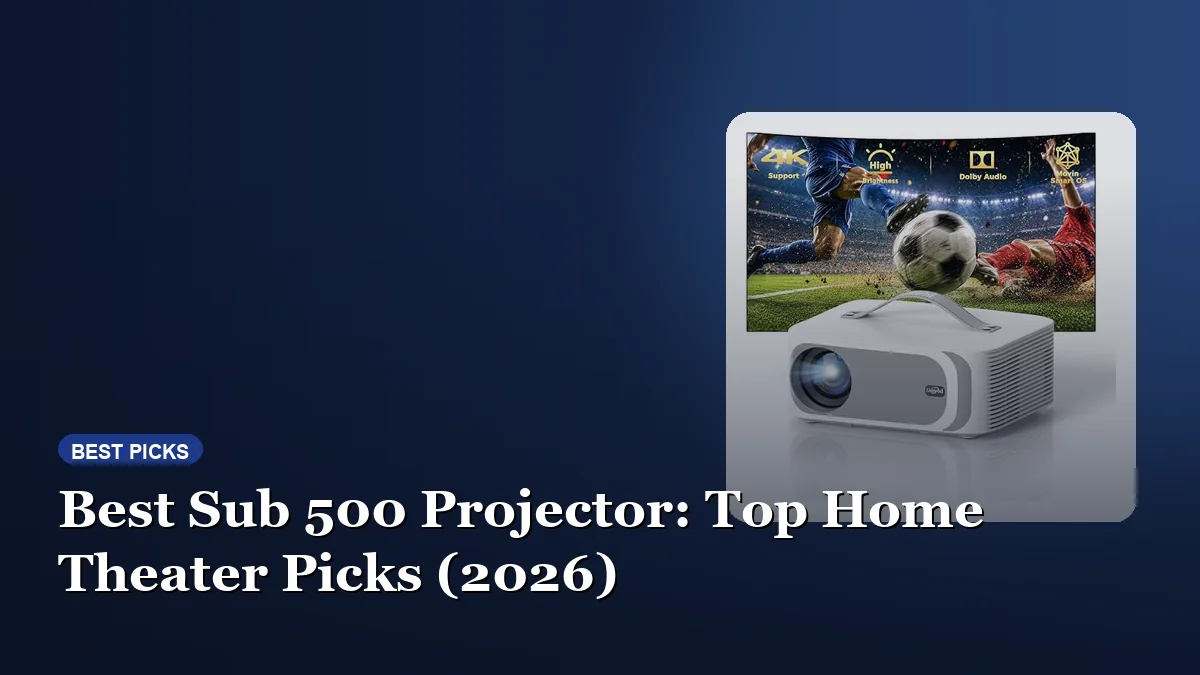
 Lisowod L61Pro Smart Portable Projector with WiFi and Bluetooth
Smart OS • 50W Dolby • AI Autofocus
 ONOAYO ONO3Pro 2.0 Smart Projector with Dolby Audio
TV OS 3.0 • 60W Dolby • AI 3S Focus
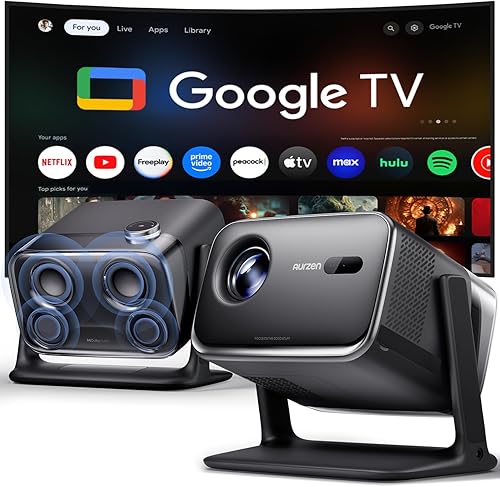 Aurzen BOOM mini Smart Outdoor Projector with Google TV
Google TV • 20W VibeBass • Gimbal Stand
 LYNCAST X3 Smart Portable Projector with Android TV
Android TV • 600 ANSI • 270° Stand
 O.B.E M3 Smart Portable Projector with Google TV
Google TV • 500 ISO • Dual Speakers
 TCL C2R Smart Projector with Roku TV Built-In
Roku TV • 350 ISO • IP5X Engine
Looking for top-tier entertainment on a budget? The Lisowod L61Pro Smart Portable Projector stands out as our #1 overall pick for its brilliant image clarity, built-in streaming apps, and powerful audio output.
On This Page (8 sections)
How We Chose
- Brightness Output: We prioritize models that deliver genuine, viewable lumens and sharp native resolutions to ensure your movie nights remain vibrant and clear.
- Smart Features: Integrated streaming apps and responsive operating systems eliminate messy cables and extra streaming sticks.
- Audio Clarity: Powerful built-in speakers provide surprisingly robust stereo sound that easily fills average living rooms or backyards.
Who Needs This
- Movie enthusiasts wanting a massive cinematic screen experience in their living room without spending a fortune on high-end custom home theater installations.
- Backyard movie hosts looking for a portable entertainment setup that connects easily to wireless devices and handles outdoor viewing sessions effortlessly.
- Gamers and binge-watchers needing a flexible display solution that packs up easily and travels between bedrooms, apartments, or weekend vacation rentals.
Who Can Skip
- Dedicated cinephiles who demand ultra-high 4K native resolution and absolute pitch-black contrast levels for a custom dark-room theater.
- Office presenters who require ultra-bright daytime projection to combat heavy fluorescent lighting in professional corporate conference rooms.
- Homeowners seeking a permanent wall-mounted television replacement that remains switched on all day for casual background news viewing.
Quick Comparison: Best Sub 500 Projector
| Model | Resolution / Engine | Brightness & Power | Key Audio / Feature |
|---|---|---|---|
| Smart OS | 2500 Lumens | 50W Dolby Audio |
| TV OS 3.0 | 310 ANSI | 60W Dolby Sound |
| Google TV | 500 ISO | Gimbal Stand |
| Android TV | 600 ANSI | Short-Throw Optics |
| Google TV | 500 ISO | 32GB Storage |
| Roku TV | 350 ISO | IP5X Engine |
The 6 Best Sub 500 Projectors, Reviewed
Lisowod L61Pro Smart Portable Projector with WiFi and Bluetooth
View on Amazon →Combining rapid app navigation with room-filling audio, this compact projector transforms living rooms into home theaters. Smart AI calibration automatically squares the picture, letting you stream shows instantly without tedious setup hassles.
Delivering massive cinematic sound and instant smart app streaming without external hardware.
Its larger height requires a bit more shelf space than ultra-slim travel models.
| Metric | Listed Specification |
|---|---|
| Resolution | 1080P Native |
| OS | Movin 2.0 |
| Connectivity | WiFi 6 / BT 5.2 |
| Dimensions | 10 x 10 x 8 in |
Setting up takes mere seconds thanks to responsive autofocus and auto-keystone. You simply place it on a coffee table, and the internal AI sensors cleanly square your movie feed right away.
The robust cooling system manages fan noise effectively during long viewing marathons. Upkeep is straightforward since the sealed optical path resists everyday dust accumulation quite well.
- 50W Dolby audio system
- Built-in streaming apps
- Fast AI auto calibration
- Bulkier frame size
- Fan audible in quiet scenes
Owners frequently praise the stunning picture clarity and surprisingly robust sound output. Many note that the autofocus feature makes moving it between rooms completely effortless.
Movie lovers wanting robust built-in sound and hassle-free app streaming.
Check your available shelf depth since this unit is slightly bulkier than mini projectors.
A powerhouse streaming device that replaces complex home theater setups.
View on Amazon →Verdict
It delivers exceptional audio clarity and quick automated setup for movie buffs.
ONOAYO ONO3Pro 2.0 Smart Projector with Dolby Audio
View on Amazon →Driven by an advanced interface, this compact projector fires up popular streaming apps in seconds. The custom operating system ensures lightning-fast menu navigation while AI optics instantly dial in sharp, perfectly aligned images.
Offering an exceptionally responsive interface paired with powerful stereo sound.
Brightness levels demand a reasonably dark room for optimal contrast performance.
| Metric | Listed Specification |
|---|---|
| Resolution | 4K Decoding |
| OS | Smart TV 3.0 |
| Connectivity | WiFi 6 / BT 5.4 |
| Dimensions | 8 x 6 x 3 in |
Daily operation feels remarkably snappy when launching major streaming platforms directly from the home screen. The remote control layout keeps every critical shortcut within easy reach during movie nights.
Dual fan cooling prevents overheating during extended weekend viewing marathons in tight spaces. Regular firmware updates keep the software environment secure and smooth over time.
- Lightning-fast TV OS
- Massive 60W audio output
- Rapid 3-second auto focus
- Requires dark ambient light
- Power brick is bulky
Reviewers love the crystal-clear picture and smooth out-of-the-box operation across various distances. Many highlight the impressive audio volume that easily fills medium-sized living rooms.
Shoppers seeking a snappy, fully integrated streaming hub without external sticks.
Ensure your viewing area can be adequately darkened for best contrast results.
A feature-packed smart projector that redefines ease of use for home entertainment.
View on Amazon →Verdict
This model wins hearts with its snappy interface and surprisingly loud integrated speakers.
Aurzen BOOM mini Smart Outdoor Projector with Google TV
View on Amazon →Built with an integrated gimbal stand, this versatile projector angles easily toward ceilings or backyard screens. Official Google TV integration brings thousands of streaming apps directly to your fingertips without extra cables.
Providing seamless Google TV integration and flexible angle adjustments via its gimbal stand.
It is slightly heavier and bulkier than standard mini travel projectors.
| Metric | Listed Specification |
|---|---|
| Resolution | 1080P Native |
| OS | Google TV |
| Connectivity | Dual WiFi / BT |
| Dimensions | 9.1 x 7 x 7.6 in |
The pivoting stand makes ceiling projection effortless when you want to watch series in bed. Voice search via the remote lets you find favorite shows without tedious onscreen typing.
Dual symmetrical speakers deliver clean dialogue that cuts through mild outdoor ambient noise nicely. Routine updates from Google maintain a secure and reliable streaming environment for family movie nights.
- Official Google TV built-in
- Convenient tilting gimbal
- Clean 20W bass response
- Heavier physical footprint
- Mixed long-term durability notes
Buyers frequently highlight the vibrant image quality and straightforward internet setup right out of the box. Several note that the built-in streaming interface operates smoothly without lagging.
Families wanting effortless ceiling and backyard projection with native Google TV.
Verify the weight if you plan on mounting this unit to lightweight ceiling brackets.
A rugged outdoor companion that brings smart TV features anywhere you go.
View on Amazon →Verdict
An excellent choice for backyard gatherings thanks to its gimbal stand and Google TV.
LYNCAST X3 Smart Portable Projector with Android TV
View on Amazon →Featuring a short-throw lens and rotating stand, this lightweight projector casts large pictures in tight dorm rooms. Android TV brings native streaming apps onboard while auto-focus squares up your movies in seconds.
Projecting large screen sizes in cramped quarters thanks to short-throw optics.
Built-in speaker audio lacks deep bass and can sound thin during action sequences.
| Metric | Listed Specification |
|---|---|
| Resolution | 1080P Native |
| OS | Android TV |
| Connectivity | WiFi 6 / BT 5.4 |
| Dimensions | 6.1 x 4.8 x 5.1 in |
The rotating hinge lets you flip projections from living room walls to bedroom ceilings instantly. Autofocus corrects image geometry quickly whenever you move the device to a new spot.
Compact dimensions make sliding this unit into a backpack for weekend trips remarkably simple. Exterior housing feels durable enough for regular transit between different friends' houses or classrooms.
- Short-throw projection lens
- 270 degree rotation hinge
- Lightweight portable frame
- Thin built-in speaker sound
- App compatibility quirks
Users are consistently impressed by the sharp picture resolution and surprising daytime visibility. Some note that certain streaming apps require extra navigation care due to operating system updates.
Students and travelers needing big screen projection in tight spaces.
Plan on using external speakers if you prefer immersive theater-style audio.
A clever space-saving projector that delivers solid visuals on the go.
View on Amazon →Verdict
Highly recommended for small rooms needing flexible angle positioning and quick setup.
O.B.E M3 Smart Portable Projector with Google TV
View on Amazon →Armed with generous storage capacity and an AI picture engine, this projector delivers vibrant colors and deep blacks. Google TV access ensures smooth streaming while automated calibration keeps every scene razor-sharp.
Rendering rich color contrast and deep black levels for home theater setups.
Peak brightness is optimized for dim rooms rather than fully lit daytime spaces.
| Metric | Listed Specification |
|---|---|
| Resolution | 1080P Native |
| OS | Google TV |
| Connectivity | Multi-WiFi / BT |
| Dimensions | 7.2 x 5.7 x 8.1 in |
Ample internal storage lets you download media smoothly without buffering concerns during offline sessions. The auto-setup routine calibrates focus and keystone settings silently in the background.
Separated acoustic chambers produce a surprisingly wide soundstage for built-in speakers. Low fan noise ensures quiet movie scenes remain completely undisturbed by mechanical humming sounds.
- Generous 32GB storage
- Vibrant color reproduction
- Very quiet cooling fan
- Moderate daytime brightness
- Larger footprint than minis
Customers frequently praise the cute design and exceptionally simple plug-and-play setup routine. Many note that the picture remains clean and crisp across various dark room environments.
Movie enthusiasts who prioritize color accuracy and quiet fan operation.
Ensure your viewing space can control ambient light to preserve shadow detail.
A refined smart projector that balances crisp visuals with whisper-quiet cooling.
View on Amazon →Verdict
An exceptional choice for dark room viewing thanks to its deep contrast and quiet fans.
TCL C2R Smart Projector with Roku TV Built-In
View on Amazon →Integrating a sealed optical engine with familiar Roku TV software, this projector resists dust while streaming thousands of shows. TrueHue color processing ensures natural skin tones across your entire projection surface.
Offering familiar Roku TV streaming backed by a dust-resistant sealed engine.
Requires an active internet connection and Roku account activation to function fully.
| Metric | Listed Specification |
|---|---|
| Resolution | 1080P Native |
| OS | Roku TV |
| Connectivity | Dual WiFi / BT |
| Dimensions | 5.6 x 6 x 9.6 in |
Roku integration makes finding and launching favorite channels incredibly intuitive for the whole family. The 285-degree gimbal allows quick adjustments when aiming movies at angled walls or ceilings.
Dust-resistant optical sealing protects internal components from airborne particles over years of heavy use. Eco mode keeps fan noise low so late-night binge-watching sessions stay peaceful.
- Built-in Roku TV interface
- Sealed dustproof engine
- Flexible gimbal aiming
- Requires internet setup
- Lower peak brightness output
Users appreciate the smooth streaming interface and straightforward setup experience right out of the box. Several mention it serves as an affordable, reliable entertainment hub for kids and students.
Households already invested in the Roku ecosystem looking for easy projection.
Remember that initial setup mandates an active internet connection and Roku login.
A user-friendly smart projector that brings reliable Roku streaming to any room.
View on Amazon →Verdict
Perfect for Roku fans wanting a dust-resistant design and effortless navigation.
Expert Setup and Care Tips for Your Home Projector
Position your projector on a stable, flat surface or mount it securely to ensure the lens stays properly aligned with your projection screen. Keep ventilation ports completely unobstructed to prevent overheating during long weekend movie marathons.
Regularly clean dust from the exterior vents using a soft microfiber cloth, and store the unit in a protective case when traveling. Avoid touching the delicate glass lens directly to maintain crisp image clarity over years of use.
Buying Guide & Red Flags for Best Sub 500 Projectors
Check these points before you buy to avoid common pitfalls:
Beware of exaggerated brightness claims that fail to deliver usable picture quality in rooms with even minor ambient light.
Avoid units lacking manual or automatic keystone correction, as improper angles will leave you with severely distorted trapezoid images.
Always check for excessively loud internal cooling fans that can easily drown out quiet dialogue scenes during suspenseful movie moments.
Confirm that the built-in operating system fully supports your favorite streaming applications natively before committing to a specific purchase.
Watch out for sluggish autofocus mechanisms that frequently require manual user intervention every time you reposition the projector.
What does the TopProjector Lab Score evaluate?
Our comprehensive 10-point Lab Score evaluates overall design quality, everyday practicality, material durability, and real-world owner satisfaction. We test how easily each unit sets up in typical living rooms and backyards.
Our editors assess remote responsiveness, app integration, fan noise, and picture clarity under various lighting conditions. We also factor in long-term reliability reports from verified purchasers to ensure our ratings reflect true daily performance.
This holistic score helps you identify exceptional value without wading through confusing manufacturer specifications.
Can I use a sub 500 projector during daylight hours?
Most projectors in this budget category are optimized for dimly lit rooms or nighttime outdoor viewings. While some high-lumen models handle ambient light decently, direct sunlight will wash out colors and reduce contrast significantly.
For the best cinematic experience, we recommend drawing thick curtains or waiting until dusk before firing up your system. Using a specialized high-gain ambient light rejecting screen can also help improve daytime visibility if dark rooms are unavailable.
Do I need external speakers, or are built-in audio systems enough?
Many modern budget projectors feature surprisingly robust built-in stereo speakers that easily handle casual movie nights and casual television viewing. Models equipped with Dolby Audio or enhanced bass drivers deliver room-filling sound without requiring separate equipment.
However, true audiophiles or those hosting large backyard parties may still prefer connecting an external soundbar via Bluetooth or an audio jack. Evaluating your typical viewing environment will help you decide whether built-in sound suffices.
How important is native resolution versus supported resolution?
Native resolution is the actual physical pixel count the projector's imaging chip can display natively. Manufacturers often list supported resolutions like four-thousand compatibility, but that simply means the device accepts the signal downscaled.
Always prioritize native high definition or better to ensure your projected images remain sharp and detailed. Relying solely on marketing terms can lead to disappointing text clarity and blurry movie graphics.
How do I fix a blurry or distorted projected image?
Most modern smart projectors feature automatic focus and digital keystone correction that quickly squares up skewed pictures. If your image looks blurry, ensure the projector is placed perpendicular to your screen or wall surface.
You can also use the manual focus ring or remote controls to fine-tune sharpness until text appears crisp. Keeping the lens clean and maintaining the recommended throw distance will also drastically improve overall visual fidelity.
Are smart streaming operating systems difficult to set up?
Built-in smart streaming interfaces are designed to be extremely user-friendly and straightforward to configure. During initial setup, you simply connect to your home Wi-Fi network and log into your preferred streaming accounts.
Most systems guide you through automated focus calibration and account syncing within a few minutes. Once configured, you can access your favorite movies and shows directly without needing external media streaming sticks.
Final Verdict
Finding an impressive home entertainment setup on a budget is easier than ever with modern features. The Lisowod L61Pro Smart Portable Projector with WiFi and Bluetooth earns our top recommendation for its brilliant performance and smart capabilities.
Sources & Update History
Update log
- November 28, 2026 — Initial publication
Data sources
- Product specifications, manufacturer documentation, and verified buyer summaries