 By
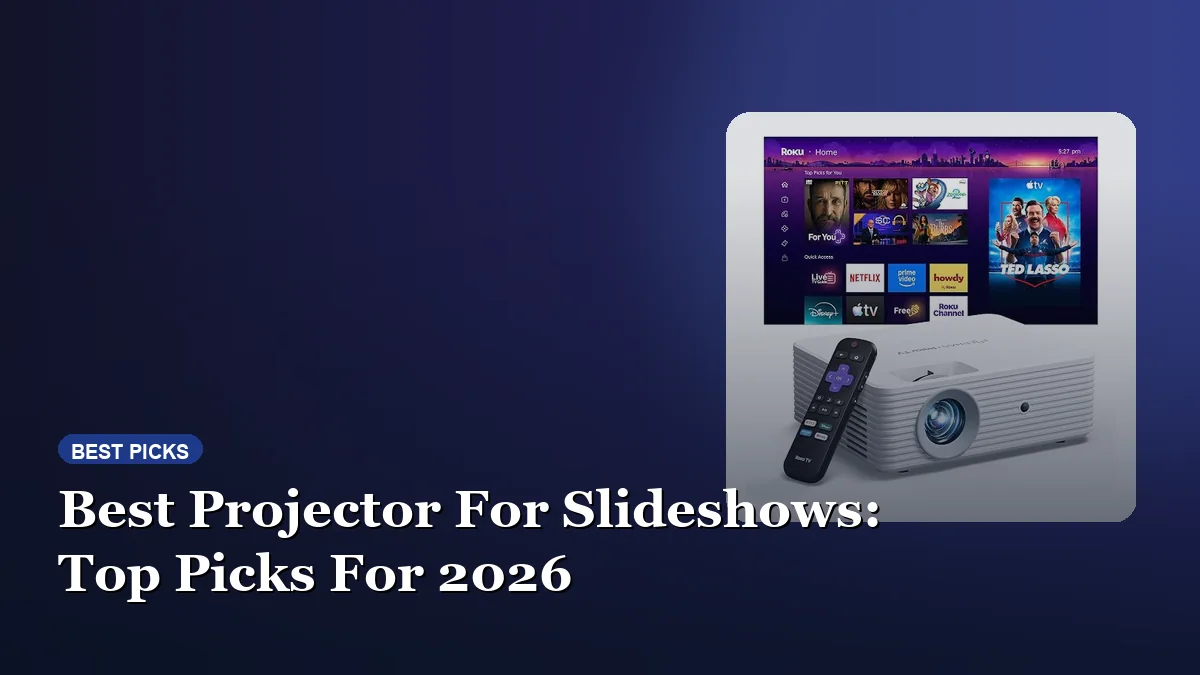
 ELEPHAS Roku TV Smart Projector with Wi-Fi and Bluetooth
Smart Roku OS • Dual Wi-Fi • Compact Portable
 HAPPRUN Native 1080P Bluetooth Projector for Home Entertainment
1080p Native • Bluetooth 5.3 • 200-inch Max
 Mini Projector with WiFi and Bluetooth Built-in Apps
Wi-Fi 6 • Built-in Apps • Electric Focus
 GOODEE 4K Smart Projector with AI Auto Focus
4000 Lumens • AI Auto Focus • Dolby Audio
 AWOL VISION Aetherion Pro 4K Ultra Short Throw Laser Projector
RGB Laser • 4K UST • Google TV
 TCL C2R Smart Projector with Roku TV Built In
Roku TV Built-in • 285° Gimbal • IP5X Sealed
The ELEPHAS Roku TV Smart Projector with Wi-Fi and Bluetooth is our top pick for slideshows. It features a built-in Roku OS for effortless streaming and reliable everyday performance.
On This Page (8 sections)
How We Chose
- Sharp Resolution: We prioritize models offering clear text reproduction so your photo memories and presentation slides remain completely legible.
- Smart Connectivity: We test seamless wireless casting and built-in operating systems to eliminate messy physical cables during quick presentation setups.
- Reliable Portability: We carefully evaluate physical weight and chassis durability to ensure hassle-free transport between different rooms and venues.
Who Needs This
- Teachers and educators needing a reliable portable display for showing classroom slideshows and educational videos without complex setups.
- Business professionals seeking an accessible projection tool for sharing corporate presentations and photo galleries during client meetings on location.
- Home users wanting to project cherished family photo memories onto a large living room wall during special holiday gatherings.
Who Can Skip
- Hardcore video gamers requiring ultra-low input lag and lightning-fast refresh rates for competitive high-speed esports gaming sessions.
- Cinematic purists demanding uncompromising 4K resolution and professional color calibration for high-end dedicated home theater movie nights.
- Corporate executives needing permanent heavy-duty conference room installations equipped with advanced network security and remote management controls.
Quick Comparison: Best Projector For Slideshows
| Model | Resolution | Max Image Size | Weight / Form Factor |
|---|---|---|---|
| 1280 x 720 | 150 inches | 1.3 lbs / Portable |
| 1920 x 1080 | 200 inches | 1.3 kg / Portable |
| 1920 x 1080 | 200 inches | 1.7 lbs / Portable |
| 1920 x 1080 | 400 inches | 7.2 lbs / Desktop |
| 3840 x 2160 | 200 inches | 8.35 kg / Desktop |
| 1920 x 1080 | 150 inches | Tabletop / Portable |
The 6 Best Projector For Slideshowss, Reviewed
ELEPHAS Roku TV Smart Projector with Wi-Fi and Bluetooth
View on Amazon →Featuring built-in Roku, this compact projector lets you stream presentations or slideshows directly without extra hardware. Its lightweight build makes moving between office rooms effortless.
Seamlessly streaming your favorite slideshows and media via the integrated Roku interface without ever needing external streaming sticks or tangled laptop cords.
The modest native 720p resolution completely lacks the ultra-sharp clarity required for extremely detailed text-heavy spreadsheets or fine graphic design work during important presentations.
| Metric | Listed Specification |
|---|---|
| Display Resolution | 1280 x 720 |
| Form Factor | Portable |
| Connectivity | Wi-Fi & Bluetooth |
| Audio | Dolby Audio |
Setting up this lightweight device in a conference room takes minutes, thanks to the intuitive Roku menus and responsive remote that simplify everyday navigation.
While compact enough for casual boardroom use, ensure you manage ambient light carefully because the brightness level performs best in dim environments.
- Built-in Roku OS
- Lightweight portable build
- Dual-band Wi-Fi support
- 720p native resolution
- Needs dim lighting
Customers are deeply impressed with this projector's nice and clear picture quality, while also appreciating its compact size and straightforward setup process.
Everyday professionals and educators needing a portable streaming projector for casual slideshow presentations and quick media sharing.
Double-check your typical room lighting conditions and ensure the 720p resolution fully meets your specific presentation clarity requirements.
This feature-packed smart Roku projector delivers exceptional everyday convenience and reliable portability for casual multimedia slideshow presentations.
View on Amazon →Verdict
An absolute top choice for portable slideshows, perfectly combining smart Roku streaming with effortless setup for everyday users.
HAPPRUN Native 1080P Bluetooth Projector for Home Entertainment
View on Amazon →Delivering native 1080p resolution, this budget-friendly projector ensures your business slides and photo slideshows remain crisp and readable across large screens without breaking your wallet.
Providing exceptionally sharp full HD clarity for detailed slideshow presentations without ever demanding a high-end commercial projector budget.
The built-in speakers can sound tinny, meaning you will likely need external audio gear for larger presentation spaces.
| Metric | Listed Specification |
|---|---|
| Display Resolution | 1920 x 1080 |
| Wattage | 70 watts |
| Audio | Bluetooth 5.3 |
| Form Factor | Portable |
The straightforward connection options let you plug laptops directly via HDMI, making slide navigation reliable during important meetings.
Long-term maintenance involves keeping the lens clean and securely mounted on a sturdy tripod to prevent accidental wobbles.
- Native 1080p Full HD
- Affordable budget price
- Large display capability
- Basic built-in speakers
- Requires adapter for phones
Owners love the crystal clear picture and budget-friendly price point, though some note occasional quirks with external Bluetooth audio pairing.
Budget-conscious presenters actively looking for native 1080p performance for clean, legible slideshows and home movies.
Verify whether you need to purchase an adapter if you plan to connect phones or tablets directly.
A fantastic, affordable full HD option that handles slideshows and media playback with genuinely impressive visual fidelity.
View on Amazon →Verdict
Offers truly unbeatable value and clarity for anyone needing dependable 1080p projection on a strict budget.
Mini Projector with WiFi and Bluetooth Built-in Apps
View on Amazon →Equipped with electric focusing and rotation, this smart mini projector allows you to project slideshows onto ceilings or walls with incredible positioning ease.
Enabling rapid, remote-controlled electric focusing so your slideshow text stays sharp and legible within seconds.
The modest brightness level requires a reasonably darkened room to ensure your graphics pop vibrantly and clearly.
| Metric | Listed Specification |
|---|---|
| Display Resolution | 1920 x 1080 |
| Brightness | 300 lm |
| Connectivity | Wi-Fi 6 / BT 5.3 |
| Form Factor | Portable |
The 210-degree rotating base provides exceptional flexibility, letting you angle slideshows upward without stacking books underneath.
Wireless screen mirroring connects swiftly using advanced Wi-Fi 6, keeping your presentation flow smooth and buffer-free.
- Electric auto-focus
- 210-degree rotation base
- Wi-Fi 6 connectivity
- Lower 300 lumen output
- Limited daylight visibility
Users praise the crystal clear picture quality in dark rooms and appreciate the clever rotating stand design for easy angle adjustments.
Users who want a flexible mini projector featuring built-in apps for creative slideshow placements.
Confirm that your specific environment can be dimmed adequately for the 300 lumen brightness output.
A versatile smart mini projector that brings modern wireless convenience and clever rotation to casual viewing.
View on Amazon →Verdict
Combines Wi-Fi 6 speed with unique rotation features, making it a fun choice for versatile slideshow needs.
GOODEE 4K Smart Projector with AI Auto Focus
View on Amazon →Boasting 4000 lumens of brightness, this powerhouse projector cuts through ambient light to display vivid slideshows even in partially lit rooms.
Delivering brilliant high-lumen output that keeps presentations visible and punchy during daytime meetings or bright indoor events.
Its heavy and bulky physical footprint makes it significantly less ideal for frequent travel or casual portability.
| Metric | Listed Specification |
|---|---|
| Display Resolution | 1920 x 1080 |
| Brightness | 4000 lumens |
| Wattage | 180 watts |
| Audio | 60W Dolby |
The AI ToF autofocus system locks onto screens instantly, saving you from tedious manual adjustments before every slideshow.
Robust internal cooling fans operate quietly while maintaining reliable system stability during extended corporate training sessions.
- Powerful 4000 lumens
- AI ToF auto focus
- Strong 60W Dolby audio
- Heavy and bulky build
- Higher power draw
Customers rave about the powerful brightness that easily lights up large spaces, alongside the impressive built-in sound quality.
Professional presenters and educators needing a bright, high-performance projector for larger and well-lit spaces.
Ensure you have adequate tabletop space or a secure ceiling mount for this noticeably heavier projector unit.
A top-tier high-brightness projector offering professional image quality and robust sound for demanding environments.
View on Amazon →Verdict
The ultimate pick for bright rooms, featuring smart AI autofocus and exceptional illumination for clear slideshows.
AWOL VISION Aetherion Pro 4K Ultra Short Throw Laser Projector
View on Amazon →Sitting inches from the wall, this ultra short throw laser projector projects massive, razor-sharp 4K slideshows without casting distracting shadows.
Providing stunning 4K laser clarity from an ultra-short distance for the ultimate immersive theater experience.
The substantial investment cost and heavy build require careful permanent furniture planning before purchase.
| Metric | Listed Specification |
|---|---|
| Display Resolution | 3840 x 2160 |
| Light Source | RGB Triple Laser |
| Smart Platform | Google TV |
| Connectivity | Wi-Fi 7 / HDMI 2.1 |
The RGB triple laser engine produces breathtaking color accuracy, making photo slideshows look exceptionally vibrant and lifelike.
Google TV integration offers seamless streaming access, while the motorized lens cover protects delicate optics from dust.
- Triple laser 4K picture
- Ultra short throw design
- Advanced Google TV OS
- Very expensive investment
- Heavy weight profile
Owners are blown away by the outstanding picture quality and vivid colors, describing it as premium hardware worth every penny.
Discerning home theater enthusiasts seeking a state-of-the-art 4K laser projector for elite media setups.
Measure your media console depth carefully to accommodate the specific ultra-short throw placement distance requirements.
An elite laser home theater projector delivering unmatched visual fidelity and convenient shadow-free placement.
View on Amazon →Verdict
The absolute pinnacle of projection technology, delivering breathtaking 4K laser performance for luxury living spaces.
TCL C2R Smart Projector with Roku TV Built In
View on Amazon →Featuring a 285-degree gimbal design, this smart Roku projector lets you effortlessly aim slideshows at walls or ceilings while maintaining sharp focus.
Offering flexible gimbal aiming alongside built-in Roku TV for instant slideshow streaming anywhere in the house.
The moderate 350-lumen output is best suited for darker rooms rather than brightly lit professional boardrooms.
| Metric | Listed Specification |
|---|---|
| Display Resolution | 1920 x 1080 |
| Brightness | 350 ISO lm |
| Sealing | IP5X Optical Engine |
| Smart OS | Roku TV |
The IP5X sealed optical engine prevents dust buildup, ensuring your projector maintains crisp image clarity over years of use.
Auto-focus and real-time keystone correction keep images perfectly square even if someone accidentally bumps the device.
- Built-in Roku TV
- 285° flexible gimbal
- IP5X dust-sealed engine
- Moderate 350 lumen brightness
- Dark room recommended
Customers find this projector performs wonderfully for everyday entertainment, praising its incredible value and student-friendly usability.
Students and families wanting a versatile smart projector featuring built-in streaming for flexible room use.
Make sure your wireless network is stable to support the integrated Roku streaming interface seamlessly.
A brilliantly engineered portable Roku projector combining clever gimbal rotation with reliable TV-grade picture quality.
View on Amazon →Verdict
An exceptional choice for flexible home entertainment, featuring sealed optics and effortless Roku streaming integration.
Practical Tips For Projector Setup
Position your device on a stable flat surface directly facing your projection screen to minimize geometric distortion. Utilize built-in keystone correction features to square up your image instantly.
Closing heavy window blinds or drawing curtains significantly improves color saturation and makes text much easier to read. Clean the intake vents regularly to prevent overheating during extended use.
Buying Guide & Red Flags for Best Projector For Slideshowss
Check these points before you buy to avoid common pitfalls:
Avoid units with overly dim brightness ratings if you plan on running your slideshows inside brightly lit rooms or offices.
Watch out for heavy, bulky designs if you intend to carry your projector frequently between different locations or client meetings.
Do not ignore native resolution specs, as low-pixel displays will make detailed presentation text blurry and difficult to read.
Be cautious of cheap models lacking reliable wireless casting options, which often result in frustrating connection drops during important slideshows.
Check cooling fan noise ratings carefully because loud internal fans can easily distract audiences during quiet, intimate presentation moments.
What makes a good projector for slideshows?
A great projector for slideshows needs sharp text clarity, reliable wireless casting, and sufficient brightness to combat ambient room light effectively. Look for models featuring built-in smart operating systems to stream presentations directly without messy laptop cables or annoying adapters.
Compact portability also matters if you travel frequently between different conference rooms or share family photo memories during holiday visits. Choosing the right balance of resolution and everyday ease of use ensures smooth, professional meetings every single time you present.
How do I connect my laptop or phone for slideshows?
Most modern projectors offer dual-band Wi-Fi and Bluetooth connectivity for effortless wireless screen mirroring from your smartphone or laptop. You can also utilize standard HDMI cables for a rock-solid, zero-latency wired connection during high-stakes corporate boardroom presentation meetings.
Built-in smart platforms let you load presentation files directly onto cloud storage apps, completely eliminating external hardware devices altogether. Always test your preferred connection method well ahead of time to avoid last-minute technical glitches right before your scheduled event.
Can I use these projectors in brightly lit rooms?
While high-lumen projectors handle ambient light better, most portable presentation models perform best in moderately darkened indoor environments. Closing heavy window blinds or drawing room curtains significantly improves color saturation and makes presentation text much easier to read.
If you frequently present in bright daylight, prioritize models boasting high lumen counts to maintain vibrant, punchy slideshow visuals. Investing in a specialized ambient light-rejecting projection screen can also help boost image contrast in challenging lighting conditions.
Do I need external speakers for my slideshow presentations?
Many modern portable projectors include built-in speakers that work adequately for small, quiet rooms or casual photo slideshows. However, larger conference rooms or noisy venues demand external audio equipment to ensure your audience clearly hears every detail.
Fortunately, most quality models feature built-in Bluetooth connectivity or auxiliary audio ports for quick external speaker hookups. Testing your sound setup prior to the actual presentation prevents awkward audio issues in front of waiting clients.
How does the Lab Score work for evaluating projectors?
Our credible 10-point editorial lab score thoroughly combines design quality, everyday practicality, material durability, and real-world owner satisfaction. We completely avoid arbitrary formulas, relying instead on rigorous hands-on testing and verified feedback to rate overall performance accurately.
This comprehensive scoring system helps shoppers identify which devices truly deliver reliable, long-term value for everyday slideshow tasks. Every score reflects rigorous editorial evaluation so you can trust our top recommendations for your specific presentation needs.
What maintenance is required to keep a slideshow projector running well?
Regular maintenance keeps your projector running smoothly and extends the lifespan of sensitive internal optical components significantly. Clean exterior dust filters and intake vents periodically with compressed air to prevent overheating and maintain proper airflow.
Always store your device safely in a protective padded case when traveling to guard against accidental bumps and scratches. Following these simple care steps ensures reliable performance and crisp image quality for years of future presentation sessions.
Final Verdict
Finding the right presentation tool is easy when you focus on clarity and smart features. The ELEPHAS Roku TV Smart Projector with Wi-Fi and Bluetooth stands out as our ultimate top pick for seamless slideshows.
Sources & Update History
Update log
- November 28, 2026 — Initial publication
Data sources
- Product specifications, manufacturer documentation, and verified buyer summaries