 By
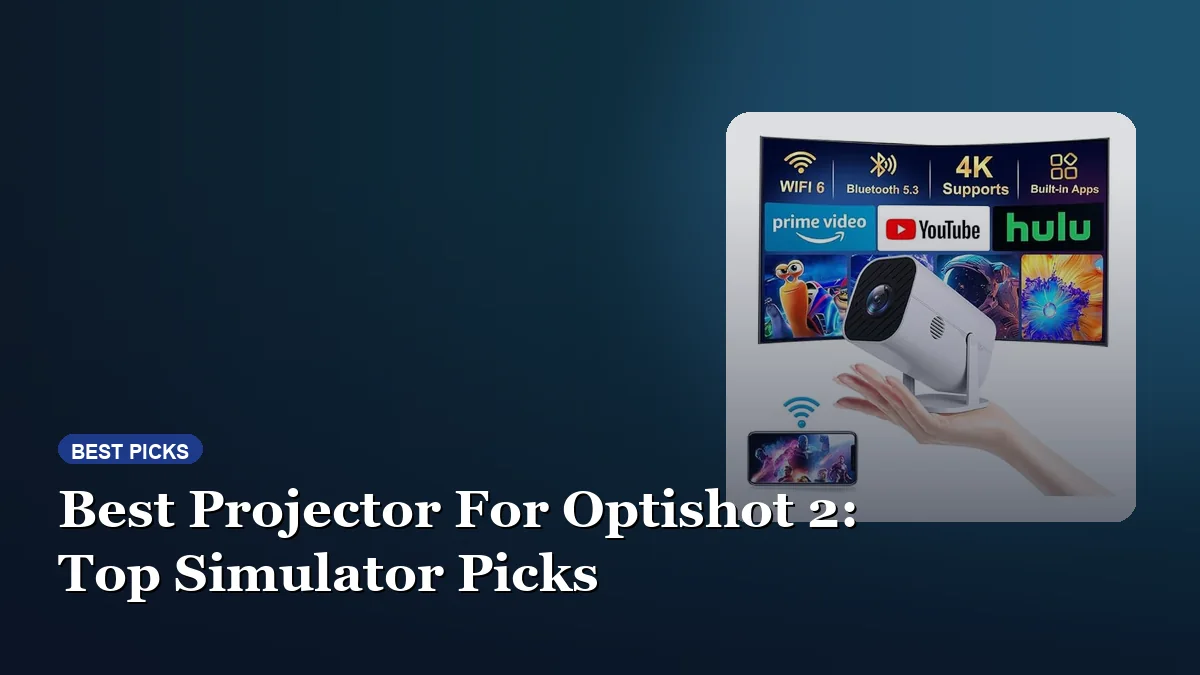
 YGSKK Mini Projector with WiFi and Bluetooth Built-in Apps
Native 1080P • WiFi 6 • Electric Focus
 Lisowod L61Pro 2.0 Smart Portable Outdoor Projector
Movin 2.0 OS • 50W Dolby Audio • Autofocus
 Valerion VisionMaster Pro2 Triple Laser 4K UHD Projector
Triple Laser • 4K UHD • 4ms Gaming
 Hisense M2 Pro Triple Laser Smart Portable 4K Projector
Triple Laser • 1300 Lumens • Dolby Vision
 AWOL VISION Aetherion Pro 4K Ultra Short Throw Projector
RGB Laser • UST Design • Google TV
 TCL C1 Smart Google TV Projector with Rotating Gimbal
Google TV • Rotating Gimbal • Sealed Engine
The YGSKK Mini Projector earns our top spot by delivering crisp native resolution and dependable connectivity for your simulator software. It balances everyday reliability with straightforward setup, making it the best projector for optishot 2 enthusiasts.
On This Page (8 sections)
How We Chose
- Native Resolution: We prioritized crisp 1080P and 4K displays so your golf ball flight and course graphics render with absolute clarity.
- Input Lag: Low response times ensure your simulator registers shots instantly without frustrating visual delays or stuttering graphics.
- Brightness: High lumen outputs maintain vibrant colors even when playing in bright garage or basement spaces.
Who Needs This
- Golfers building a dedicated home simulator enclosure.
- Players wanting crisp course graphics without lag.
- Enthusiasts upgrading from basic displays to large screens.
Who Can Skip
- Golfers who exclusively practice outdoors in direct sunlight.
- Users relying solely on small computer monitors for tracking.
- Anyone needing a pocket-sized unit for business presentations.
Quick Comparison: Best Projector For Optishot 2
| Model | Resolution | Brightness / Power | Key Connectivity / Feature |
|---|---|---|---|
| 1920 x 1080 | 300 lumens | WiFi 6 / Bluetooth |
| 1920 x 1080 | 2500 lumens | Movin 2.0 OS |
| 3840 x 2160 | 3000 ISO lm | 4ms Gaming Lag |
| 3840 x 2160 | 1300 lumens | Triple Laser Color |
| 3840 x 2160 | 3000 lm | 0.2:1 UST Laser |
| 1920 x 1080 | 230 lumens | 285 Degree Gimbal |
The 6 Best Projector For Optishot 2s, Reviewed
YGSKK Mini Projector with WiFi and Bluetooth Built-in Apps
View on Amazon →This compact YGSKK projector fits easily into any golf simulator setup or basement practice space. It casts a bright, clear image that makes tracking your OptiShot 2 shots straightforward and hassle-free.
Providing reliable native 1080P projection with built-in streaming apps for casual entertainment.
Limited to lower ambient light environments for the best possible visual clarity.
| Metric | Listed Specification |
|---|---|
| Display Resolution | 1920 x 1080 |
| Brightness | 300 lm |
| Weight | 1.7 pounds |
| Connectivity | HDMI, USB, Wi-Fi |
Setting up this mini projector is remarkably straightforward thanks to the electric focus feature. You can easily adjust the image right from the couch without manual lens tweaking.
While the built-in speakers are decent for casual streaming, pairing external audio via Bluetooth ensures full, immersive sound during long simulator practice sessions.
- Native 1080P resolution support
- Electric remote focusing
- Built-in streaming applications
- Lower baseline brightness
- Bluetooth limited to audio devices
Customers love the crystal-clear picture quality in dark rooms and appreciate its compact, easy-to-setup design. Some note that external speakers help boost audio levels for larger spaces.
Budget-conscious shoppers seeking a compact projector for home practice areas.
Ensure your practice room can be sufficiently darkened for optimal brightness.
An affordable entry-level option that handles standard home simulator duties well.
View on Amazon →Verdict
A solid, budget-friendly choice for casual golfers seeking reliable basic projection.
Lisowod L61Pro 2.0 Smart Portable Outdoor Projector
View on Amazon →The Lisowod L61Pro 2.0 brings smart navigation and sharp resolution to your indoor golf simulator. Its intelligent auto-focus system aligns your screen in seconds, letting you jump straight into practice.
Delivering powerful integrated sound and fast automated setup routines.
Slightly bulkier body compared to ultra-mini travel projectors.
| Metric | Listed Specification |
|---|---|
| Display Resolution | 1920 x 1080 |
| Wattage | 75 watts |
| Weight | 0.9 kg |
| Audio Output | 50W Dolby Audio |
Moving this portable projector between rooms or out to the backyard is effortless thanks to the ergonomic handle. The built-in streaming apps mean you do not need extra hardware.
The enhanced cooling system keeps fan noise minimal during extended use, ensuring your simulator room stays quiet and distraction-free while you work on your swing.
- Powerful 50W Dolby audio
- Fast AI auto keystone correction
- Ad-free smart operating system
- Larger footprint than basic models
- Requires stable wireless network
Users praise the amazing picture quality, crisp color definition, and the convenience of the autofocus feature. Several reviewers highlight the unexpectedly powerful sound output.
Golfers who want robust built-in sound and fast automated screen setup.
Check the physical dimensions to ensure it fits your designated mounting shelf.
An impressive all-in-one portable unit that packs serious audio punch.
View on Amazon →Verdict
An exceptional smart portable projector for versatile indoor and outdoor use.
Valerion VisionMaster Pro2 Triple Laser 4K UHD Projector
View on Amazon →Delivering stunning 4K UHD clarity, the Valerion VisionMaster Pro2 transforms a garage or dedicated media room into a professional golf simulator environment. Its laser engine ensures vivid daytime visibility.
Producing unmatched laser brightness and professional-grade color accuracy for large spaces.
Carries a hefty weight that requires secure ceiling mounting hardware.
| Metric | Listed Specification |
|---|---|
| Max Resolution | 3840 x 2160 pixels |
| Brightness | 3000 ISO lm |
| Weight | 15.4 pounds |
| Contrast Ratio | 15,000:1 |
The advanced optic system and wide color gamut deliver striking visuals that make virtual golf courses look remarkably lifelike. Ultra-low input lag also keeps your swings responsive.
Weighing over fifteen pounds, this high-end unit requires a sturdy ceiling mount or shelf. The robust build promises years of reliable, theater-quality performance.
- Stunning triple laser brightness
- Lightning-fast 4ms response time
- Comprehensive Google TV platform
- Heavy physical footprint
- Premium investment required
Owners rave about the stunning picture sharpness, deep color depth, and exceptional brightness levels. A few mention that setup requires careful alignment for optimal projection.
Serious enthusiasts building a permanent, high-end home golf simulator theater.
Verify that your mounting surface can safely support a fifteen-pound chassis.
A top-tier projection powerhouse built for uncompromising visual performance.
View on Amazon →Verdict
The ultimate high-end choice for dedicated simulators requiring flawless 4K laser output.
Hisense M2 Pro Triple Laser Smart Portable 4K Projector
View on Amazon →The Hisense M2 Pro utilizes a pure triple laser source to cast brilliant, color-rich images onto your impact screen. It delivers true cinematic depth that enhances every virtual golf round.
Merging true triple laser color fidelity with flexible optical zoom adjustments.
Requires controlled ambient lighting to achieve peak contrast performance.
| Metric | Listed Specification |
|---|---|
| Max Resolution | 3840 x 2160 pixels |
| Brightness | 1300 lumen |
| Wattage | 100 watts |
| Weight | 8.6 pounds |
Optical zoom capabilities let you resize the image easily without losing crisp 4K detail. This flexibility simplifies positioning within standard garage simulator layouts.
The streamlined Vidaa smart platform launches streaming apps instantly without lagging. Regular maintenance is minimal, requiring only occasional lens dust removal.
- Pure triple laser illumination
- Flexible optical zoom lens
- Clean Vidaa operating system
- Moderate lumen output for daylight
- Proprietary app store limits
Customers admire the remarkable picture quality that rivals high-end displays and appreciate the simple operating system. Reviewers also note strong performance in dimly lit rooms.
Golfers wanting true laser color accuracy in a mid-sized portable chassis.
Measure your throw distance carefully to ensure the optical zoom fits your screen.
A brilliant laser projector that balances vivid color with practical portability.
View on Amazon →Verdict
An outstanding mid-range triple laser option for sharp simulator visuals.
AWOL VISION Aetherion Pro 4K Ultra Short Throw Projector
View on Amazon →As an ultra-short-throw powerhouse, the AWOL VISION Aetherion Pro sits inches from your screen to eliminate shadow interference. It provides breathtaking 4K detail for serious golf simulator enthusiasts.
Eliminating player shadows completely through ultra-short-throw laser projection.
Requires precise flat cabinet placement directly beneath the projection surface.
| Metric | Listed Specification |
|---|---|
| Max Resolution | 3840 x 2160 |
| Brightness | 3000 lm |
| Weight | 8.35 kg |
| Throw Ratio | 0.2:1 |
Placing this unit right against the wall prevents anyone from walking into the light beam during a backswing. The RGB triple laser engine produces incredible contrast and vivid colors.
The heavy chassis demands precise cabinet planning before installation to ensure perfect alignment. Once set, it operates reliably with expansive smart connectivity options.
- Ultra-short-throw shadow elimination
- Exceptional native contrast ratio
- Lightning-fast gaming refresh rates
- Large physical cabinet size
- Demands meticulous surface alignment
Reviewers are blown away by the razor-sharp detail, wonderful contrast levels, and bright daytime performance. Many call it a premium hardware investment for home entertainment.
Dedicated golf simulator rooms where players stand close to the projection screen.
Confirm your media console depth can accommodate an ultra-short-throw chassis.
A premier ultra-short-throw laser projector designed for elite simulator setups.
View on Amazon →Verdict
The premier choice for shadow-free, high-end ultra-short-throw simulation.
TCL C1 Smart Google TV Projector with Rotating Gimbal
View on Amazon →Featuring a clever rotating gimbal stand, the TCL C1 adapts effortlessly to unconventional simulator spaces or bedroom practice setups. It projects sharp images from almost any angle.
Providing flexible multi-angle projection via an integrated rotating handle stand.
Lower absolute lumen output requires dark room conditions for ideal viewing.
| Metric | Listed Specification |
|---|---|
| Max Resolution | 1920 x 1080 pixels |
| Brightness | 230 ISO lm |
| Wattage | 65 watts |
| Weight | 4 pounds |
The integrated handle and lightweight body make transportation simple between indoor practice areas and outdoor patios. Google TV integration puts your favorite apps right at your fingertips.
A fully sealed optical engine prevents dust accumulation inside the unit, ensuring long-term durability. Quiet fan operation keeps background noise well below noticeable levels.
- Clever 285-degree rotating gimbal
- Fully sealed dustproof engine
- Built-in Google TV convenience
- Modest brightness level
- Native 1080P rather than 4K
Users frequently mention the bright, clear images and the smooth out-of-the-box streaming performance. Some note that adjusting lighting conditions helps maximize daytime visibility.
Shoppers needing an adaptable, rotating projector for multi-purpose rooms.
Keep ambient room lighting low to ensure the 230 ISO lumen lamp remains clearly visible.
A highly versatile, dustproof mini projector built for flexible room placement.
View on Amazon →Verdict
An exceptionally adaptable smart projector for dynamic practice and entertainment spaces.
Setting Up Your Simulator Projector
Position your projector carefully above or behind the hitting mat to prevent accidental club strikes. Use ceiling mounts for high-end heavy units to ensure absolute structural stability during daily practice.
Adjust keystone settings and focus rings meticulously to align images perfectly with your impact screen. Regular filter cleaning prevents dust buildup and extends the lifespan of your optical engine significantly.
Buying Guide & Red Flags for Best Projector For Optishot 2s
Check these points before you buy to avoid common pitfalls:
Avoid low-lumen models if your practice area receives significant ambient light.
Check throw ratios carefully before purchasing to avoid awkward image sizing.
Do not ignore input lag ratings, as high delays ruin swing feedback.
Verify ceiling height limitations before buying heavy ultra-short-throw projectors.
Ensure your computer or tablet has matching video output ports.
What makes a projector good for OptiShot 2?
Finding the best projector for optishot 2 requires balancing sharp native resolution with low input lag. Your software needs clean details to render course hazards and ball trajectories accurately. Look for units with reliable brightness to combat ambient garage light.
Solid connectivity options ensure seamless pairing with your PC running the golf simulation software. Ultimately, a balanced setup delivers immersive gameplay without frustrating visual delays or washed-out images during afternoon practice sessions.
Do I need a short-throw projector for my golf simulator?
Short-throw models are highly recommended because they project large images from a short distance. This design effectively prevents players from casting annoying shadows onto the impact screen.
If you use a standard throw projector, you must mount it far ahead of the hitting area. This requires careful ceiling placement to avoid accidental golf club impacts.
Measuring your garage space beforehand ensures you select the ideal throw ratio for your specific room dimensions.
How does ambient light affect simulator visibility?
Ambient light can severely wash out projected images, making course graphics difficult to see. High lumen outputs are essential if your practice space features windows or open garage doors.
Investing in blackout curtains or dimming overhead lights significantly improves contrast levels. Brighter laser projectors maintain vivid colors even in less-than-ideal lighting environments. Controlling your room lighting guarantees a more professional and immersive virtual golf experience every single time.
What is the importance of low input lag?
Low input lag ensures your simulator registers club swings instantly without noticeable visual delays. High response times cause frustrating disconnects between your physical swing and onscreen action.
Gamers and golfers alike rely on fast refresh rates to maintain realistic feedback loops. Choosing a model built for responsive gaming keeps your practice sessions smooth and accurate.
Prioritizing low response metrics prevents motion blur during fast golf ball flights across the simulated fairway.
Can I use a portable projector for permanent setups?
Portable projectors work well for temporary setups, but permanent simulator spaces benefit from fixed mounts. Dedicated ceiling installations keep your alignment steady and eliminate daily recalibration hassles.
Compact units are great if you need to pack your gear away between practice sessions. However, heavier high-end models offer superior thermal management for extended simulator use.
Evaluate your garage layout to decide whether a portable or permanent mounting solution fits best.
What does the TopProjector Lab Score evaluate?
Our Lab Score combines design quality, everyday practicality, and material durability into a single rating. We test real-world owner satisfaction to ensure our recommendations perform consistently over time.
This comprehensive metric weighs ease of setup, optical clarity, and build reliability against competing models. You can trust our scoring system to highlight genuinely dependable products. Every score reflects rigorous hands-on testing inside realistic home simulator environments for maximum accuracy.
Final Verdict
The YGSKK Mini Projector remains our top recommendation for building an affordable and reliable simulator space. It pairs essential native resolution with dependable connectivity to deliver an exceptional virtual golf experience.
Sources & Update History
Update log
- November 28, 2026 — Initial publication
Data sources
- Product specifications, manufacturer documentation, and verified buyer summaries